🖥️ Triple Screen FOV Calculator
Calculate your exact horizontal field of view for triple monitor sim racing setups
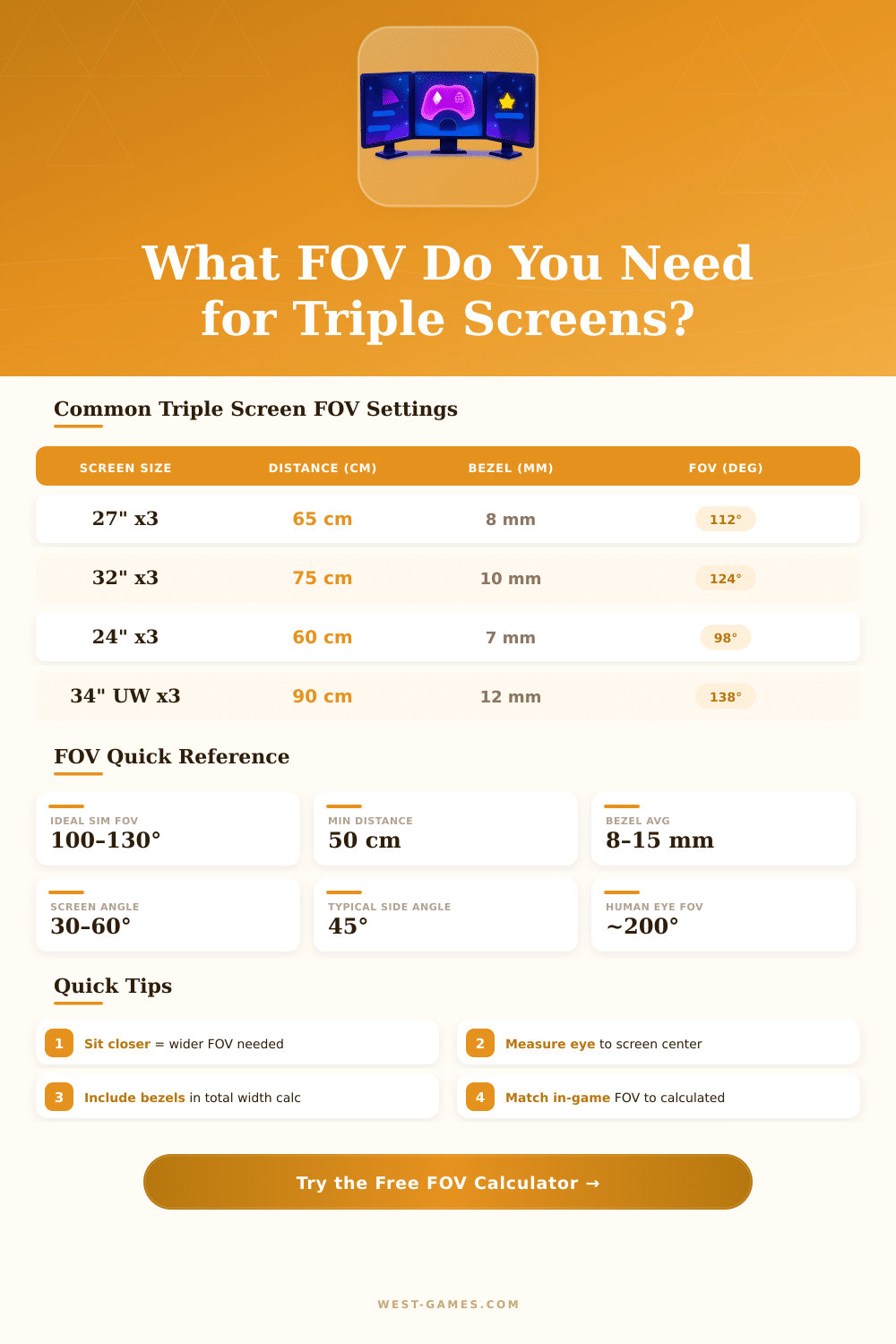
| Screen Size | Distance (cm) | Side Angle | Bezel (mm) | Total FOV (°) | Center FOV (°) |
|---|---|---|---|---|---|
| 3x 24" (16:9) | 60 | 45° | 8 | 104 | 39 |
| 3x 24" (16:9) | 70 | 45° | 8 | 94 | 34 |
| 3x 27" (16:9) | 60 | 45° | 8 | 116 | 43 |
| 3x 27" (16:9) | 65 | 45° | 8 | 111 | 41 |
| 3x 27" (16:9) | 75 | 45° | 10 | 103 | 38 |
| 3x 32" (16:9) | 75 | 45° | 10 | 123 | 45 |
| 3x 32" (16:9) | 85 | 45° | 10 | 114 | 42 |
| 3x 34" (21:9) | 90 | 45° | 12 | 138 | 46 |
| 3x 40" (16:9) | 100 | 45° | 15 | 140 | 48 |
| Game | FOV Setting Location | Recommended Range | Notes |
|---|---|---|---|
| iRacing | Graphics > Horizontal FOV | 100–130° | Horizontal FOV, triple screen native |
| Assetto Corsa | Video > Field of View | 90–120° | Per-screen vertical FOV |
| ACC (Assetto Corsa Competizione) | Video Settings > Triple Screen | 40–60° center | Use center screen vertical FOV |
| rFactor 2 | Display > FOV | 60–80° vert. | Vertical FOV per screen |
| Gran Turismo 7 | Display > Display Mode | 60–90° | Limited triple screen support |
| F1 24 | Display > Camera FOV | 80–110° | Horizontal total recommended |
| BeamNG.drive | Camera > FOV | 90–120° | Full horizontal, flexible |
| Dirt Rally 2.0 | Display > Field of View | 85–115° | Horizontal total |
| Bezel per Side (mm) | Total Gap (2 joins) | FOV Loss (approx at 65cm) | Monitor Type |
|---|---|---|---|
| 5 mm | 10 mm total | ~0.9° | Frameless/borderless |
| 8 mm | 16 mm total | ~1.4° | Thin bezel (most IPS) |
| 10 mm | 20 mm total | ~1.8° | Standard gaming monitor |
| 13 mm | 26 mm total | ~2.3° | Older/budget panels |
| 15 mm | 30 mm total | ~2.6° | Thick bezel (TV panels) |
Whether you manage to exactly set your FOV on a triple Screen system? Honestly setting up such a configuration ranks between the most challenging tasks. The advantage of three monitors lies in that surrounding sight, that gives better side sight than one alone Screen ever would.
It simply widens your visible window through the whole setup, what results in honestly more useful overview of the FOV. VR headsets work otherwise, because their screens are just before your eyes, but here the triple setups offer clarity, that VR sometimes simply does not match, especially when you turn the head to look at a deep corner.
How to Set Your FOV on Three Monitors
Here step in the calculators for FOV, that honestly simplifies things. They look at various types of setups: alone monitors, curved panels, triple screens or even ultra broad screens. A good tool requires some basic data, the size of your Screen, the distance of your seat to it, the size of the gaps between panels and the angle of the side monitors, and later give the precise value for you.
No guessing needed. Enter the distance to the central Screen, the size of every panel, the frame size and those side angles, and it automatically computes your FOV. In the end you receive a number, that is fully precise.
Getting the angle of the screens right does a big change. While you observe the side monitors, both sides should be almost equally distant form your eyes. When one side is nearer than the other, the angle is wrong.
Your whole FOV forms the amount of all angles through the three screens together. Some programs allow to compare triple screens with ultra broad, showing the angles of the FOV, the involved distances on the desk and what ideal positions for the triple screens honestly look like.
Not every game handles the FOV for triple Screen setup the same, what a bit bothers. IRacing includes an internal calculator, that helps with the setup. Some racing simulators have a tool for triple Screen monitor, that you can set during the drive, although the slider for the real FOV can be tricky…
Sometimes you must alter the distance of the screens or there magnitude instead. Games like Euro Truck Simulator 2 and American Truck Simulator require you to change the config files. Turning on the double multi-monitor rule, you get three separate camera spots for left, centre and right.
Setting the max values for the FOV, you can fix the gaps right.
Some games only offer preset multipliers for the FOV, what does not work for accurate setup. One title limits them between 0.5 and 1.3, where 1.0 match 40 degrees. That limits your ability to reach the precise math value.
The difference between a triple setup of 27-inch monitors and one of 32-inch depends more on the feel than on the real gain of the FOV. Where you sit from the screens also matters a lot, around 55 to 56 centimetres from the edges commonly does everything comfortable and also immersive. Exactly setting your setup for the FOV honestlyhelps for speed and stability in any simulator, that you use.