🖧 Game Server Bandwidth Calculator
Estimate dedicated server upload, download, total throughput, monthly transfer, packet overhead, voice traffic, mod sync, tick-rate load, and spare headroom for multiplayer hosting.
| Item | Formula | What it estimates | Planning note |
|---|---|---|---|
| Direct per-client traffic | kbps entered x players | Server upload and download from known per-client rates | Best when a game or host publishes average client bandwidth. |
| Packet-mode traffic | (payload bytes + overhead bytes) x tick rate x packets x 8 / 1000 | kbps per player before burst and voice | Useful for custom engines, private telemetry, or measured packet captures. |
| Server upload | downstream per client x players | Outbound server traffic to all clients | This is usually the home-hosting bottleneck. |
| Server download | upstream per client x players | Inbound server traffic from all clients | Usually smaller, but voice relay can raise it. |
| Monthly transfer | Mbps x 0.45 x active hours x days | Decimal GB transferred over the selected month | Uses both inbound and outbound sustained traffic plus mod averages. |
| Overhead model | Bytes per packet | Included headers | When to use it |
|---|---|---|---|
| IPv4 UDP + Ethernet | 46 bytes | 20 byte IPv4, 8 byte UDP, 18 byte Ethernet frame overhead | Common baseline for UDP game packets on wired LAN and internet paths. |
| IPv6 UDP + Ethernet | 66 bytes | 40 byte IPv6, 8 byte UDP, 18 byte Ethernet frame overhead | Use for IPv6 servers or dual-stack hosts where IPv6 is preferred. |
| IPv4 TCP + Ethernet | 58 bytes | 20 byte IPv4, 20 byte TCP, 18 byte Ethernet frame overhead | Useful for TCP-based login, query, mod, or control streams. |
| VPN tunnel estimate | 82 bytes | IPv4 UDP baseline plus tunnel allowance | Use when players connect through a VPN overlay or encrypted tunnel. |
| Custom | User value | Your own packet capture or provider guidance | Best for measured servers, unusual encapsulation, or extra tags. |
| Server type | Typical players | Tick range | Per-client downstream |
|---|---|---|---|
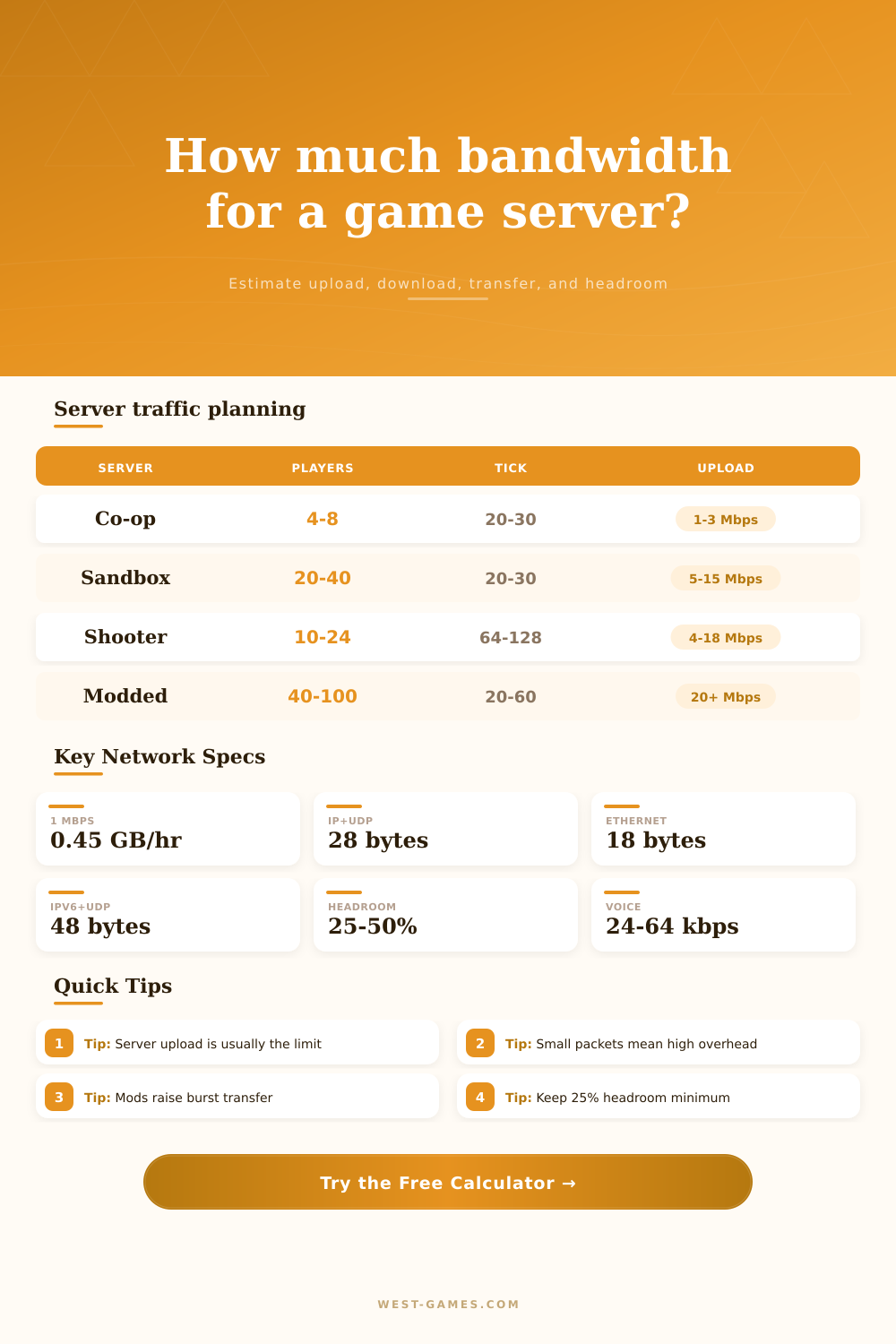
| Small co-op survival | 4 to 8 | 20 to 30 Hz | 60 to 120 kbps for modest world updates and few entities. |
| Block or voxel sandbox | 10 to 40 | 20 Hz | 80 to 220 kbps depending on view distance, chunks, and mods. |
| Competitive shooter | 10 to 24 | 64 to 128 Hz | 250 to 900 kbps depending on snapshots, spectators, and rate limits. |
| Open world sandbox | 50 to 150 | 20 to 60 Hz | 180 to 500 kbps with spikes around bases, vehicles, and combat. |
| Sim racing league | 16 to 40 | 30 to 60 Hz | 160 to 350 kbps as position and contact updates rise with cars. |
You’re not alone: there’s a certain type of panic that sets in when your internet begins to buffer at home mid-competitive match. It doesn’t help that your router probably isn’t actualy the problem, either. This is what happens when your gaming rig upstairs start fighting for bandwidth with all the other devices in your home. You suddenly realize that running a game server is different than actually playing one.
Most folks assume their connection can handle 4K video streaming so it can definitely host a twenty-player shooter. Wrong, almost always. Streaming requires downstream bandwidth; hosting require huge amounts of upstream capacity. Since most residential internet plans are asymmetric, your connection’s upload speed is typically the limiting factor, not its download.
How to Calculate Your Server Bandwidth Needs
And that makes a difference because you should of have some idea of how much data the server needs to push out to each connected player at any given moment. You could guess at how much protocol overhead there is, what size packets are being sent back and forth, but thankfully this page has a calculator that does it for you when you specify your tick rate and player count.
It breaks down the traffic flow nicely too: you’ll notice that by default, server upload is usually your bottleneck. This is because each client need the server to send it the latest world changes, entity position updates, and any other state updates. That means if you’re hosting a game with 20 players, then each tick, the server needs to make 20 copies of all that data and send them off to each client.
Each of those cycles contains data. And it adds up fast, especially since the game might be running at sixty ticks a second. So that’s a thousand cycles of sending that update data across the wire each second.
To compensate for that, the tool offers both direct kilobit per second calculations as well as a more detailed packet mode which calculates bytes per tick. If you have an idea of what the payload size from your game engine will be, packet mode makes sense. But if you’re just doing some general planning based off community benchmark numbers, the direct mode is good to go.
A common mistake in any bandwidth budget is the tick rate. Increasing tick rate increases responsiveness and smoothness in-game, but it also scales the number of packets being sent each second. If your payload size stays the same, then doubling the tick rate also doubles the packet count.
Developers will drive tick rates up to one hundred twenty-eight hertz in their shooters to catch every millisecond of action. That means far more bandwidth than a slower paced sandbox game where the world updates at lower frequencies. The table on the page shows that a competitive shooter needs much less upload speed then a cooperative survival game with fewer things to track.
It’s time to pick your poison: stable connections for maximum players or ultra-low latency?
The other thing that people tend to ignore until it bites them is protocol overhead. Everything that transits over the internet have headers on its data packets that say where this packet originated and where it’s going. For example, UDP packets (IPv4) have roughly 46 bytes of overhead. That 46 bytes of overhead already includes Ethernet framing. IPv6 introduces even more bytes.
So if you’re sending lots of little packets constantly, that overhead starts to add up pretty quickly as a percentage of overall traffic. You can turn those protocols off/on with the tool so you can find out what additional capacity you need to route things properly.
One feature we include is voice chat. That will be a surprise to some hosts. That traffic can go through the roof compared to a solution that passes voice through an external service. Also, if your server relays voice data to all listeners, the traffic spikes dramatically compared to a system where voice is handled by a separate external service. This solution sends only one copy of voice audio across the network.
The final piece here is mod sync. When someone joins a server or updates their mod pack, there’s a huge burst of traffic that occurs for large mod packs, but it doesn’t keep going forever. However, those bursts can overwhelm a connection while in steady state gameplay.
The key difference between a laggy and stable server is planning for headroom. Don’t make the mistake of sizing your server connection to your theoretical maximum usage. Unpredictable traffic spikes, background updates, and network congestion will happen. To account for all of this, add twenty-five to fifty percent headroom so the server can accommodate vehicle clusters and combat bursts without dropping packets.
This margin is specified in the calculator, and gives you an idea of how much realistic headroom you have on your sustained upload speed. It’s also used to estimate your monthly transfer, which helps you select a hosting plan that doesn’t penalize you with overage fees.
A modded sandbox server with forty players can easily push past five or ten megabits per second during peak activity, especially if you use a residential ISP that caps upload speeds. Avoiding these mistakes with expensive hardware or hosting commitments is important. Knowing the exact numbers upfront saves you from costly mistakes down the road.
But there’s no unlimited bandwidth, nor is there any limitless patience on either end. Having an idea about where data flows between client and server will let you create a functioning network. It’s all about figuring out which direction the data flows and what it is.
When you get a clear picture of the numbers, then the panic ends and the planning begins. No more guesswork, just configuration with full knowledge of how much room you have before the connection breaks.