⚡ PSU Wattage Headroom Calculator
Estimate sustained power, transient spike demand, recommended PSU wattage, efficiency curve position, and 12V rail margin for gaming PCs, streaming rigs, and workstation builds.
How hard the recommended PSU works during sustained gaming or rendering.
Estimated power at the wall after the selected efficiency tier.
Checks GPU board power against the selected cable allowance.
Remaining wattage before reaching the preferred sustained load target.
| GPU class | TBP range | Spike add | PSU note |
|---|---|---|---|
| Entry GPU | 75-150 W | 15-25% | Usually easy to size |
| Mid-range GPU | 180-260 W | 25-40% | Leave cable margin |
| High-end GPU | 300-450 W | 40-70% | ATX 3.x preferred |
| OC flagship | 450 W+ | 60-100% | Use large headroom |
| Part | Typical W | 12V share | Notes |
|---|---|---|---|
| DDR5 DIMM | 3-6 W | Low | OC kits use more |
| NVMe SSD | 5-10 W | Medium | Heavy writes peak |
| 3.5 inch HDD | 6-12 W | High | Spin-up matters |
| 120 mm fan | 1-4 W | High | RGB adds load |
| AIO pump | 6-18 W | High | Set exact if known |
| Tier | 20% load | 50% load | 100% load |
|---|---|---|---|
| Bronze | 82% | 85% | 82% |
| Gold | 87% | 90% | 87% |
| Platinum | 90% | 92% | 89% |
| Titanium | 92% | 94% | 90% |
| PSU class | Best fit | Gaming load | Upgrade room |
|---|---|---|---|
| 450-550 W | APU / entry GPU | 200-330 W | Limited |
| 650-750 W | 1080p / 1440p | 350-500 W | Moderate |
| 850-1000 W | High-end GPU | 500-700 W | Strong |
| 1200-1600 W | Flagship / dual GPU | 750 W+ | Large |
| Label rating | 12V watts | Useful for | Margin check |
|---|---|---|---|
| 45 A | 540 W | Budget GPU builds | Good below 430 W 12V load |
| 62 A | 744 W | 650-750 W PSUs | Good below 595 W 12V load |
| 83 A | 996 W | 850-1000 W PSUs | Good below 795 W 12V load |
| 100 A | 1200 W | Flagship systems | Good below 960 W 12V load |
It’s been weeks. You spent weeks researching processors and graphics cards for your new build. You spent weeks measuring clearances inside your case. You spent weeks debating RGB aesthetics until your eyes was burning out of their sockets.
And then there it sits: your power supply unit. It stares back at you with its own silent judgment, leaving a sudden cold wash of anxiety spreading across your stomach.
How to Choose the Right Power Supply
That’s not uncommon; the answer isn’t nearly as simple than a single large number printed onto the unit itself. Your PSU’s wattage rating only tells you how many watts it’s capable of outputting before hitting thermal shutdown. It doesn’t tell you anything about the millisecond-long power spikes it needs to withstand from moddern silicon. It completely ignores how efficiently the components are powered and how much heat they will put out. More importantly, it ignores what that will do to your electricity bill after three years of use.
Once you plug in exactly what you’re trying to power, the calculator above will crunch numbers for you, saving you from having to guess on rail margins and transient coefficients.
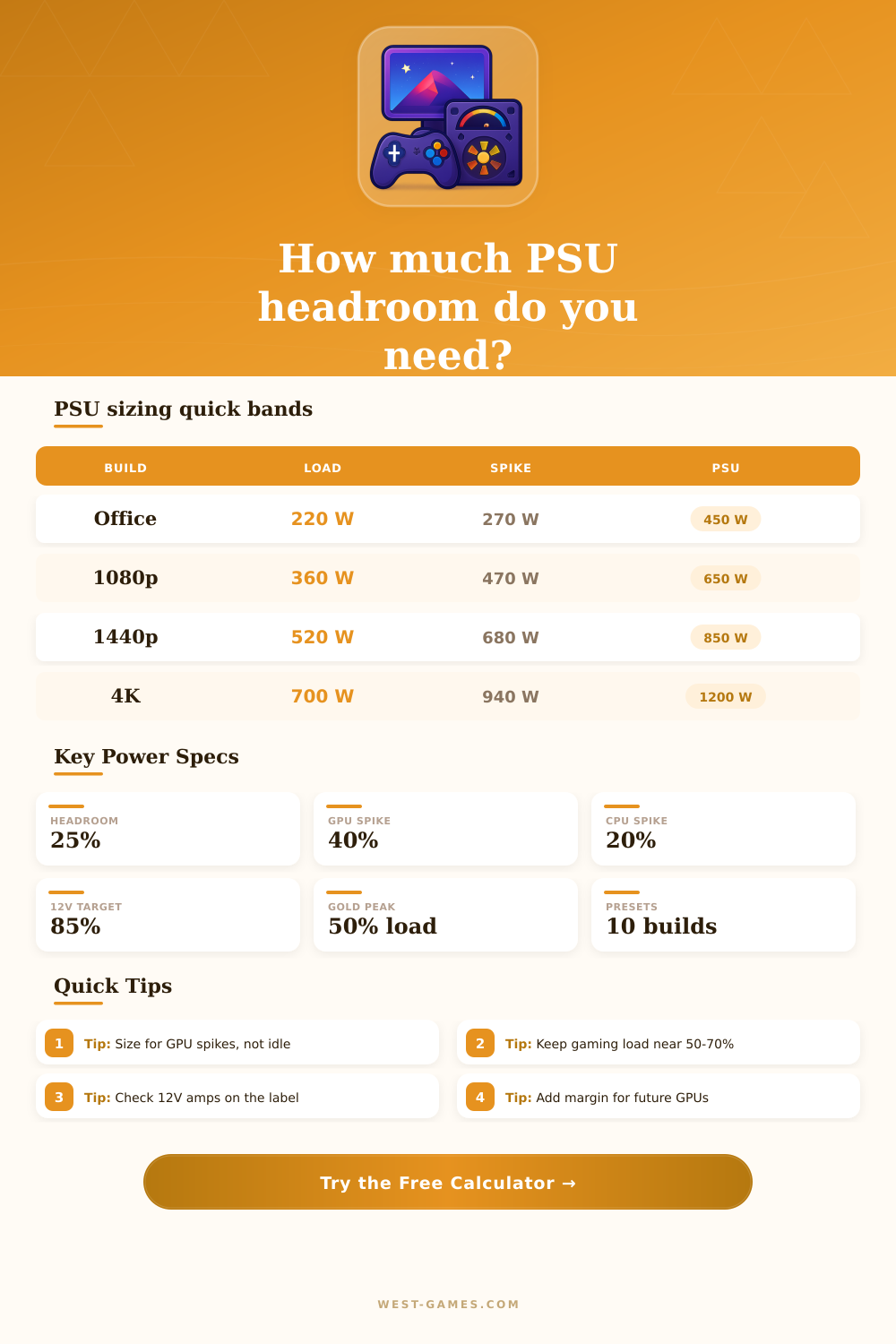
Now what? So you look at sustained power draw and find that a high end graphics card lists as having a three hundred watt board power rating. Sounds like it will fit into an eight hundred watt unit. The problem is, that card could easily spike way beyond its average rating under heavy gaming conditions due to rapid load changes and voltage drops. In fact, some cards has brief bursts of forty or even sixty percent more than their stated consumption. These occur over a few millisecond periods.
Older power supplies read these as fault conditions and would of turned off immediately. Modern units with moddern hold up times can handle the blow. Enter those spike percentages into the tool and see if the unit you’re considering has enough headroom to weather the storm without shutting itself down.
This is the part that most people miss when relying on generic wattage chart. A power supply isn’t a passive block. It’s an active converter, transforming wall current into clean DC voltage for your parts. This generates waste heat. A good power supply is efficient but is most efficient at about half of its output. If you run a large system on a massive power supply at ten percent load, efficiency tanks and the unit has to work harder to maintain stability. Efficiency will tank otherwise and the power supply will have to work harder to maintain stability.
Likewise, if you have a little system with a tiny power supply, you are going to be running it near 90% load and working near its limit. That power supply is pushing hard and running hot. The calculator takes in what you select for each tier and tries to estimate where that puts your build along that curve. Where you want to be is dead center, quiet and cool while converting efficienty.
Don’t overlook the rail capacity on 12 volts. That’s where your GPU and CPU run just about exclusively. You may have a power supply rated at a zillion watts, but if it’s mostly getting there through three or five volt rails devoted to drives and fans, forget it. Examine the twelve volt line’s amperage rating. Those amps multiplied by twelve equals your available power in actual terms for your heavy lifters. If combined demands of CPU and GPU exceed what that rail will support, then all those other watts don’t mean squat. The page has some handy reference tables which spell it out well, with amp ratings turned into hard limits on real-world usage.
Consider the future, too. Maybe you assemble a system today around one particular graphics card. In two or three years, though, you’ll probably want something different. These days, newer cards tend to be more powerful, but less efficient, sometimes. The extra thirty percent of headroom that you add now ensures you won’t need to replace your power supply later. It prevents it from running at its loudest when you’re really gaming hard. And it ensures there’s space for other component like additional fans, liquid cooling pumps, or storage drives, without having to do a complete rebuild. Rarely ever does a “sized-up” system turn out to be a bad thing, unless you’re putting together an office PC that will never, ever change.
Using a power supply is about confidence. Are you confident that your system can last through a gaming session? Don’t fret. Understanding what a transient spike is versus a sustained draw, and knowing when to trust your efficiency curve instead of looking at the highest-wattage label, removes all guesswork from the equation. This isn’t simply purchasing a box with cables; this is setting the foundation for everything else in your build. When you have a good power supply, you won’t even think twice about it; exactly how it should be.