🖱 Polling Rate Latency Calculator
Estimate USB and mouse polling interval, click scan delay, debounce, display refresh interaction, frame timing, and CPU overhead for esports settings.
Useful for Bluetooth or battery saving. It can span more than one frame at 144 Hz and higher.
Standard gaming baseline. Usually the best compatibility setting for mixed games and launchers.
Strong high-refresh setting with lower overhead than 8K on many systems.
Smallest poll gap, best paired with 240 Hz to 540 Hz displays and stable CPU headroom.
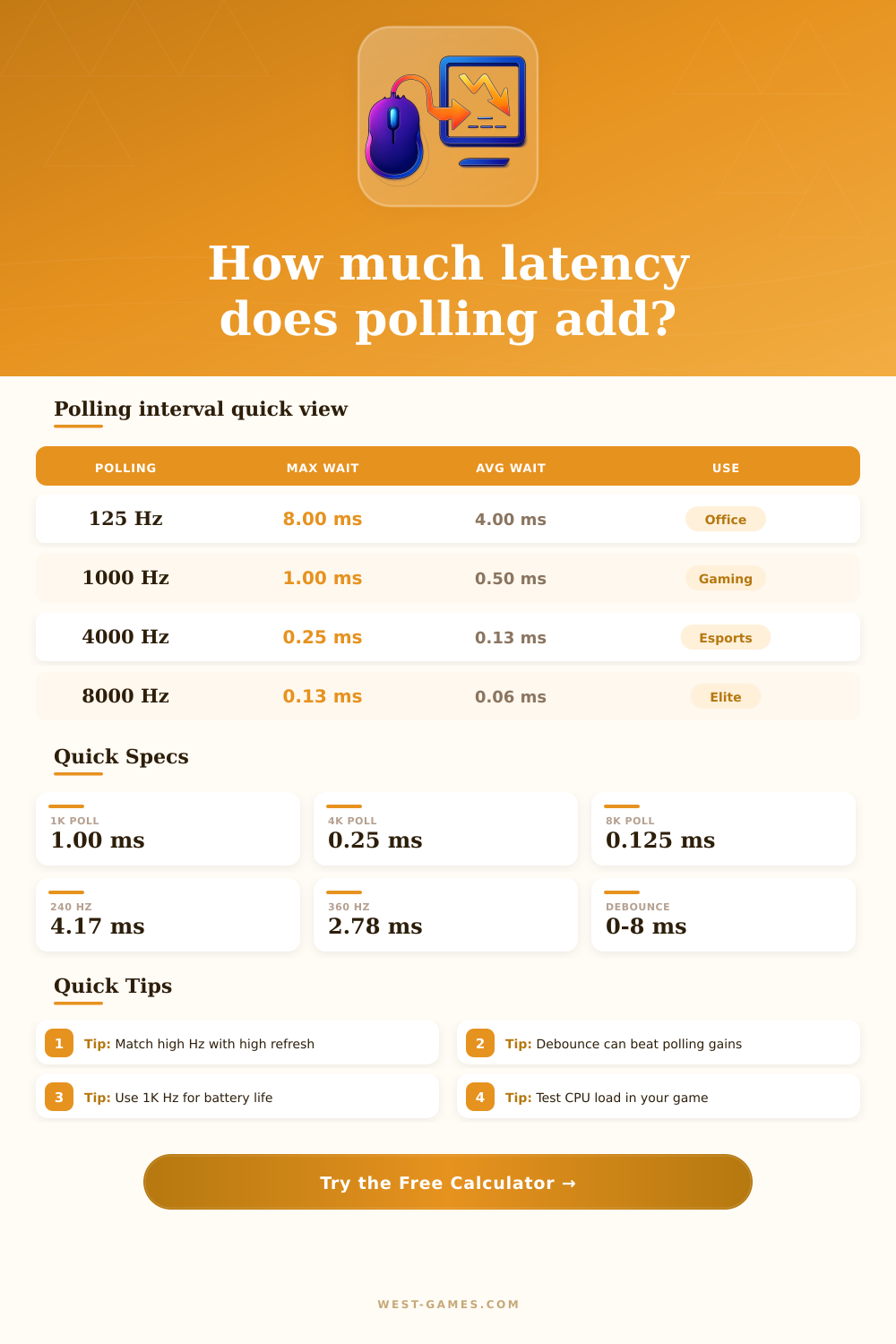
| Polling rate | Interval | Average wait | Common use |
|---|---|---|---|
| 125 Hz | 8.000 ms | 4.000 ms | Bluetooth, office, maximum battery life. |
| 500 Hz | 2.000 ms | 1.000 ms | Older competitive mice and low overhead gaming. |
| 1000 Hz | 1.000 ms | 0.500 ms | Default gaming USB or 2.4 GHz wireless baseline. |
| 2000 Hz | 0.500 ms | 0.250 ms | Middle step for smoother tracking with modest overhead. |
| 4000 Hz | 0.250 ms | 0.125 ms | High-refresh esports setting on many 4K wireless receivers. |
| 8000 Hz | 0.125 ms | 0.063 ms | Top-tier wired or wireless polling when game and CPU support it. |
| Refresh | Frame time | 1K reports | 8K reports |
|---|---|---|---|
| 60 Hz | 16.67 ms | 16.7 reports/frame | 133.3 reports/frame |
| 144 Hz | 6.94 ms | 6.9 reports/frame | 55.6 reports/frame |
| 240 Hz | 4.17 ms | 4.2 reports/frame | 33.3 reports/frame |
| 360 Hz | 2.78 ms | 2.8 reports/frame | 22.2 reports/frame |
| 500 Hz | 2.00 ms | 2.0 reports/frame | 40.0 reports/frame |
| 540 Hz | 1.85 ms | 1.9 reports/frame | 14.8 reports/frame |
| Device | Preset max | Connection | Calculator note |
|---|---|---|---|
| Razer Viper V3 Pro | 8000 Hz | 2.4 GHz dongle | Use the bundled HyperPolling receiver for 8K mode. |
| Logitech G PRO X Superlight 2 | 8000 Hz | LIGHTSPEED | Firmware and receiver mode must support the high report rate. |
| Razer DeathAdder V3 | 8000 Hz | Wired USB | Good wired baseline for 8K testing without wireless battery limits. |
| ASUS ROG Harpe II Ace | 8000 Hz | SpeedNova 8K | High-end wireless profile for very high refresh monitors. |
| ZOWIE U2-DW | 4000 Hz | 2.4 GHz receiver | 4K setting with enhanced receiver and esports shape focus. |
| SteelSeries Rival 3 Wireless | 1000 Hz | 2.4 GHz | Standard 1 ms gaming wireless profile. |
| Logitech G502 X Lightspeed | 1000 Hz | LIGHTSPEED | Feature-heavy wireless mouse with 1K report baseline. |
| Razer Basilisk V3 | 1000 Hz | Wired USB | Typical wired gaming setting for broad compatibility. |
| Component | Typical range | Latency impact | Planning note |
|---|---|---|---|
| Click scan | 0.1-1.0 ms | Before next report | Firmware scan speed matters most for button presses. |
| Optical debounce | 0-1.0 ms | Small or none | Often faster because the switch has less bounce filtering. |
| Mechanical debounce | 2-8 ms | Can dominate | A safe debounce value can erase the difference between 1K and 8K. |
| Motion sync | 0-0.5 ms | Consistency trade | May align samples to USB timing for smoother tracking. |
| Wireless path | 0.1-1.5 ms | Receiver dependent | Keep the receiver close and avoid congested USB hubs. |
| Bluetooth path | 4-12 ms | Large | Better for battery than fast competitive input. |
| Setup | Polling target | Display target | CPU overhead | Best fit |
|---|---|---|---|---|
| Casual laptop or handheld | 500-1000 Hz | 60-144 Hz | Low | Battery stability, controller-style games, browser play. |
| Mainstream gaming desktop | 1000-2000 Hz | 144-240 Hz | Low to medium | Most shooters, action games, RPGs, and mixed desktop use. |
| Competitive 240 Hz setup | 2000-4000 Hz | 240 Hz | Medium | Low-latency tracking without the full 8K processing load. |
| 360 Hz or 540 Hz esports | 4000-8000 Hz | 360-540 Hz | Medium to high | Aim trainers, tactical FPS, and systems with stable frame pacing. |
| CPU-bound streaming setup | 1000-2000 Hz | 144-240 Hz | Controlled | Keep frame time consistent before chasing the smallest poll interval. |
In a competitive shooter you see an enemy poke out from behind cover. Your mouse clicks. Your finger move. The mouse registered it. It sent that information through the USB cable. It goes through your CPU to be shown on you screen. That all take place in milliseconds, but in that moment it feels like forever. The shot goes wide.
And then you start thinking about polling rate. It’s technical. Sounds good. A higher number mean there will be less wait time before your data reaches the computer. It seems simple, right? It’s not. The truth is murkier. There isn’t just one number for latency. It’s a stack of delays, with each delay contributing its own weight to the lag between your thoughts and what appear on screen.
Why Your Mouse Speed Might Not Help You Win
If you have more specifics about your set-up then you can plug them into the calculator at the top and let it do the maths for you. Aside from checking-in with the PC on a regular basis, there are other things to consider, too. Your mouse’s actual frame rate (in-game), your monitor’s refresh rate, your switch’s debounce time; all these goes into equation.
To give you an idea of what I’m talking about here: debounce is this small delay added to mechanical switches to stop them from registering a double-click when you depress the button. A long debounce might add a few milliseconds to your overall response time. This is enough to totally cancel out difference between using a mouse at eight thousand hertz or one thousand. We’re chasing high polling rates while blindly ignoring the fact our mouse hardware itself is blocking the signal on its way out of the unit.
That said, most setups fail because their input device don’t align with their monitor. For example: if you have a high polling rate, it’s irrelevant unless your monitor can actualy display those fast inputs. On a sixty hertz screen, for instance, each frame take approximately sixteen milliseconds. Increasing your mouse reporting speed won’t make that frame any quicker. Your mouse could be sending position information every point one hundred and twenty five milliseconds, but your screen isn’t going to paint another image until the next refresh cycle anyway. The reference table on this page compares report frequency with common refresh rates to make that clear. It illustrates why throwing race car tires on a minivan, i.e., pairing an eight thousand hertz mouse with a low end display, isn’t really worth it. You’re spending money on speed that has no place to go.
But that’s not all, there’s also the issue of system stability at higher speeds. The higher you crank up the polling rate, the more interrupts your CPU must processes per second. One thousand hertz mean your computer receives one report per millisecond. Eight thousand means it processes thirty two times as much. That additional load doesn’t show itself on a powerful desktop with lots of headroom. But on a laptop on battery power or an older system, all those constant interrupts can result in frame pacing issues.
Frame pacing refers to how consistently frames gets sent to the screen. Sometimes a stuttery game feel worse than something that’s just a little bit slower. You could give yourself half a millisecond of input latency but take away ten milliseconds of inconsistent rendering times. For most people, that isn’t a tradeoff they’re willing to make.
Old is new: The days of using old ways are gone; wireless technology has changed the game…quite literally. Lag was noticeable with early wireless mice due to both power saving modes and transmission delays. Nowadays, proprietary dongles use high frequency radios which allow them to keep up with wired speed levels. Enabling hyper polling modes decreases your battery life at the cost of performance; it’s either squeeze out every last fraction of a millisecond or play longer on a single charge.
That’s why most wireless mice gives you several polling profiles. A balanced setting will help your battery last longer. It will also keep a stable connection without losing too much performance. All this adds up, though, eventually, as with all things, we hit diminishing returns after a thousand hertz.
One hundred twenty-five to a thousand is such a huge difference. It shifts the experience of the input itself. A slow office machine becomes a responsive gaming peripheral. Past that point? Microscopic gain. Yes, those gains exist, but at a cost. You have to pay for the hardware. Then get software drivers to match. And a fast-enough monitor to render what’s happening on screen.
Before jumping to conclusions about the polling rate, try adjusting your practice routine, or maybe even your sensitivity settings if your aim is off. Ultimately, the tool highlights where our real bottlenecks lies. It reminds us that latency isn’t a single link in a chain, but rather a chain in its own right. Making parts that are already strong even stronger does nothing, but fixing a single weak link changes everything.