⚡ PSU Efficiency Loss Calculator
Estimate DC load percentage, 80 Plus efficiency, AC wall draw, heat loss, and PSU headroom for gaming PCs, workstations, streaming rigs, and compact builds.
| 80 Plus tier | 115V at 10% | 115V at 20% | 115V at 50% | 115V at 100% | 230V EU at 20/50/100% |
|---|---|---|---|---|---|
| Standard | Not rated | 80% | 80% | 80% | 82% / 85% / 82% |
| Bronze | Not rated | 82% | 85% | 82% | 85% / 88% / 85% |
| Silver | Not rated | 85% | 88% | 85% | 87% / 90% / 87% |
| Gold | Not rated | 87% | 90% | 87% | 90% / 92% / 89% |
| Platinum | Not rated | 90% | 92% | 89% | 92% / 94% / 90% |
| Titanium | 90% | 92% | 94% | 90% | 94% / 96% / 91%, plus 90% at 10% |
| Ruby | Data center only | Reference | Reference | Reference | Redundant category reference: 90% / 91% / 95% / 96.5% / 92% from 5% to 100% |
| Component | Power value | Spec label | Planning note |
|---|---|---|---|
| NVIDIA GeForce RTX 4090 Founders Edition | 450W | Total Graphics Power | NVIDIA lists 850W required system power for the FE reference system. |
| NVIDIA GeForce RTX 4080 Super | 320W | Total Graphics Power | Good 4K profile; add board-vendor and CPU margin. |
| NVIDIA GeForce RTX 4070 Super | 220W | Total Graphics Power | Often lands near a comfortable 650W to 750W PSU class. |
| AMD Ryzen 9 7950X | 170W | Default TDP | Use measured package power if PBO or motherboard limits change it. |
| Intel Core i9-14900K | 125W / 253W | Base / Maximum Turbo Power | Turbo power is better for sustained heavy render or stress-test planning. |
| Board, memory, storage, cooling, USB | 150W | Formula overhead | Prompt-required headroom basis before the margin multiplier. |
| Metric | Formula | Good range | What it means |
|---|---|---|---|
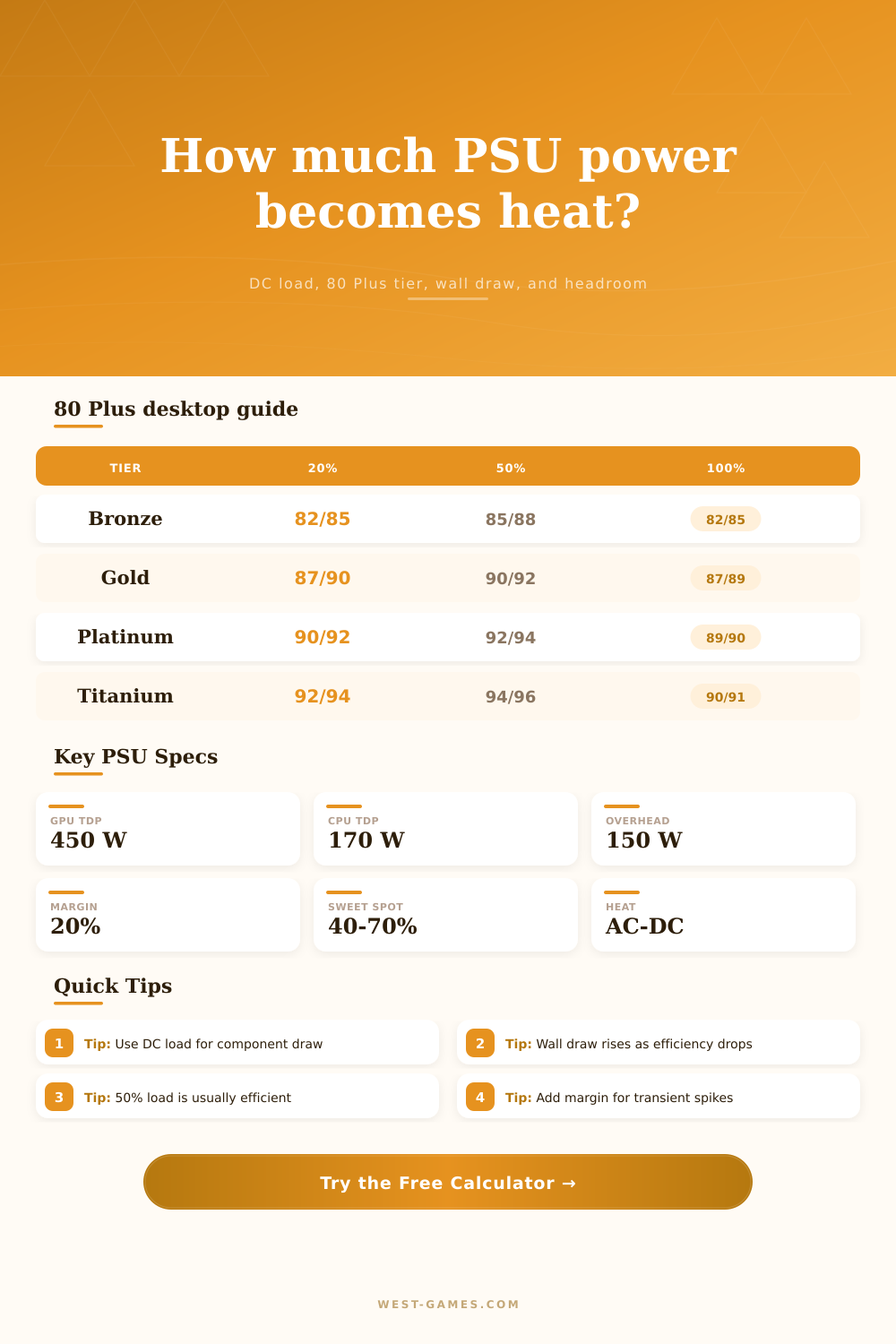
| DC load percent | DC load / PSU watts | 40% to 70% | Most desktop PSUs are near their strongest efficiency zone around the mid load range. |
| AC wall draw | DC load / efficiency | Lower is better | This is what a wall meter sees before any battery backup or power strip losses. |
| Heat loss | AC watts - DC watts | Lower is cooler | Every lost watt becomes heat around the PSU and case exhaust. |
| Headroom target | (GPU + CPU + 150W) x margin | At or below PSU | Uses the required GPU TDP + CPU TDP + 150W + 20% default margin approach. |
| Heat rate | Loss watts x 3.412 | BTU/hr | Useful when comparing room heat from different PSU tiers or load levels. |
For example, you spend on a high-performance graphics card, but how much energy is lost when it generates that heat? We don’t think about our power supply’s efficiency until we notice fans are spinning too loudly or the electricity bill has gone up. This calculator will calculate this for you if you put in the efficiency level and the draw of each component (you won’t have to guess how much loss there is).
A power supply’s efficiency isn’t some static figure; it’s a curve that varies with the load it carries. For instance, it might be great at 50 percent load, but then tank at ten percent and one-hundred percent loads. So while it’s tempting to buy the biggest one you can get, it’s better to match your unit with what you actualy use it for. Running an over-the-top system on a massive power supply rated for maybe twenty percent max load mean you are working where it is least efficient. This is another common mistake.
How to Save Power with Your Computer
Splitting out theory from actual draw comes from the input fields. Here, you enter your processor’s thermal design power (TDP) as well as your graphics card TDP. Then you include additional overheads for cooling, drives, and memory.
Why does this matter? Very few games max out both graphics and CPU at the exact same moment. By adjusting your active load percentage, the calculator accounts for the fact that you don’t run your CPU and GPU at full capacity every single second. If you can reduce your active load percentage (which typically puts you more in line with where efficiency peaks), you’ll use less wasted heat.
Inefficiency causes heat. Every watt of electricity that doesn’t get delivered directly to your components is converted to heat within your computer’s case. That means reduced lifespan and louder noise. A 50-watt inefficient power supply will cause the system’s case fans to spin more in order to keep the internal temperature cool. Multiply that wasted power over a four-hour gaming session, those extra watts becomes noticeable heat.
With the tool, that waste is expressed in BTU/hour (thermal) and watt-hour, allowing you to see how much thermal impact you’re creating in your room. It is a small detail but a big deal for comfort.
How do you pick the correct 80 Plus tier? It’s an up-front cost vs. It is a down-the-road savings question. Gold and Platinum tiers costs more initially but draw less power from the wall at common load levels.
For example, here are the certification minimums by tier: As you can see, there’s no one size fits all answer: The 80 Plus efficiency rating ranges depending on input (115 or 230 volts). Generally, if you have 230V power where you live, the unit will be more efficient throughout. This voltage thing is a big hidden variable when it comes to choosing power.
You also need to consider headroom. The calculator suggests appropriate size for a power supply taking into account how much your components will draw along with some safety margin to protect from those pesky transient power spikes that cause cheaper supplies to trip out. A common rule of thumb is to add 20% headroom, though you can tweak this in the tool depending on what your tolerance for risk is. A larger margin means you are running further below capacity which tends to decrease noise and improve efficiency. It’s an exercise in balancing energy waste, noise, and cost.
However, reality also matters. Efficiency can get worse as units age and are subjected to dusty environments. There’s an adjustment option for the conditions on the curves, which allows you to factor in something like an older unit or a warmer case. It recognizes that the certification rating, the best case scenario, even when it’s certified (happens under ideal lab conditions). You don’t live in a lab. So, this adjusts based off those factors, allowing you to get a better understanding of how much energy you’re actualy consuming.
Efficiency in power supplies is all about control, controlling not just where your power is going but also keeping it from heating up the air around your desktop. You want the power to go to wherever you direct it rather than into heating up the air around your desk. Tweaking those inputs and seeing what happens allows you to get the balance right between being cool, quiet, and cost-effective with your system. Knowing exactly where that energy is going is far preferable to wondering why the room is feeling hot when you’re playing games.