🖥 Aspect Ratio Calculator
Gaming monitor & screen aspect ratio — find width, height, pixels & ratio match
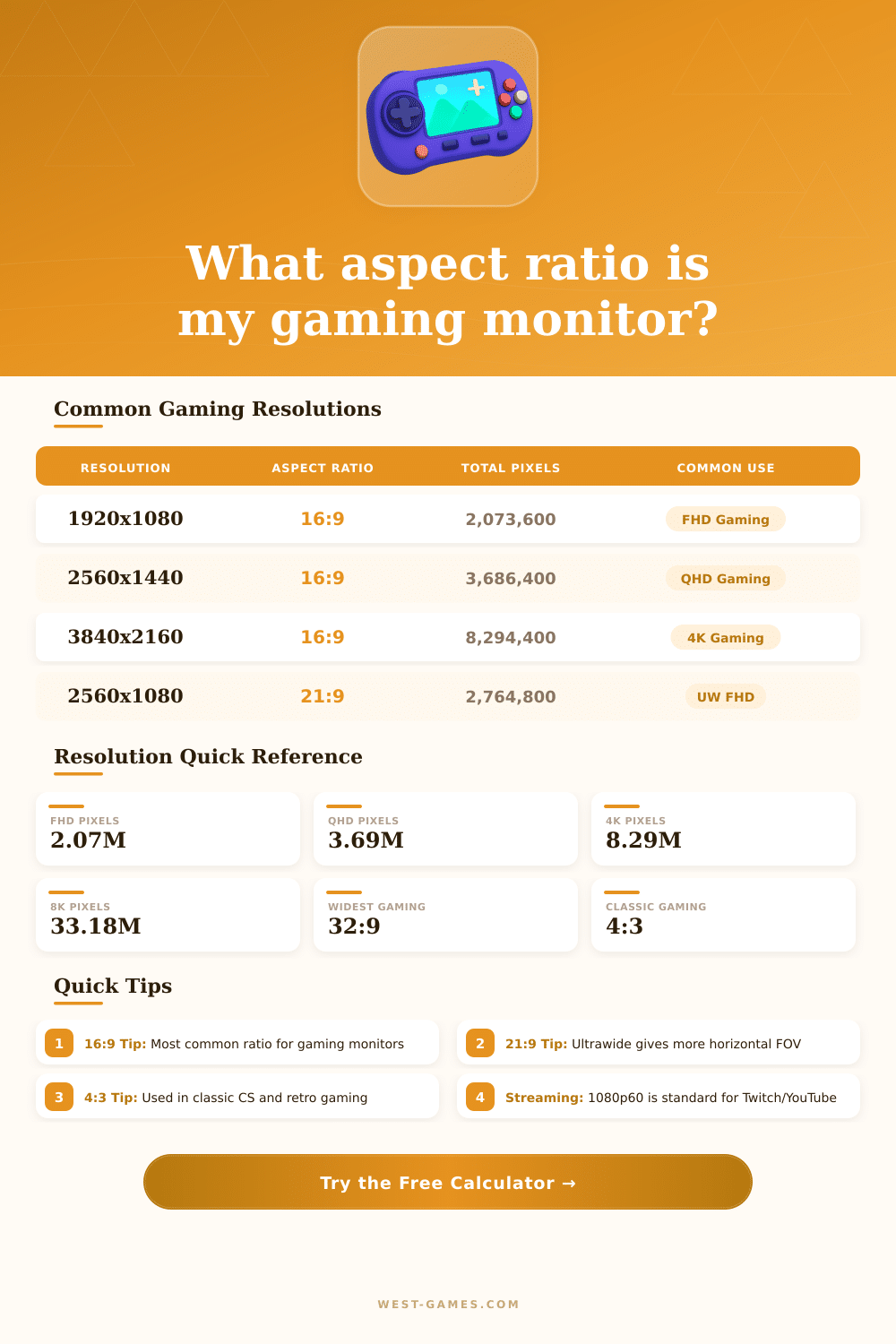
| Resolution | Aspect Ratio | Total Pixels | Common Use |
|---|---|---|---|
| 1920×1080 | 16:9 | 2,073,600 | FHD Gaming (Standard) |
| 2560×1440 | 16:9 | 3,686,400 | QHD Gaming (High-End) |
| 3840×2160 | 16:9 | 8,294,400 | 4K Gaming (Premium) |
| 2560×1080 | 21:9 | 2,764,800 | Ultrawide FHD |
| 3440×1440 | 21:9 | 4,953,600 | Ultrawide QHD |
| 5120×1440 | 32:9 | 7,372,800 | Super Ultrawide |
| 1280×960 | 4:3 | 1,228,800 | Classic CS / Retro |
| 1920×1200 | 16:10 | 2,304,000 | Professional / Photo |
| Monitor Size | Recommended Res | Pixel Density | Best For |
|---|---|---|---|
| 24 inch | 1920×1080 | ~92 PPI | Competitive FPS |
| 27 inch | 2560×1440 | ~109 PPI | General Gaming |
| 32 inch | 3840×2160 | ~138 PPI | Immersive / Console |
| 34 inch UW | 3440×1440 | ~109 PPI | Ultrawide Gaming |
| 49 inch UW | 5120×1440 | ~109 PPI | Super Ultrawide |
| Output | Resolution | Aspect Ratio | Platform |
|---|---|---|---|
| 1080p60 | 1920×1080 | 16:9 | Twitch / YouTube |
| 1440p60 | 2560×1440 | 16:9 | YouTube / VOD |
| 4K30 | 3840×2160 | 16:9 | YouTube 4K |
| 720p60 | 1280×720 | 16:9 | Low Bitrate Stream |
| 480p | 854×480 | 16:9 | Mobile Stream |
The Aspect Ratio shows the relation between the width and the height of something, whether it is image, screen or film. It is commonly written as two numbers with a colon between them, for instance width:height. Think about it as the basic shape of the object, is the image much more wide than high, or almost square?
Here is the point of the Aspect Ratio in one word.
What is Aspect Ratio?
Resolution is an entirely different thing. It relates to the number of pixels in an image. More pixels give clearer and sharper results.
So mind that: resolution and Aspect Ratio do not depend on each other. For instance, a screen of 1920×1080 has an Aspect Ratio of around 1.78, that we know as 16:9. And what about 3840×2160?
The Aspect Ratio stays the same, but everything looks much more detailed because of the bigger amount of information shown.
Different cameras have their own favourite Aspect Ratios. A camera with 35mm film, a digital camera or a phone can shoot in entirely different shapes. Traditional still cameras usually use 3:2, because that is how the 35mm film was set.
Phone cameras on the other hand commonly choose around 1.33:1, that is one of the most common Aspect Ratios. For portraits, 4:3 feels natural. While for landscapes or panoramas, 16:9 helps a lot.
In film making one uses a separate range of Aspect Ratios. One commonly sees 1.85:1 and 2.39:1 in films. Television started with 4:3 in the past, but current televisions moved to 16:9.
The Aspect Ratio that the filmmaker chooses shapes how the story is told visually, that is a creative choice that changes what the viewers can sea.
Computer monitors, laptops, phones, televisions and cinemas all come with different Aspect Ratios. For big screens today, 16:9 and 16:10 are the usual. Every Aspect Ratio that you work with decides what fits in your view at any moment.
In video games the Aspect Ratios range a lot. Older computer monitors used 4:3, sometimes even 5:4. Later came 16:10, followed by 16:9, that became the standard.
Now ultrawide monitors of 21:9 appeared, and even huge ones of 32:9. Even so, some old games or ported versions do not work well with 21:9. Developers sometimes limit support for ultrawide screens, so that no group has too big a visual advantage.
Professional players commonly prefer 4:3 because of habit from their starts. Most games stay at 16:9, because that is where developers test.
The Steam Deck has a set resolution of 1280×800, what gives it a 16:10 Aspect Ratio. Not the usual for many games. That difference causes black bars above and below on the screen.
If the Aspect Ratios do not match, the letterbox effect appears. In web design, CSS has a rule for Aspect Ratio that lets browsers automatically adjust the size ofelements to keep the right Aspect Ratios when the screen size changes.
When one resizes photos, the Aspect Ratio matters if you want to avoid stretching or warping. Cropping to different Aspect Ratios can certainly work, depending on your layout. In photography, Aspect Ratios between 3:2 and 6:7 feel most natural.
But it is not a hard rule, creative cropping and testing usually lead to something interesting.