💾 External Hard Drive Lifespan Calculator
Estimate how long your external hard drive will last based on type, usage & conditions
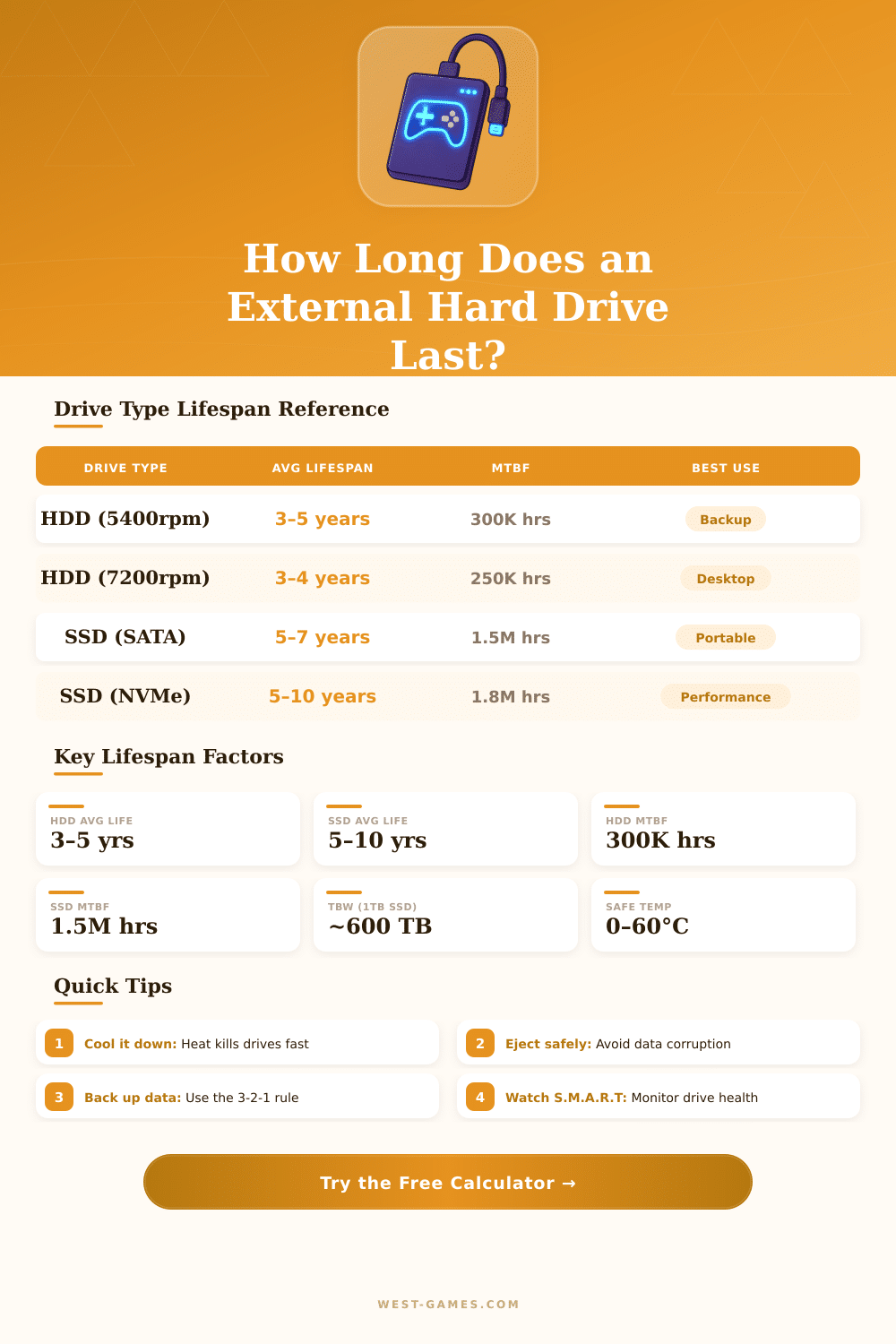
| Drive Type | Avg Lifespan | MTBF | TBW (1TB) | Safe Temp Range | Failure Risk by Year 5 |
|---|---|---|---|---|---|
| HDD 5,400 RPM | 3–5 years | ~300,000 hrs | N/A | 0°C – 60°C | ~50% |
| HDD 7,200 RPM | 3–4 years | ~250,000 hrs | N/A | 0°C – 60°C | ~55% |
| SSD SATA | 5–7 years | ~1,500,000 hrs | ~600 TB | 0°C – 70°C | ~20% |
| SSD NVMe | 5–10 years | ~1,800,000 hrs | ~1,200 TB | 0°C – 85°C | ~15% |
| Temperature Range | Celsius | Fahrenheit | Impact on HDD | Impact on SSD |
|---|---|---|---|---|
| Ideal / Cool | 20°C – 30°C | 68°F – 86°F | No reduction | No reduction |
| Acceptable / Warm | 31°C – 40°C | 88°F – 104°F | –5% lifespan | –2% lifespan |
| Hot / Concerning | 41°C – 50°C | 106°F – 122°F | –20% lifespan | –8% lifespan |
| Dangerous | 51°C – 60°C | 124°F – 140°F | –40% lifespan | –20% lifespan |
| Critical | > 60°C | > 140°F | Imminent failure | Imminent failure |
| Factor | Condition | HDD Lifespan Impact | SSD Lifespan Impact |
|---|---|---|---|
| Physical Handling | Stationary desk use | No reduction | No reduction |
| Physical Handling | Occasional portability | –10% | –2% |
| Physical Handling | Frequent travel | –25% | –5% |
| Physical Handling | Drops / rough use | –50%+ | –15% |
| Environment | Clean office / home | No reduction | No reduction |
| Environment | Moderate dust | –8% | –3% |
| Environment | Dusty / workshop | –20% | –8% |
| S.M.A.R.T Attribute | What It Means | Warning Threshold | Action Recommended |
|---|---|---|---|
| Reallocated Sectors (HDD) | Bad sectors remapped | > 5 sectors | Back up immediately |
| Pending Sectors (HDD) | Unstable sectors found | > 0 | Run full disk check |
| Power-On Hours | Total powered time | >20,000 hrs HDD | Plan replacement |
| TBW Remaining (SSD) | Write endurance left | < 10% TBW | Plan replacement |
| Temperature | Operating temp | > 50°C sustained | Improve ventilation |
| Uncorrectable Errors | Read/write failures | Any value > 0 | Replace immediately |
An External Hard Drive is simply a regular hard drive, like the one in a computer, but surrounded by its own case. It is fully portable and connects to almost any computer by means of a USB cable, whether type A or C. The main difference between an internal and External Hard Drive is that one lives inside the computer while the other stays outside.
These drives work well for keeping very important files or growing the storage space without need to open the computer. The portable versions receive energy and exchange data through one single cable. They take up less space on the desk and do not need a separate power cable.
What Is an External Hard Drive and How to Use It
One can copy the data from an internal hard drive to an External Hard Drive.
The size of an external drive depends on your needs for storage. Portable External Hard Drive models are physically smaller than full desktop models. Both do the same thing, even so.
Seagate External Hard Drive models offer up to 24 TB of capacity, which is enough for big collections of media and important backups. They also provide fast speeds for data transfer, ideal for scheduled backups. Among the main brands in that feild are WD, Seagate, Toshiba, Transcend and Samsung.
A strong pick for the best desktop external drive is the WD My Book. For portable options, the WD My Passport with USB-C in the 6 TB version shines as a capable leader among the portable versions. The name maybe sounds strange, but it works well.
Here is something useful to no. Traditional hard drives have spinning parts inside. Data is written on the surface of plates. Because of that, they can easily get damaged from shocks or falls.
SSDs are faster and without moving parts, so they handle hits much better. Popular brands for SSDs include Samsung, SanDisk and Western Digital. SanDisk currently belongs to WD.
Even so, if the storage matters more than the speed, traditional External Hard Drive models stay a good, cheaper solution. CMR hard drives in 3.5-inch format commonly prove more reliable.
Hard drives do keep data well, especially when one uses them regularly. SSDs can suffer from something called cell decay, which is wear of the circuit in cells over time, when one leaves them without energy.
Gaming is another good use. External SSDs work with desktops, laptops, PlayStation and Xbox. Adding an external SSD to a gaming laptop helps grow the space and carry a game library easily.
Playing games from an external drive usually only brings a bit longer loading screens. Using a USB 3.0 port with a matching drive helps to lower the delay. An external SSD is useful even more for faster searches.
Games load their main files in RAM anyhow. Even so, the transfer speed on external drives commonly is lower than that of internal. Storing games instead of playing directly from them is acommon method.
At least 1 TB is suggested for keeping some big games.