🔋 Mobile Game Battery Drain Calculator
Estimate phone battery drain from mAh, watt-hours, screen brightness, FPS mode, network type, chipset load, session length, and thermal pressure.
Same settings with a 30 FPS cap. Best for long events, turn-based games, and lower heat.
coolerBalanced play target for most phones. Usually stable without extreme radio or display drain.
balancedSmoother controls and scrolling, with a noticeable increase in GPU and display load.
warmFastest touch feel when supported. Expect the shortest runtime and highest sustained heat.
hottest| Phone | mAh | Nominal V | Wh |
|---|---|---|---|
| iPhone 15 Pro Max | 4441 | 3.86 | 17.1 |
| Galaxy S24 Ultra | 5000 | 3.85 | 19.3 |
| Pixel 8 Pro | 5050 | 3.87 | 19.5 |
| ROG Phone 8 Pro | 5500 | 3.86 | 21.2 |
| OnePlus 12 | 5400 | 3.85 | 20.8 |
| FPS cap | Power factor | Best use | Tradeoff |
|---|---|---|---|
| 30 FPS | 0.72x | Casual play | Less smooth |
| 45 FPS | 0.86x | Balanced RPG | Mixed support |
| 60 FPS | 1.00x | Default gaming | Moderate heat |
| 90 FPS | 1.18x | Fast action | High drain |
| 120 FPS | 1.38x | Competitive feel | Hot sessions |
| Network | Extra W | Typical games | Note |
|---|---|---|---|
| Offline | 0.05 | Puzzle, story | Lowest radio load |
| Wi-Fi strong | 0.20 | MOBA, FPS | Best online default |
| Wi-Fi weak | 0.45 | Online play | Router distance hurts |
| 4G or LTE | 0.65 | Ranked mobile | Signal dependent |
| 5G sub-6 | 0.95 | Cloud saves | Can spike higher |
| Tier | Score | Feel | Likely behavior |
|---|---|---|---|
| Cool | 0-44 | Comfortable | Stable clocks |
| Warm | 45-64 | Noticeable | Minor dimming possible |
| Hot | 65-84 | Uncomfortable | Throttling risk |
| Very hot | 85+ | Hard to hold | Lower FPS likely |
| Game style | Base W | Chipset load | Default FPS | Drain pattern |
|---|---|---|---|---|
| Casual puzzle or cards | 1.45 | 25% | 30 | Screen-led, low heat |
| Pokemon GO with GPS | 2.55 | 48% | 60 | GPS, camera, radio bursts |
| Roblox experience | 2.90 | 55% | 60 | Varies by world complexity |
| Call of Duty Mobile | 3.70 | 72% | 60 | High touch and network load |
| Genshin Impact | 4.45 | 84% | 60 | GPU-heavy open-world scenes |
| Honkai: Star Rail | 4.15 | 78% | 60 | Bursty combat and effects |
Now it’s time for just one last game, a quick match to get that rank push over the top. Forty percent should of been plenty of juice, right? You load up only to find the screen stuttering and the backlight dimming as you try to fire off another shot. But way mobile games suck down power is beyond what a percentage bar can convey. Plug in your game style and device specs into the calculator above and it’ll do the numbers for you… No need to fiddle with conversions and factors.
Battery life is all about capacity, most people think, the number of milliamp hours inside. So if I have a phone with a five thousand milliamphour battery, it will outlast my friend’s phone with a four thousand milliamphour battery. This only happens when you’re doing things like reading email or browsing the internet. When you game, though, your screen will be running at high brightness; your processor will be pushing heavy graphical loads; your radio will be constantly pinging to get more data. All those add up way quicker then you think from looking at the percentage bar. That’s why our tool layers on top of the raw battery size, taking into account not just chipset load, but also the network type and thermal pressure.
Why Your Phone Battery Drains Fast While Gaming
You might find it surprising how much heat does matter: It makes silicon in your phone throttle its performance in order to save itself from damage. Throttled performance result in stuttery gameplay and a processor working harder for less time, leading to further battery drain. Based off surrounding temperature and duration of use, the calculator pegs an estimate for what heat tier your session will be. If it says very hot, expect performance degradation within about twenty minutes of playtime. That’s why taking off thick cases or having some sort of cooling setup seems like magic. It adds no extra power; it just removes the heat limit that was choking your device in the first place.
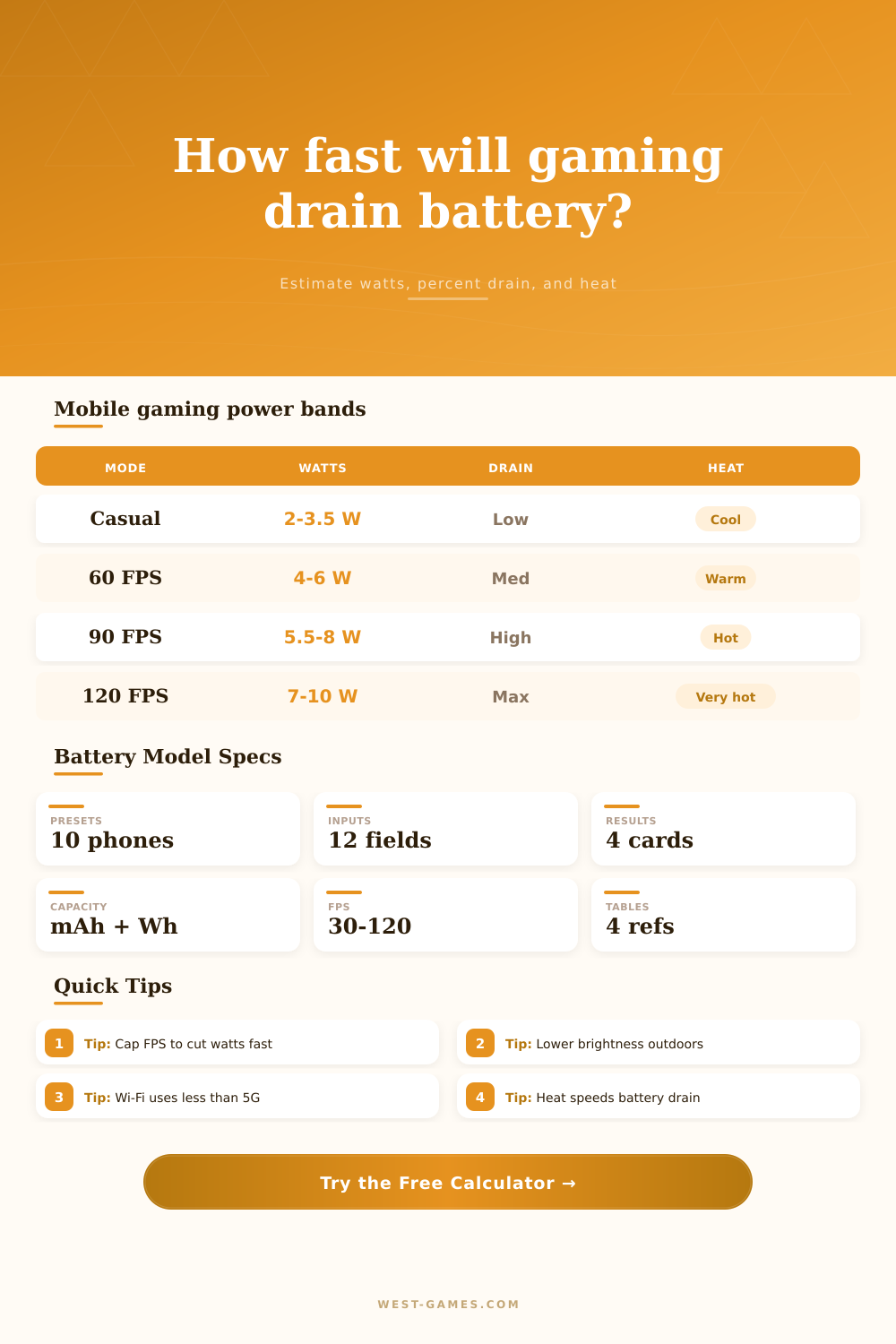
The fact that a lot of people jump to mobile data when their WiFi is slow, spotty, or they’re playing competitively also makes network selection surprisingly important. 5G is fast, but it’s going to suck down a whole lot more power compared to solid WiFi signal. On average, it’s pulling down half a watt, which doesn’t seem like a huge deal, but if you’re gaming hard for an hour, that extra drain will result in less time playing as the day goes on. It’s one of those things where you don’t realize what you’re sacrificing until you find yourself at ten percent and scrambling to find your charger.
You can also use frame rate caps. Most titles runs at sixty frames per second, which is their sweet spot. Bump that up to ninety or one hundred twenty, and it feels super smooth, particularly if you’re playing something fast paced like a shooter. But here’s the thing, your GPU still needs to render all of those additional frames each and every second. This constant workload increase temperatures and drives up power consumption. Drop down to thirty frames per second, and sure, it may feel choppier initially, but it drastically cuts down on amount of strain put on your hardware. It’s a matter of finding a balance between visual quality and session length.
The other thing is that the battery health skews your expectations, as in your phone with ninety percent battery health doesn’t have as much usable capacity as indicated by its spec sheet. Like maybe it says five thousand milliamp hours, but really it’s only got four thousand five hundred or so. You can take that into account on the calculator, and you’ll get a more realistic estimate instead of the idealized one. Otherwise, if you plan your play session based on energy you don’t actualy have, you aren’t taking your health stats into account and are just setting yourself up for dissapears.
So what’s all that mean for battery management? It comes down to balancing inputs against real-world conditions. You can’t alter the laws of lithium-ion, but you can adjust brightness, limit your frames, and deal with your heat output. That’s where the chart on the page comes into play; it details power draw based off game profile. Open-world RPGs eat energy fast, whereas casual puzzle titles does so at a slow pace. Knowing your own load will determine if it’s time for a break or time to plug up. So next time your battery seemingly dissapears without warning, try adjusting these variables first before pointing fingers at the phone itself.
A few tweaks could squeeze out those final minutes of juice for that victory. It’s not as much about making it hold more but rather not waste what little juice there is left. Your phone will appreciate it; your rank will too.