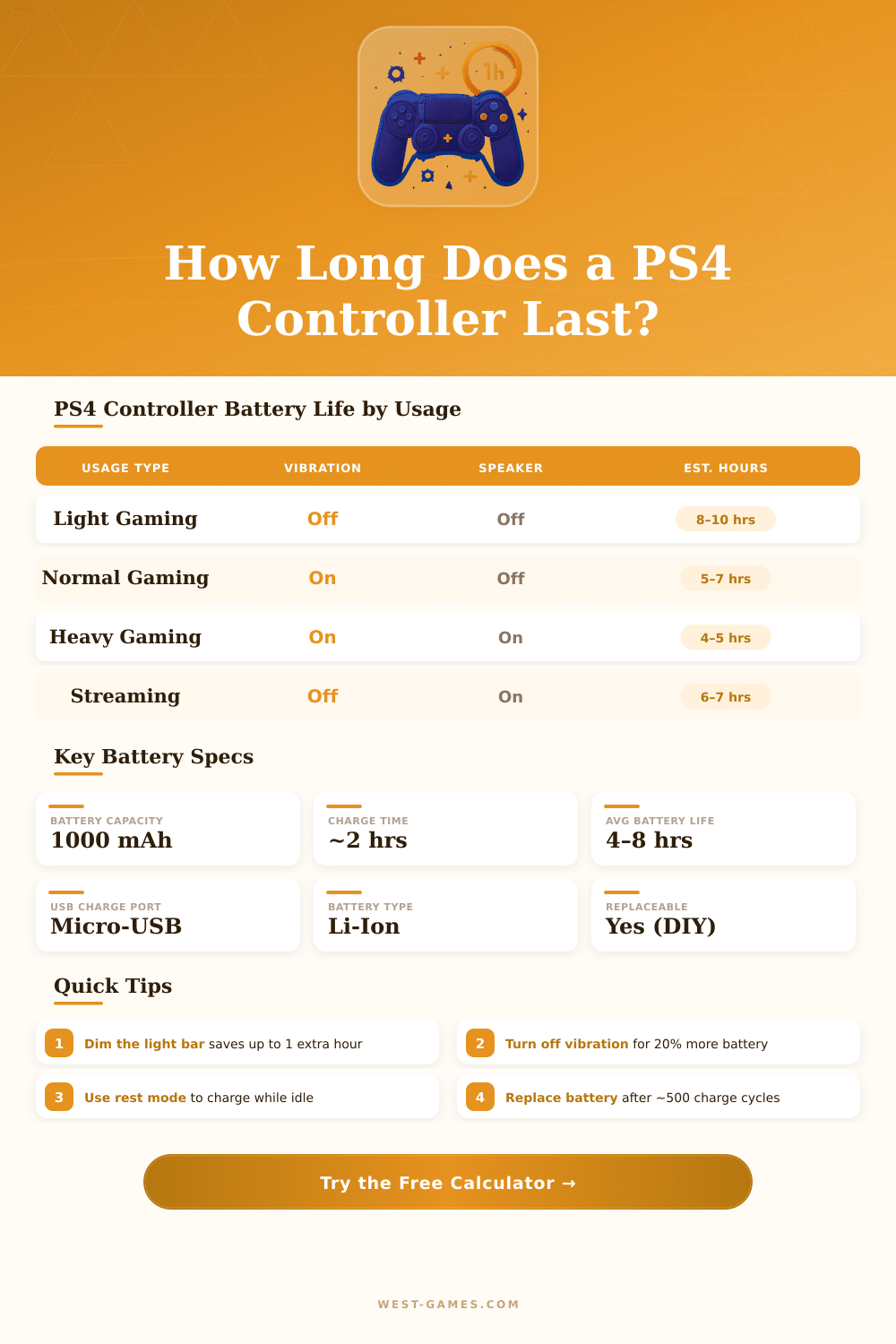
🎮 PS4 Controller Battery Life Calculator
Estimate exactly how long your DualShock 4 battery will last based on your playstyle and settings
| Usage Scenario | Vibration | Light Bar | Speaker | Est. Runtime |
|---|---|---|---|---|
| Casual / Indie Games | Low | Dim | Low | 7–8 hrs |
| Action / RPG (default settings) | High | Bright | High | 4–5 hrs |
| Competitive / FPS (optimized) | Off | Dim | Off | 6–7 hrs |
| Sports Games (FIFA, NBA 2K) | Medium | Medium | Low | 5–6.5 hrs |
| Media / Netflix Playback | Off | Off | Off | 8–9 hrs |
| AFK / Menu Browsing | Off | Dim | Off | 8+ hrs |
| Feature | Off / Min | Medium | Max / On |
|---|---|---|---|
| Vibration Motors | 0 mAh | ~40 mAh | ~80 mAh |
| Light Bar (LED) | 0–5 mAh | ~20 mAh | ~40 mAh |
| Controller Speaker | 0 mAh | ~15 mAh | ~30 mAh |
| Bluetooth Chip | ~15–25 mAh (always on) | ||
| Touchpad / Buttons / Sticks | ~60–80 mAh (baseline idle) | ||
| Total Idle Draw | ~80–120 mAh/hr | ||
| Age / Cycles | Health | Capacity Left | Expected Runtime |
|---|---|---|---|
| New (0–6 months) | 100% | ~1000 mAh | 4–8 hrs |
| Good (6–18 months) | ~90% | ~900 mAh | 3.5–7 hrs |
| Fair (18–36 months) | ~75% | ~750 mAh | 3–6 hrs |
| Worn (3–4 years) | ~60% | ~600 mAh | 2–5 hrs |
| Very Worn (4+ years) | ~45% | ~450 mAh | 1.5–3.5 hrs |
The DualShock 4 is the main part of PS4 play, control without cables that comes in various colours. Every PS4 that you buy from the box, carry one of them, and that makes sense, because it opens the doors to everything the devices fit. Great, that it does not limit to PlayStation; one can use it also on PC, what adds real freedom.
The built-in motion detection works by means of accelerometer and gyroscope, that registers how you tilt and turn the controller. The touchpad and the Share button helps for social functions and for easy play with friends. Even so, the problem is, that most games almost do not use the touchpad.
DualShock 4: Uses, Features and Problems
It seems like a missed chance, especially in shooting games, where it truly could serve well but the developers simply did not adopt it.
It sits comfortably in your hands and has good weight. Compared to DualSense, the buttons of DualShock 4 are flat and even, because they all sit on the same level. The buttons of DualSense feel a bit different.
More clicky and harder to press. Early models of DualShock 4 had dark buttons and a coating, that stopped the light bar shine through them. New versions apparently fixed that, allowing the light bar to shine through the touchpad, so you truly can see it.
Connect DualShock 4 to your PC happens either by means of Bluetooth or by means of USB cable. In Steam, the easiest method is to turn on support for PS4 Controller in the settings. To match it, press the PS and Share buttons together until the lights flash, that signals that it is ready.
Sometimes a game detects the control, but does not take your commands, and turning the Steam Overlay on in the settings of that game can fix that. There is also a third-party program called DS4Windows, that tricks games to believe that you have an Xbox control, which helps with compatibility.
To get a real DualShock 4 now is harder then before. Sony stopped making them in big amounts, although sometimes small restocks appear. Official Sony controls still have high prices almost everywhere.
Third-party copies commonly feel cheaper and less solid, plus they lack the precise tuning of dead zone of Sony. Budget options commonly come with real crashes (lagging input is the most common fault). Refurbished controls from GameStop offer a good middle ground if you want to save money withoutrisking unknown copies.
If the control turns off, there is a small reset button hidden on the left. Use a paperclip and some seconds of pressure for it. Later, open the Settings of your PS4, go to Devices and put the control in pairing mode.
Sometimes simply repeating the whole process removes connection problems. The hinge of the R2 button wears out because of clicking after maybe half a year of usage. Drift of the sticks commonly shows up later, which is its own problem.