🎯 Destiny 2 eDPI Calculator
Calculate your effective DPI and find your ideal sensitivity for Crucible & PvP
| Look Sens | Approx Multiplier | eDPI (400 DPI) | eDPI (800 DPI) | Feel |
|---|---|---|---|---|
| 1 | 0.5x | 200 | 400 | Extremely slow |
| 2 | 1.0x | 400 | 800 | Very slow |
| 3 | 1.5x | 600 | 1200 | Slow / precision |
| 4 | 2.0x | 800 | 1600 | Low (popular) |
| 5 | 2.5x | 1000 | 2000 | Medium (most common) |
| 6 | 3.25x | 1300 | 2600 | Medium-high |
| 7 | 4.25x | 1700 | 3400 | Fast |
| 8 | 5.5x | 2200 | 4400 | Very fast |
| 9 | 7.25x | 2900 | 5800 | Very aggressive |
| 10 | 10.0x | 4000 | 8000 | Max / flick |
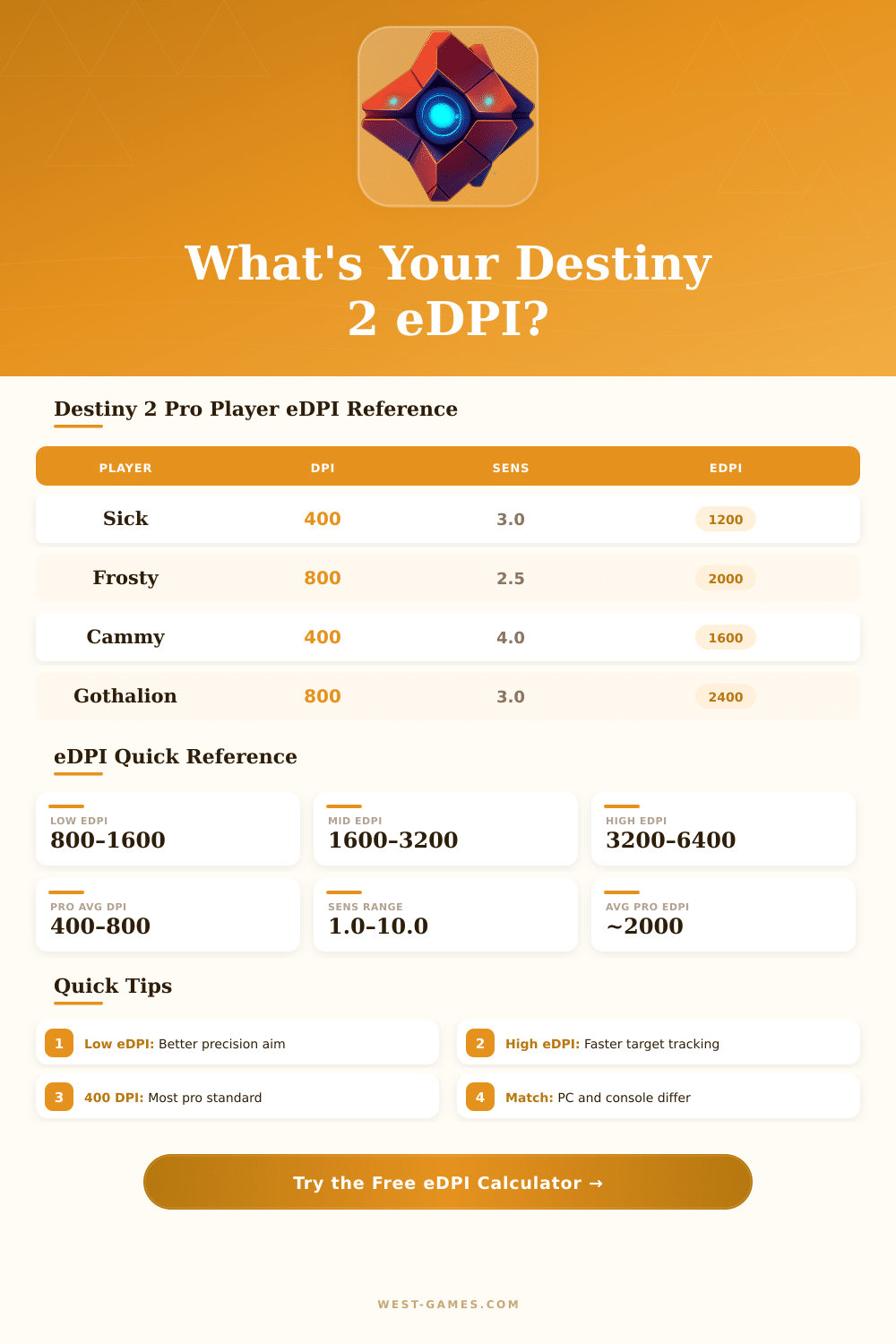
| Player / Streamer | DPI | Look Sens | ADS Modifier | Est. eDPI | Role Style |
|---|---|---|---|---|---|
| Sick | 400 | 3.0 | 0.30 | ~1,200 | Precision / Sniper |
| Frosty | 800 | 2.5 | 0.40 | ~2,000 | Balanced |
| Cammy | 400 | 4.0 | 0.40 | ~1,600 | Aggressive |
| Gothalion | 800 | 3.0 | 0.50 | ~2,400 | Streamer / Casual |
| Aztecross | 800 | 5.0 | 0.50 | ~4,000 | Content Creator |
| Sweatcicle | 400 | 5.0 | 0.35 | ~2,000 | Trials Competitive |
| KingGothalion | 1600 | 2.0 | 0.45 | ~3,200 | Casual / PvE |
| Lúnxss | 400 | 3.5 | 0.35 | ~1,400 | Competitive Trials |
| eDPI Range | Category | Best For | cm/360 (approx) | Destiny 2 Use Case |
|---|---|---|---|---|
| 400–1,200 | Ultra Low | Precision snipers | 60–180 cm | Long-range, patient playstyle |
| 1,200–2,000 | Low | Competitive PvP | 36–60 cm | Trials of Osiris, Iron Banner |
| 2,000–3,200 | Medium | Balanced players | 22–36 cm | Quickplay, casual Crucible |
| 3,200–5,000 | High | Aggressive / flick | 14–22 cm | Close-range, shotgun meta |
| 5,000+ | Very High | Controller feel | <14 cm | Transitioning from controller |
| Mouse | Sensor | Rec. DPI | Max DPI | Popular With |
|---|---|---|---|---|
| Logitech G Pro X Superlight 2 | HERO 25K | 400–800 | 25,600 | Sick, Frosty |
| Razer DeathAdder V3 Pro | Focus Pro 30K | 800–1600 | 30,000 | Cammy |
| Zowie EC2-C | 3212 | 400–800 | 3,200 | Competitive PvP |
| SteelSeries Aerox 3 | TrueMove Air | 800 | 18,000 | Mid eDPI players |
| Pulsar X2 | PAW3395 | 400–800 | 26,000 | Budget competitive |
| Logitech G502 X | HERO 25K | 800–1600 | 25,600 | Casual / PvE |
• Start with an eDPI between 1,600 and 3,200 and adjust from there.
• Set your ADS modifier to 0.3–0.6 for better long-range control.
• A cm/360 of 25–45 works well for most Trials of Osiris players.
• Lower DPI (400–800) with medium sens gives smoother cursor movement than high DPI with low sens.
Note: Here some tips from expert player retrospektivo and community chatters about EDPI settings for Destiny 2.
Have you heard about EDPI? It is short for effective dots per inch, and simply said it counts what results from multiplying your mouse DPI by your in-game sensitivity. For instance, if someone uses 400 DPI with sensitivity 4 in the game, that gives total EDPI of 1600.
EDPI and sensitivity tips for Destiny 2
A second player could reach the same value with 800 DPI and sensitivity 2. Same EDPI means same real mouse speed inside the game… Only the math happens differently behind the scene.
There are free calculators made specially for Destiny 2, that handle all those calculations for you. Simply enter your DPI and sensitivity, and it right away shows your EDPI. Many of those programs also show cm/360 and inches/360, that explains how much move you need to turn the mouse in a full round in the game.
That helps to better understand your real sesnitivity.
Sensitivity converters are another useful tool worth knowing. They allow you to adapt your settings between Destiny 2 and more than 1600 other games. It really matters if you often switch between different titles.
Take CS:GO and Destiny 2… The conversion ratio is around 1:0.3. So, to find sensitivity of 1.25 from CS:GO, you would need around 4.16 in Destiny 2.
The ideal EDPI for Destiny 2 sits between 2000 and 6000. Pro players commonly stay in the range of 2500 to 6000, while across the whole playing community the average is around 4148. The median sits near 4000.
It matches roughly 800 DPI with sensitivity 5, or the other way, 400 DPI with 10.
Top players usually choose lower sensitivity over high. Here is the reason: low EDPI forces you to use your arm for aiming instead of relying on the wrist. This weigh your wrist stays healthier long-term, and you can play more time without tiredness.
One commonly successful setup that I noticed is 800 DPI with sensitivity 6 and 0.5 multiplier for ADS, especially for those that aim as snipers. Even so, for low sensitivity to feel natural, you need a big mousepad, and small keyboards help to free space on the desk.
The thing is, sensitivity is fully personal. Simply copying the settings of someone else most commonly does not work well. A good starting point is to set your sensitivity so that a full move across the mousepad gives a 180-degree turn, then adjust from there.
About 6 to 8 inches for 360 degrees is a good starting range… Then you adjust up or down based on your feeling.
Here is where it gets weird: Destiny 2 handles sensitivity in an unusual way. Every sensitivity value actually is a multiplier. For instance, setting 3 matches around 0.899999.
To reach a precise 1.0 multiplier, you would need something like 2.66665, but the game does not let you enter decimals like that.
Pro settings that you find online commonly list everything carefully; DPI, sensitivity, EDPI, ADS settings, kinds of monitors, resolution, and even gear like mousepad andkeyboard. It is worth looking into that deeply if you seriously want to perfect your setup.