💾 RAM Speed Calculator
Compare DDR speed, timings, channels, and platform fit to find the best memory setup for daily use or tuning.
Bandwidth rises with speed and channels, while latency falls with tighter timings. This calculator blends both with a stability score.
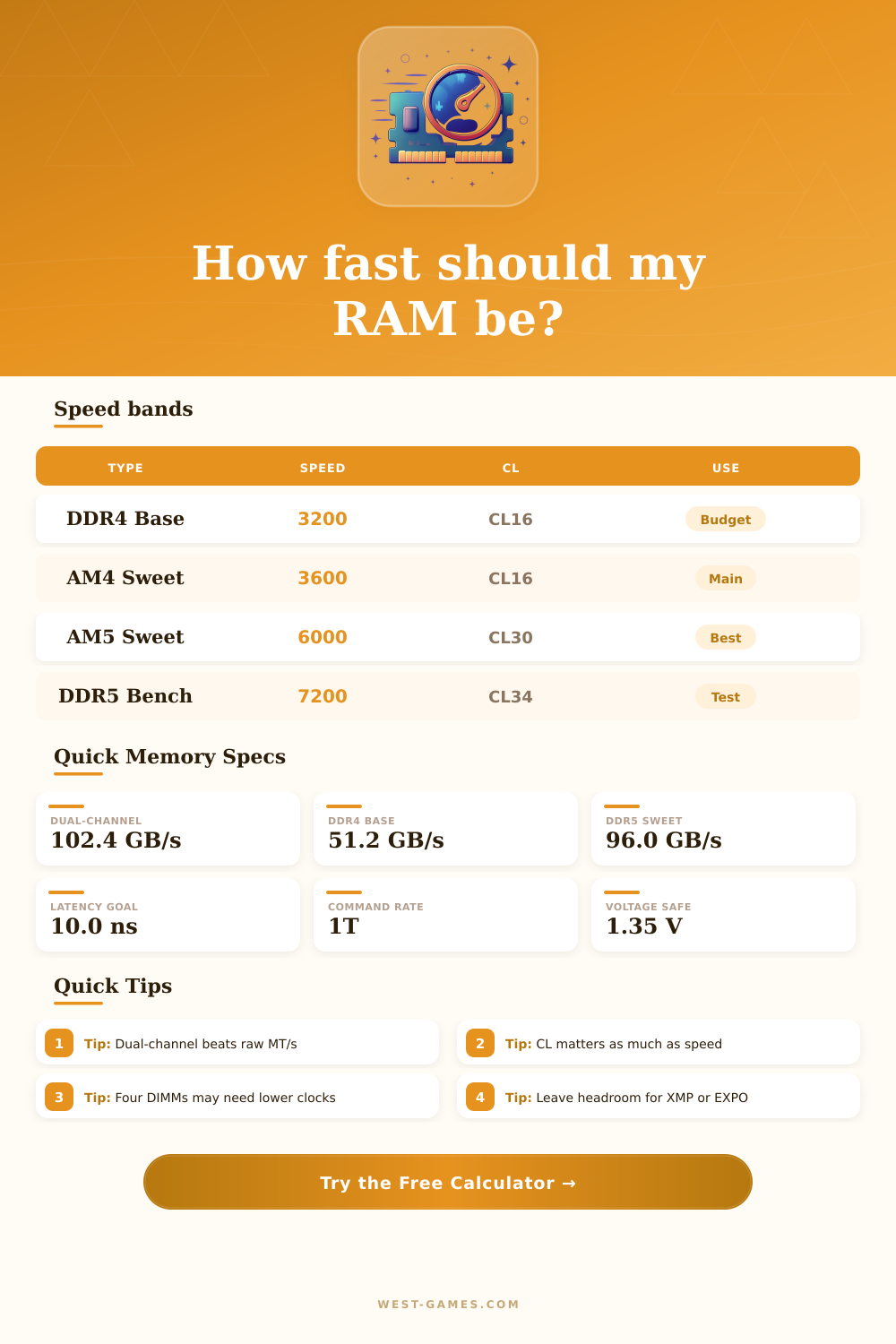
| Kit | Speed | CL | Best for |
|---|---|---|---|
| DDR4 Budget | 3200 | CL16 | Value builds |
| DDR4 Sweet | 3600 | CL16 | AM4 gaming |
| DDR4 Fast | 4000 | CL18 | Intel daily |
| DDR5 Balance | 6000 | CL30 | AM5 daily |
| DDR5 Bench | 7200 | CL34 | Heavy tuning |
The best kit is often the one with the lowest real latency and enough bandwidth for your workload.
| Platform | Safe | Mode | Note |
|---|---|---|---|
| AM4 DDR4 | 3200-3600 | Auto | CL16 is classic |
| Intel DDR4 | 3600-4266 | Gear 1 | Watch IMC load |
| AM5 DDR5 | 5600-6400 | Sync | 6000 CL30 wins |
| Intel DDR5 | 6400-7600 | Gear 2 | Needs stronger board |
| 4 DIMMs | Drop 1 step | 2T | More stress |
Four sticks, higher clocks, and tighter CL all add pressure to the memory controller.
| Setting | Tight | Balanced | Loose |
|---|---|---|---|
| CL | 14-16 | 18-30 | 32+ |
| tRCD | CL + 0 | CL + 2 | CL + 4 |
| tRP | CL + 0 | CL + 2 | CL + 4 |
| tRAS | 2x CL | 2.5x CL | 3x CL |
| Cmd rate | 1T | 1T / 2T | 2T safe |
Tighter timings reduce latency, but they often need more voltage or fewer sticks.
| Scenario | Priority | Kit fit | Note |
|---|---|---|---|
| Gaming | Latency | 3600 / 6000 | Fast response |
| Creator | Bandwidth | 6400+ | Big transfers |
| APU | Bandwidth | 6000+ | iGPU loves speed |
| VM | Capacity | 32 GB+ | More sticks help |
| Bench | Speed | 7200+ | Validation runs |
This table turns the calculator into a quick buying and tuning reference for common desktop builds.
The RAM-pace points in who haste you can read or write data in the casual alir memory. You measures it usually in megahertz (MHz) what means millions of cyclical propulsive for second. Like this you can compare it with the rhythm of the chip.
Simply said it shows as far as quickly the computer memory pretas data. Each taktociklo allow to read or write ionan so the pace matches to the number of cyclical for second One commonly identifies it with the memora taktoraideco.
What Is RAM Speed and Why It Matters
Discussing about RAM-pace folks usually intend the incidence of the memory. That is the amount of operations that it can accomplish in second. The incidence estimates in MHz and always accompanies the DDR-type in the kind For instance you finds of DDR4-1600 until DDR4-3200.
The freshest station is DDR5 with mainstream hastes since 4800 MT/s Even more altas they do possible new technologies as LPCAMM2-forms and taktŝoforoj in fresh modules.
The reela haste mixes the incidence with the memora latenco CL The incidence shows as far as quickly the memory works. The latenco point how many time it requires for pause before the consequent operation At purchase you find CL-numbron in the name. CL14 surpass CL16 that surpasses CL18 Mind latencon commonly matter more than incidence For instance a bit of DDR4-4000 MHz RAM surpasses DDR5-6000 MHz in games because bottom latenco help the chip reach maximum IPC.
The RAM-pace seriously affects the whole systematic output Alii it with the CPU-pace helps to reach optimumon For instance many CPU-subpartoj as the kaŝmemoro depend directly of the RAM-pace faster memory can plifaciligii the CPU-work Even so you must observe the minimajn needs of the ĉefplato and chip. If the rhythm subpasas the minimon of the ĉefplato the system can act strangement It causes inferior output or the computer refuses ŝaltiĝi.
On Windows you easily control the RAM-pace Premeru the Fenestran lid and X later choose Taskomanĝilon Here go to the Rendiment-klafo and click on Memory Otherwise right-click the taskobrodon for open Taskomanĝilon later choose the second button to the left for find the efficient part.