Sim Racing Wheel Rotation Calculator
Calculate wheel rotation, steering lock, steering ratio, degrees per tire degree, linearity response, sensitivity scaling, and car class range checks for sim racing setups.
Calculation Breakdown
| Car Class | Wheel Rotation | Steering Lock | Typical Ratio | Linearity | Use Case |
|---|
| Preset | Class | Rotation | Lock | Ratio | Sample Input | Use |
|---|
| Target Ratio | Rotation Needed | Per-Side Wheel | Current Difference | Fits Device | Feel |
|---|
| Metric | Formula | Inputs | Units | Meaning |
|---|
In sim racing, you turn the wheel and the car doesn’t turn. You crank on it some more and you spin yourself off into grass. And it’s not all about force feedback wheels. Your wheel must physically turn the same as your car in game to make it feel real. If you’ve got something where every time you turn it three rotations when the car require only half a turn to do so, your wheel is misleading your body. There’s no way you can ever get rid of mistake through practice because there’s a lag between what you think should of happen and what your hands think happens.
Plug in your device limits and steering lock and calculator above will do the rest. No need to convert and mess with coefficients. It connects dots between what’s moving in your wrist and abstract amount shown on your display.
How to Set Up Your Sim Racing Wheel
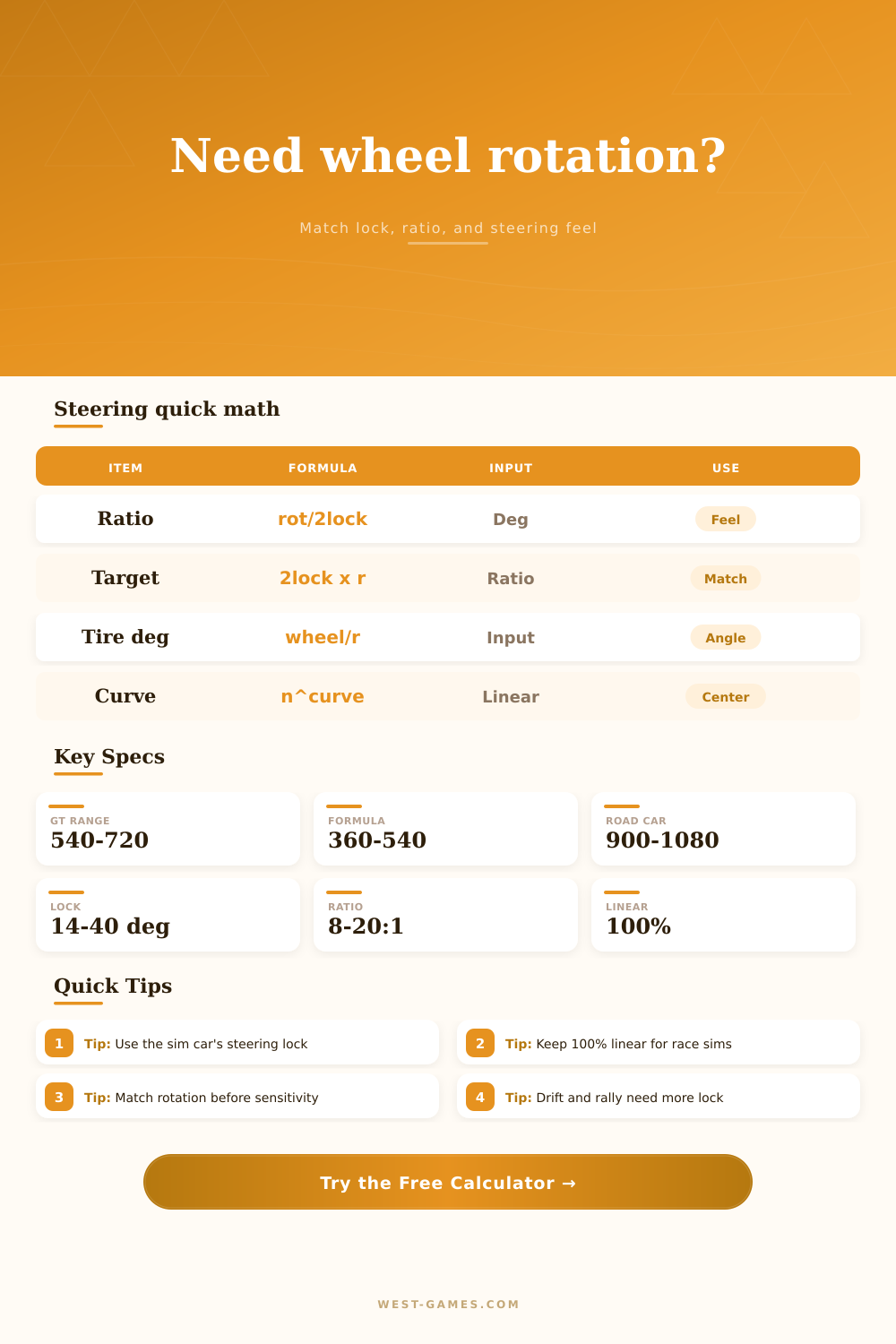
Most racers initially select a rotation they like, typically about 540 degrees for a GT car. But their cars has only 20 degrees of lock each side. That seems like enough, but the ratio is important as well. It’s how much it spins relative to how far you turn the wheel. Small turns generate big changes if the ratio is fast. Big turns are required if the ratio is slow. Miss on this one and the car will feel twitchy or numb, one way or another.
The other thing is steering lock. This sets the limit on how far front tires physically can point. Everything else is just noise if you don’t respect it. And that’s what the tool does, allows you to visualize what you’re doing vs. Actual limitations of your car. Some cars has a lot less lock (like 30 degrees) and some have almost as much as 40 in them (drift sedans). Each will feel entirely different. With formula car, it’s quick, so every degree of wheel rotation matters. In the drift car, you’ve got a little space to breathe.
The tool removes this and shows you effective ratio. It tells you, “for every degree of wheel you turn, you get X degrees of tire angle.” That is the truth. The rest are preferences.
A lot of folks gets hung up on linearity. But 100% is standard. So steering map remains even from center point out to the stops. That feels honest and keeps driver feeling what’s going on. Going lower in linearity makes center softer, which some drivers prefer for slow turns, but also distorts their perception of what they’re doing. Now there isn’t a direct connection between your hand position and the feedback. You begin to guess how far you’ve turned wheel. And in most cases on a race track, keeping it linear makes more sense. It builds muscle memory. Learn that when you put your hands here, you get this much bite. When you do this fraction of a turn, you get this. Change the curve and each time you go out, you have to relearn the track.
Sensitivity and rotation caps are safety valves. Rotation cap and sensitivity give you the ability to tune the feel without tampering with core ratio. You can have a highly sensitive setting that makes the car more responsive, but that will cut off the maximum steering angle before wheels stop spinning. That leaves a dead zone where you turn the wheel but the tires aren’t moving. The calculator alerts you to this. It tells you when your hardware is working too hard for what the software has in it for it. When the tool tell you that your set-up is out of range for the class, pay attention. Road cars need heavy slow steering. Formula cars requires quick ratios. You can’t take a Formula setup and try to drive a GT3 car. Physics won’t allow it. It’s like trying to drive a semi-truck with a go-kart wheel.
This is all spelled out nicely on the page in the reference table. Here’s a benchmark for various vehicle classes. But don’t take this as gospel. The purpose here is to get you into that sweet spot where the way your arms feel interacting with the wheel becomes an extension of car’s suspension. Where the wheel moves and the car responds exactly how you want it to, no exaggeration, no lag, the simulator fades away. You’re just driving. Tuning the numbers is about taking away the interface so that you can concentrate on what’s ahead of you.
So start there. The ratio. Lock it down. And then, and only then, will you be able to worry about fine tuning.