💻 Gaming Laptop Lifespan Calculator
Estimate how long your gaming laptop will last based on specs, usage habits, and maintenance
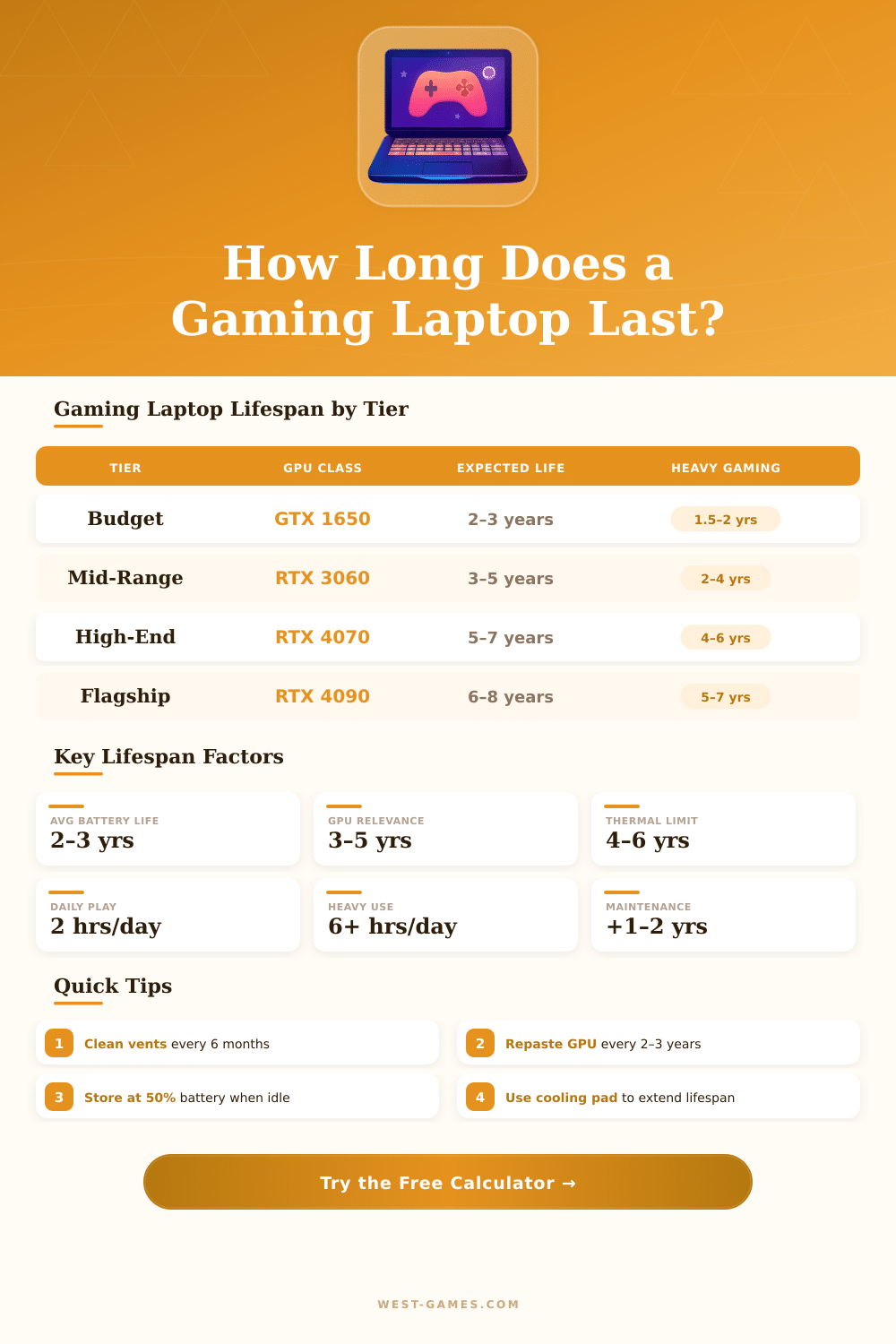
| Tier | Example GPU | Typical Lifespan | Heavy Gaming | GPU Relevance |
|---|---|---|---|---|
| Entry-Level | GTX 1650 / RX 6500M | 2–3 years | 1.5–2 years | 1–2 years |
| Mid-Range | RTX 3060 / RX 6700M | 3–5 years | 2–3 years | 3–4 years |
| High-End | RTX 4070 / RX 7800M | 5–7 years | 4–5 years | 4–6 years |
| Flagship | RTX 4080 / RTX 4090 | 6–8 years | 5–6 years | 5–7 years |
| GPU Temp Range | Rating | Lifespan Impact | Recommended Action |
|---|---|---|---|
| Below 75°C (167°F) | Excellent | +1 to +2 years | No action needed |
| 75–85°C (167–185°F) | Good | Neutral | Cooling pad recommended |
| 85–90°C (185–194°F) | Caution | –0.5 to –1 year | Clean vents, repaste |
| 90–95°C (194–203°F) | Warning | –1 to –2 years | Repaste immediately |
| Above 95°C (203°F) | Danger | –2 to –3 years | Thermal service ASAP |
| Component | Avg Lifespan | Failure Signs | Extend With |
|---|---|---|---|
| Battery | 2–3 years | Poor runtime, swelling | Smart charging limits |
| GPU | 4–8 years | Artifacts, crashes | Good thermals |
| CPU | 5–10 years | Throttling, overheating | Repasting, airflow |
| SSD (NVMe) | 5–10 years | Slow speeds, errors | Avoid full capacity |
| HDD | 3–5 years | Clicking, slow reads | Avoid drops, vibration |
| Display | 5–8 years | Dead pixels, backlight | Avoid max brightness |
| Fans | 3–5 years | Loud noise, no spin | Regular cleaning |
Gaming Laptops come in all forms and sizes, and choosing the right model can be difficult because each year fresh versions appear with stronger chips and graphics units. Brands like Alienware, ASUS ROG, Acer Predator and Lenovo Legion make devices designed for heavy play. When you choose one the size of the screen you must consider carefully.
If you play only in 1080p and do not need 4K or 1440p, then a full HD screen works well for that.
How to Choose a Gaming Laptop
A chip with many cores, for instance Intel Core i7 or AMD Ryzen 7, together with at least 16 GB RAM, help in games and multitasking, like streaming or background apps. SSD drives matter for fast loading. Gaming Laptops with separate NVIDIA or AMD graphics help to reach top settings, higher resolutions and good frames per sceond.
Even so there are some real downsides. All Gaming Laptops warm up a lot, no matter what happens. They weigh a lot, are thick and hard to carry.
The fans become very loud. The battery runs out after only one hour of play, and even watching film during travel can be a problem. Taking care or updating them is not easy, because chips and graphics usually can not be swapped.
And they cost more, while giving less power then desktops.
The Lenovo Legion Pro 5i has a good thermal system and a price under two thousand dollars, which is rare for that range. It has software that allows undervolting the chip, so that the heat stays under control. Alienware devices also have good cooling, and their look seems truly modern.
The Alienware X17 or M15 are good options. Thanks to being portable and long battery, the ASUS ROG Zephyrus G14 lasts almost eight hours of energy while staying ready for games.
The Razer Blade is a nice device that does not look like a Gaming Laptop. Typing on it is a joy, and it works well as a daily machine. But the storage is limited to 256 GB in many models, and because games are huge today, only some of them can be installed at once.
There are also budget options. The MSI Katana 15 HX forms a solid base for gaming. The Acer Predator Triton 14 comes in around a thousand dollars with a strong chip and graphics combo.
The Acer Nitro V 16 AI is a slim gaming device that does not make compromises on heat or raw power in games. If the main reason for buying one is portability and play during travel, then a Gaming Laptop makes sense. But if it neverleaves the desk, a desktop computer is the better solution.