🌪️ CPU Fan Lifespan Calculator
Estimate how long your CPU fan will last based on usage, temperature, RPM, and bearing type
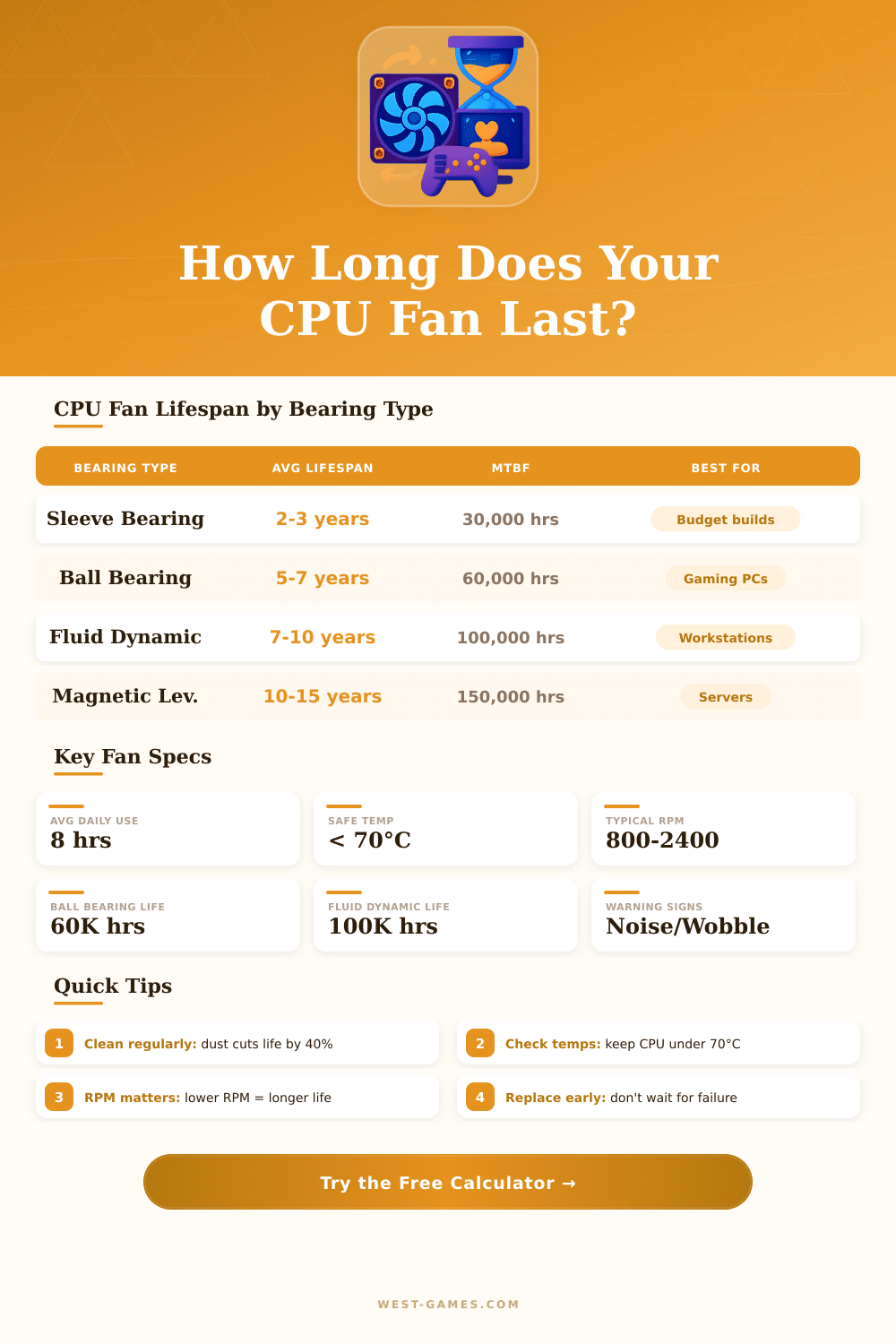
| Bearing Type | Avg Lifespan | MTBF (hrs) | Noise Level | Best For |
|---|---|---|---|---|
| Sleeve Bearing | 2–3 years | ~30,000 | Low initially | Budget builds, horizontal fans |
| Ball Bearing | 5–7 years | ~60,000 | Moderate | Gaming PCs, any orientation |
| Fluid Dynamic (FDB) | 7–10 years | ~100,000 | Very Low | Workstations, quiet builds |
| Magnetic Levitation | 10–15 years | ~150,000 | Ultra Low | Servers, enterprise systems |
| Rifle Bearing | 4–6 years | ~50,000 | Low | Mid-range desktops |
| CPU Avg Temp | Temp (°F) | Fan Impact | Lifespan Effect | Action |
|---|---|---|---|---|
| < 50°C | < 122°F | Ideal | Full rated life | ✅ No action needed |
| 50–65°C | 122–149°F | Normal | –5% to –10% | ✅ Normal operation |
| 65–75°C | 149–167°F | Elevated | –15% to –25% | ⚠️ Check thermal paste |
| 75–85°C | 167–185°F | High | –30% to –45% | ⚠️ Improve cooling |
| > 85°C | > 185°F | Danger Zone | –50% or more | 🚨 Immediate action |
| RPM % of Max | Wear Rate | Noise | Lifespan Modifier |
|---|---|---|---|
| < 40% of max | Very Low | Near Silent | +20% longer life |
| 40–60% of max | Low | Quiet | Full rated life |
| 60–80% of max | Moderate | Audible | –10% to –15% |
| 80–95% of max | High | Loud | –20% to –30% |
| 95–100% of max | Very High | Very Loud | –35% or more |
| Warning Sign | Likely Cause | Urgency | Action |
|---|---|---|---|
| Grinding/rattling noise | Bearing failure | 🚨 Critical | Replace immediately |
| Fan not spinning at startup | Motor failure / stuck bearing | 🚨 Critical | Replace immediately |
| CPU temps rising gradually | Dust buildup / fan slowing | ⚠️ Moderate | Clean fan & heatsink |
| Intermittent wobble | Bearing wear / imbalance | ⚠️ Moderate | Plan replacement soon |
| RPM dropping over time | Lubrication loss in bearing | 🟡 Low–Moderate | Monitor & clean |
| Clicking sound | Debris / cable interference | 🟡 Low | Inspect & clean fan area |
Any good computer system needs reliable cooling for the chip. It forms the main role… Protecting your chip against overheating.
Without such cooling, the chip itself will limit its speed, will slow everything to a crawl will become unstable or, in the worst cases, even will destroy itself.
How a Computer Chip Stays Cool
Here is how the whole system truly works. The cooler for the chip is made up of two main parts: a heatsink and a CPU fan, that works together. The heatsink sits above the chip by means of a metal base, and inside it has tubes, that remove the heat of the chip itself.
All that heat flows later into a dense set of cool fins. When the CPU fan spins, it pushes air through those fins, removing the heat from the computer. What is the main task of the CPU fan?
Simply move the air around. Even so, that simple air flow is what controls your temperatures.
There are two main ways to cooling, that are worth knowing. Air coolers are the best for budget and truly easy to install… They work for the most gaming or working computers without too much efofrt.
When you choose liquid coolers, also called AIOs, they can really lower the temperatures of your chip. Some of those models use two-chamber structures with better liquid flow, to lead the liquid directly to the warmest place of the chip. Liquid coolers come with different sizes of radiators: one finds 120 mm, 240 mm, 360 mm or 420 mm versions, according to the space in your computer.
As far as how much cooling you truly need, it depends on the power, that your chip uses. If something takes less then 65 watts? A simple air cooler or one of those low-profile models will handle it well.
When you pass that 65 watt limit or plan to overclock, then one must go to a good tower heatsink or 120 mm liquid cooler, which truly helps. It matters especially, if your computer is narrow or lacks a big CPU fan, here the heat has nowhere to go.
Most CPU fans for chips are set up to push the air to the back of the computer, where an exhaust fan can remove that warm air directly. Some coolers reverse that and blow upward. The speed of the CPU fan usually is not fixed, it adjusts up and down according to the heat of the parts.
Do a stress test on the chip, and you will see the CPU fan spin to the maximum. The chip stays happy until around 85 degrees, when the temperatures start to get risky.
Changing the CPU fan of the chip is not a hard task. Take a new CPU fan of the right size, remove the old base, set the new one down by means of screws and connect it to the right spot on your motherboard. Great air coolers and cheap options are found everywhere.
Thermal paste and low-noise parts add value to the usual setup. Choosing the right cooling truly matters. It decides how warm your processorwork is and how noisy your system becomes.