🎮 BeamNG FOV Calculator
Calculate your ideal Field of View for BeamNG.drive based on monitor size, distance & aspect ratio
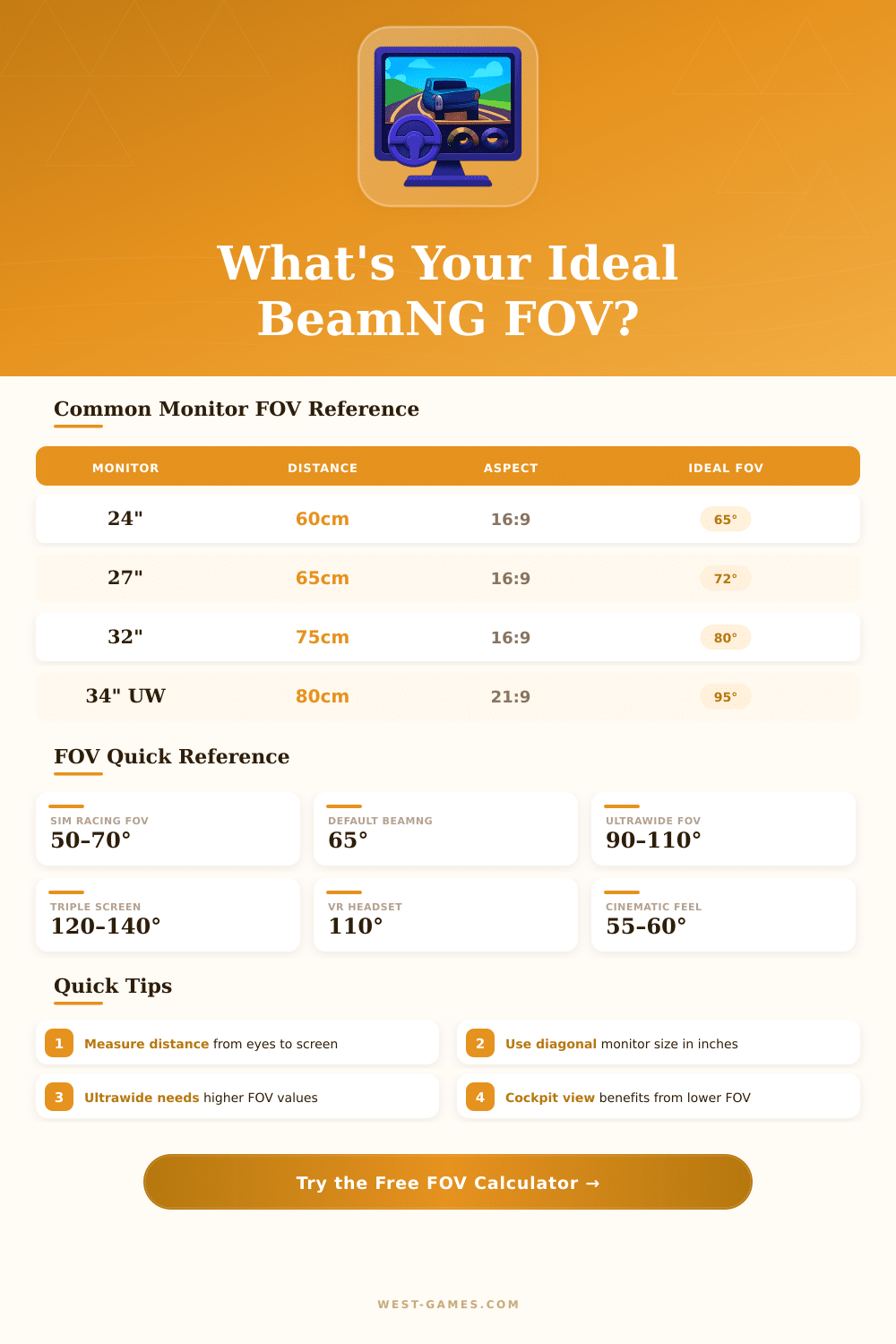
| Monitor Size | Distance 50cm | Distance 65cm | Distance 80cm | Distance 100cm | Aspect |
|---|---|---|---|---|---|
| 24" | 72° | 58° | 48° | 39° | 16:9 |
| 27" | 79° | 64° | 53° | 43° | 16:9 |
| 32" | 90° | 73° | 61° | 50° | 16:9 |
| 34" UW | 104° | 85° | 71° | 58° | 21:9 |
| 49" SUW | 143° | 122° | 104° | 86° | 32:9 |
| Aspect Ratio | VFOV 60° | VFOV 75° | VFOV 90° | HFOV (approx) |
|---|---|---|---|---|
| 4:3 | 77° | 93° | 107° | Same as 4:3 HFOV |
| 16:9 | 95° | 114° | 130° | +35° wider |
| 16:10 | 99° | 118° | 134° | +37° wider |
| 21:9 | 116° | 134° | 148° | +56° wider |
| 32:9 | 146° | 158° | 167° | +86° wider |
| Setup Type | Monitor Size | Distance | Rec. VFOV | Feel |
|---|---|---|---|---|
| Desk / Office | 24" – 27" | 60 – 70cm | 55° – 70° | Realistic |
| Sim Rig | 27" – 32" | 45 – 60cm | 65° – 85° | Immersive |
| Ultrawide Desk | 34" UW | 65 – 80cm | 85° – 100° | Wide |
| Super Ultrawide | 49" SUW | 80 – 100cm | 110° – 130° | Panoramic |
| Couch / TV | 55" – 65" | 150 – 200cm | 40° – 55° | Cinematic |
| Triple Screen | 3x 27" | 60 – 75cm | 120° – 140° | Full Peripheral |
| Laptop | 15" – 17" | 40 – 55cm | 48° – 62° | Natural |
Add your FOV grade in BeamNG drive can fully alter the whole experience of the game and its feeling. Here the range for the FOV range of 10 until 120 grades what is a bit more limited compared to the most many other driving games. The secret is, that BeamNG doubles the vertical value of the FOV, likewise as do the games about Formula 1.
When you set everything for the drive up, matter more than one thinks, do the game uses vertical or horizontal FOV flow.
How to Set FOV in BeamNG and Good Values
Set the FOV is really easy cause. Simply click the three spots in the bottom left-hand part during you find yourself in control of camera, and you will see the option for alter it. Notably, that every camera has its own settings.
The camera for the driver receives its own slider for FOV, and all other cameras have their own also. In the settings menu presents also shortcuts, that shows all key bindings, if you want to escape the menus entirely.
For the camera of the driver, you can alter the FOV by means of mouse using Move plus Page Up and Move plus Page Below. For the sight in the cockpit? It is numpad 9 and numpad 3.
The slider no always operates without mark, so really, the numpad-keys are safer. After you will adjust to those key bindigns, fast changes without enter menus will become something natural for you.
Many folks ultimately choose something between 50 and 60 grades. Leave it to roughly 60 grade help to escape tension of the screen. If you go much more highly, say 90, then you will risk clipping objects with the camera that almost touches the ceiling of cars as the K-series.
Values around 65 until 70 grades can make the feeling of speed much more intense then in actual life in same speeds. The ideal? Roughly 62 until 68 grades, but it depends on the car.
Good trick is set the FOV like this, that the mirror of the driver barely touches the edge of the screen.
Technically, bigger FOV should feel more actual, because folks naturally see around 140 grades. But here the problem: on little monitor, turn upward the FOV do everything seem twisted. Press whole side sight in one screen simply do not work well.
The free camera operates otherwise. Some settings have troubles about changing of FOV for it. The FOV of the driver camera lasts well, but the free no always remembers the changes.
Is also doubt, do the relative control of camera even allows to alter FOV. Use the world editor for the free camera can force you search through several menus. Even so, exist mods for cameras, that improves the sight for better clarity, while they keep the FOV easily readable and the feeling of speedunnoticed.
Install them only require to lay zip-file in the directory for mods of BeamNG.
For receive good screenshots, sometimes needed climb or set the FOV for find the perfect corner. Settings with several monitors using Eyefinity and alike technology can create their own problems with FOV, that does the game feel a bit odd.