📐 FOV Distance Calculator
Calculate your horizontal field of view and find the ideal viewing distance for any screen size
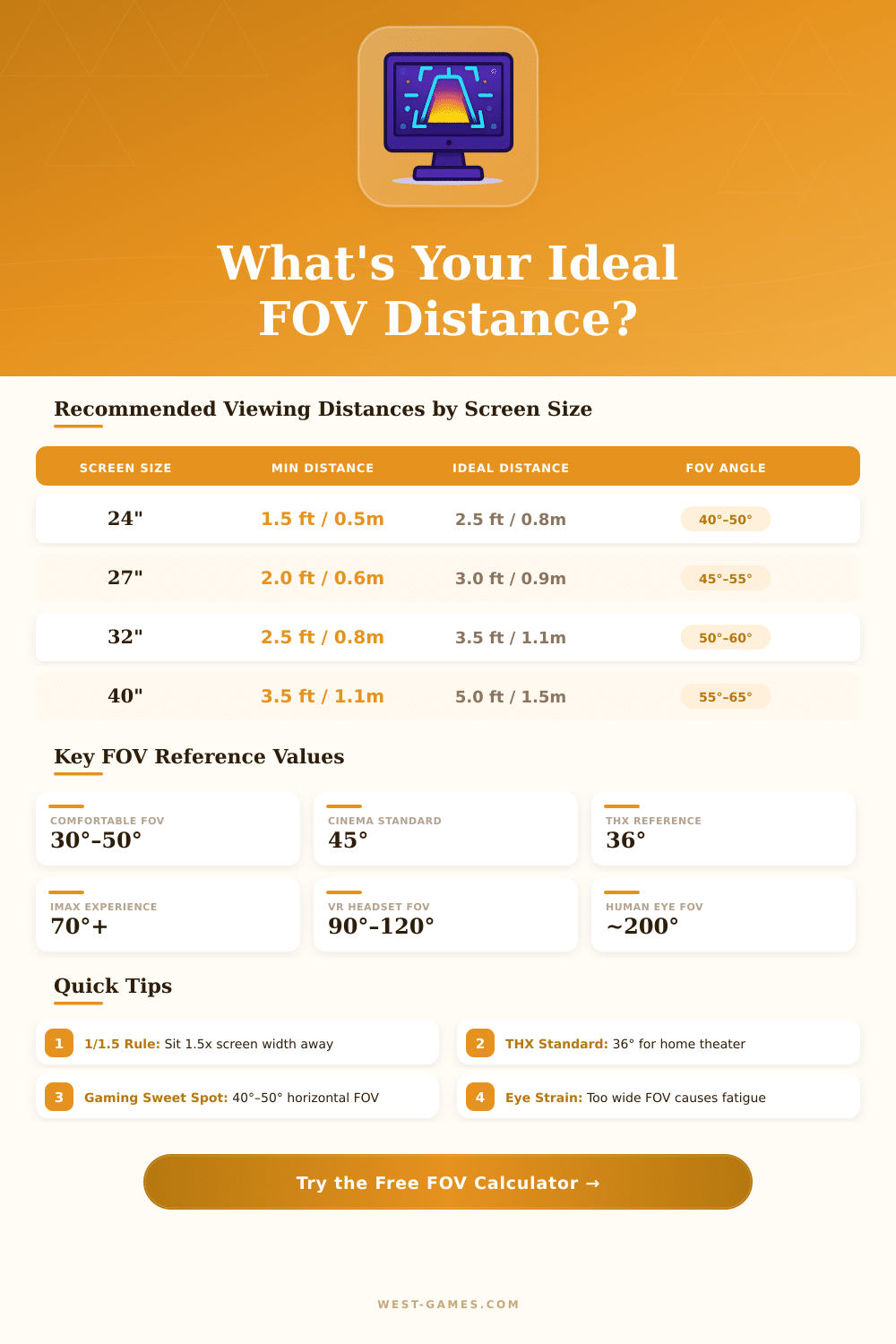
| Screen Size | THX (36°) | Comfortable (40°) | Immersive (50°) | FOV at 6ft / 1.8m |
|---|---|---|---|---|
| 24" (61 cm) | 4.4ft / 1.35m | 3.9ft / 1.19m | 3.0ft / 0.93m | 21° |
| 27" (69 cm) | 5.0ft / 1.52m | 4.4ft / 1.34m | 3.4ft / 1.04m | 24° |
| 32" (81 cm) | 5.9ft / 1.81m | 5.2ft / 1.59m | 4.0ft / 1.23m | 28° |
| 40" (102 cm) | 7.4ft / 2.26m | 6.5ft / 1.98m | 5.0ft / 1.53m | 35° |
| 55" (140 cm) | 10.2ft / 3.11m | 9.0ft / 2.73m | 6.9ft / 2.10m | 48° |
| 65" (165 cm) | 12.0ft / 3.67m | 10.6ft / 3.23m | 8.1ft / 2.48m | 56° |
| 75" (191 cm) | 13.9ft / 4.23m | 12.2ft / 3.72m | 9.4ft / 2.86m | 65° |
| 85" (216 cm) | 15.7ft / 4.80m | 13.9ft / 4.22m | 10.6ft / 3.24m | 73° |
| 100" (254 cm) | 18.5ft / 5.64m | 16.4ft / 4.97m | 12.5ft / 3.81m | 86° |
| FOV Angle | Experience Level | Best Use Case | Eye Strain Risk |
|---|---|---|---|
| Under 20° | Very Narrow | Far TV viewing | Very Low |
| 20° – 30° | Narrow | Casual TV, office | Low |
| 30° – 40° | Comfortable | Desktop, home theater | Low |
| 40° – 50° | Engaging | Gaming, movies | Low–Moderate |
| 50° – 65° | Immersive | Large TV, simulation | Moderate |
| 65° – 80° | Very Immersive | IMAX-style, sim racing | Moderate–High |
| 80°+ | Overwhelming | VR, curved ultrawide | High (short sessions) |
| Aspect Ratio | Screen Width % vs 16:9 | FOV Boost vs 16:9 | Typical Use |
|---|---|---|---|
| 4:3 | –13% | –4° narrower | Legacy, retro gaming |
| 16:10 | –4% | –1° narrower | Productivity, MacBooks |
| 16:9 | Baseline | Baseline | Standard HD/4K |
| 21:9 | +31% | +9° – +12° wider | Ultrawide gaming, cinema |
| 32:9 | +78% | +20° – +25° wider | Super ultrawide, dual replace |
• Gaming: 40°–50° horizontal FOV is the sweet spot for competitive and immersive play.
• Home Theater: THX recommends 36° for a cinema-like experience at home.
• Eye Strain: FOV above 65° may cause fatigue during long sessions — take breaks every 45 min.
• Ultrawide bonus: A 34" 21:9 monitor at 3ft delivers similar FOV to a 43" 16:9 TV at 4ft.
The field of visual Distance really deals with that, as the beam of your sight relates to your position from the camera, whether you stand or sit. The focal length of your lens decides your FOV, short focal lengths open the sight more broadly which allows you to stay closer to capture the same scene compared to long focal lengths.
Here are some practical tools that help to exactly count how much support you need to reach a particular beam and height of the FOV. They work also the other way, so you can enter your working Distance and the size of the object, so that it counts what FOV you really must have. There are also calculators that find the mix of focal length and Distance to get precise FOV at a certain Distance, for instance to capture a two foot area in portrait photos.
How Distance, Lenses and Screens Change Your Field of View
Assume that you want to capture a scene broad in two metres with 60 degree horizontal FOV. Then you stand about 1.73 metres away. The math is based on trigonometry; it all concerns the half of the FOV and the turning of that angle into a ratio between frame beam and Distance.
The usual formula shows the FOV as double the arctangent of the sensor size divided by double focal length.
But here is the problem: those calculators fail entirely in macro work. When your subjects become really small, the magnification becomes the main factor insteed. Most of those tools assume that you shoot from at least one metre or similarly away.
The size of the screen and your sitting position matter a lot when one chooses FOV for video games. The more closely you sit to your monitor, the bigger part of your natural sight it covers. The real FOV of your eyes to the edges of the screen is probably around 30 to 45 degrees depending on your device and sitting style.
Most video games on typical monitors aim to fill around 40 degrees of vision, so they use fairly narrow FOV.
Console games need higher FOV, between 55 and 75 degrees, because folks usually sit a bit more back, for instance on a couch before a television. Your whole natural sight goes to around 170 to 180 degrees, if one counts the side vision. A 27 inch monitor at 75 centimetres Distance gives about 25 degrees of FOV.
If you switch too a 32 inch monitor but want to keep that same FOV, you should sit at around 71 centimetres instead of 60.
A lower FOV in the range of 70 to 94 degrees does make far targets seem bigger and the path more clearly visible. Most players choose 90 to 100 degrees for everyday gaming. If you set it higher, you get that wrong fisheye look.
With VR headsets things getcomplicated, eye relaxation, lens opening and the space between lenses all add warping into the mix.