🎯 Tarkov FOV Calculator
Convert between in-game FOV and true horizontal/vertical field of view for any aspect ratio
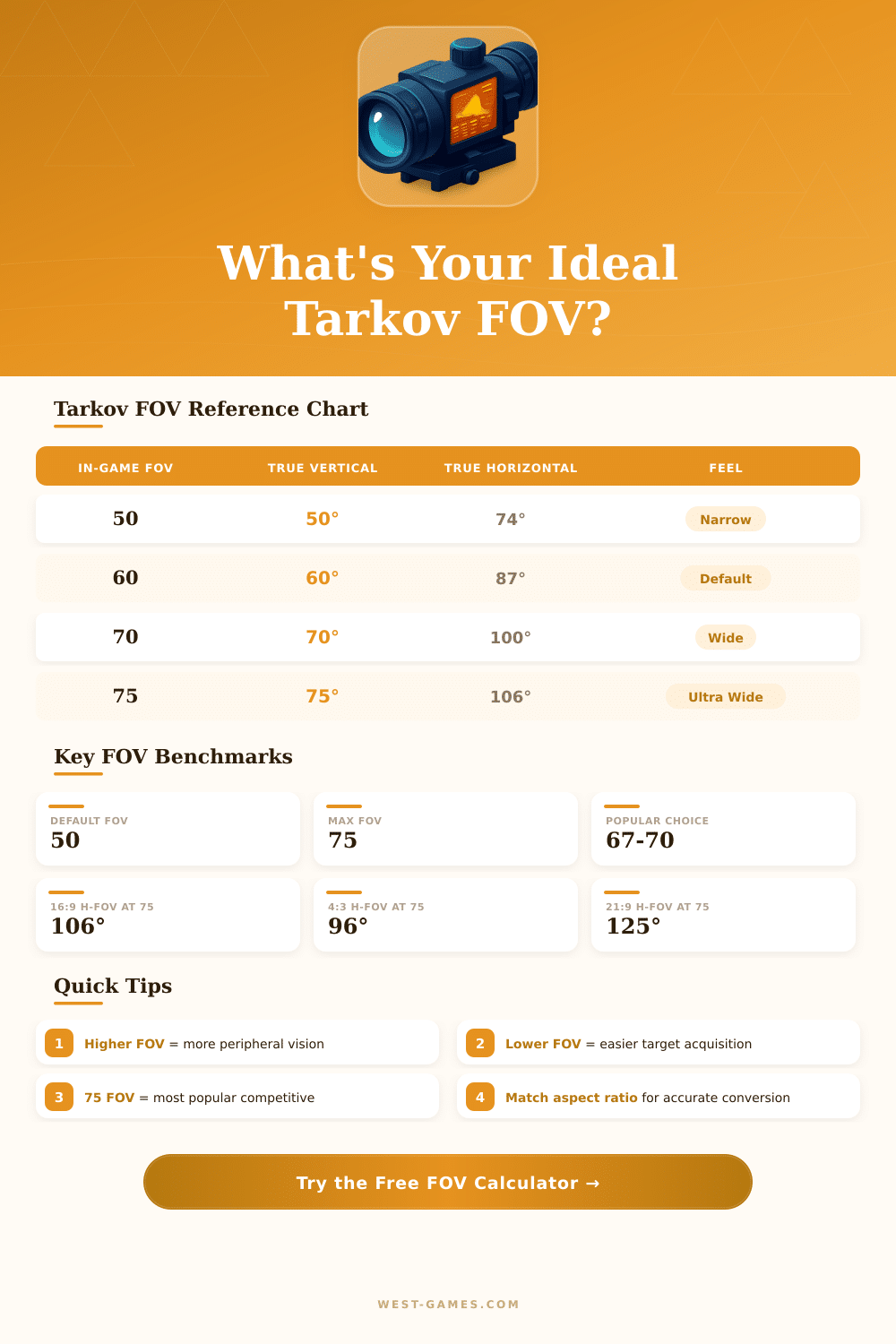
| In-Game FOV | True Vertical | H-FOV 16:9 | H-FOV 21:9 | H-FOV 4:3 | Perception |
|---|---|---|---|---|---|
| 50 Default | 50° | 74.0° | 93.3° | 63.4° | Very Narrow |
| 55 | 55° | 80.6° | 101.3° | 69.2° | Narrow |
| 60 | 60° | 87.3° | 109.4° | 74.9° | Moderate |
| 65 | 65° | 93.9° | 117.4° | 80.5° | Balanced |
| 67 Popular | 67° | 96.5° | 120.7° | 82.7° | Balanced–Wide |
| 70 Recommended | 70° | 100.4° | 125.5° | 85.9° | Wide |
| 75 Max | 75° | 106.3° | 132.8° | 90.6° | Very Wide |
| Resolution | Aspect Ratio | Width/Height Ratio | Common Monitor | FOV Impact |
|---|---|---|---|---|
| 1920x1080 | 16:9 | 1.778 | 27" / 24" | Standard baseline |
| 2560x1440 | 16:9 | 1.778 | 27" / 32" | Same as 1080p FOV |
| 3440x1440 | 21:9 | 2.389 | 34" Ultrawide | +19° wider H-FOV |
| 2560x1080 | 21:9 | 2.370 | 29" Ultrawide | +18° wider H-FOV |
| 1920x1200 | 16:10 | 1.600 | 24" 16:10 | Slightly narrower H-FOV |
| 1280x1024 | 5:4 | 1.250 | Legacy monitor | Narrower than 16:9 |
| 1024x768 | 4:3 | 1.333 | Legacy / stretched | Narrowest H-FOV |
| Game | FOV Type | Tarkov 67 Equiv. | Tarkov 75 Equiv. | Recommended |
|---|---|---|---|---|
| Escape from Tarkov | Vertical | 67 | 75 | 67–75 |
| CS2 / CSGO | Horizontal (4:3 base) | ~82° | ~90° | 90° (default) |
| Valorant | Horizontal (16:9) | ~96° | ~106° | 103° |
| Apex Legends | Horizontal | ~96° | ~106° | 90–104° |
| Hunt: Showdown | Vertical | 67 | 75 | 70–75 |
| Battlefield 2042 | Horizontal | ~96° | ~106° | 80–95° |
Lower FOV (50–60): Easier to track targets at range, less visual noise, may feel more "zoomed in." Some players find it better for long-range engagements.
Performance: Higher FOV renders more of the scene and can reduce FPS slightly on lower-end systems. If you have FPS issues, try lowering FOV by 5–10 increments.
Note: This article is based on actual talks and reviews of the community of Escape from Tarkov.
Many players that jump to Tarkov from other shooters find something odd, the game values of FOV are measured in vertical degrees not horizontal. That differs from the custom in most FPS games. If you set Tarkov to 59, you indeed get around 90 horizontal FOV, what is the standard setting for many shooters outside the default box.
How to choose FOV in Escape from Tarkov
The default FOV in Tarkov seems more strained than in most other first-person shooters. It reaches maximum at 75. During years, players asked if the ceiling could rise…
To something between 90 and 104, similar to CS2 or Valorant. Moreover, higher FOV options could reduce the 3D motion sickness for those that feel sick during game.
Here is where it becomes complex. The developers designed all optics and sights around FOV of 50. Everything else twists the view.
If you expand your FOV, sights sharply seem distant and small. Paths of bullets also bend, what makes precise aiming hard. Because of that, the developers chose a fast solution.
Instead of changing the field of sight, they simply moved the camera forward. That change caused teh current problems with sights, that each must last.
What value so should one choose for good game? 59 feels most natural for FPS games, because it gives the usual 90 horizontal FOV. Playing at 50 is technically the “right” option, if you care about accuracy of sights, but honestly, 59 simply works more well.
Some players bid higher values. Around 67 works surprisingly for big monitors, for instance, 32 inches or more. If you mostly use red spots instead of sights, you can commonly go higher without too many troubles.
From CS2? Those games reach almost 106 horizontal degrees, what matches to around 74 in the scale of Tarkov. That would be a good comfortable area.
Players of Valorant usually choose something near to 71.
Another effect is expanding FOV until the limit, before everything starts too seem like a fish tank when you look upward or down. Notably, at 75 it feels quite a lot ugly. Higher FOV also moves your gun model away from your face on the screen, what some favor.
Narrow FOV certainly helps the frame rate and ease to see distant targets. Broad FOV allows you to get more from the surrounding world. In competitive game, many players maximize FOV to escape surprising attacks from the screen edges.
Ultimately, it is only a changebetween reliability of sights, situational attention and your personal comfort.