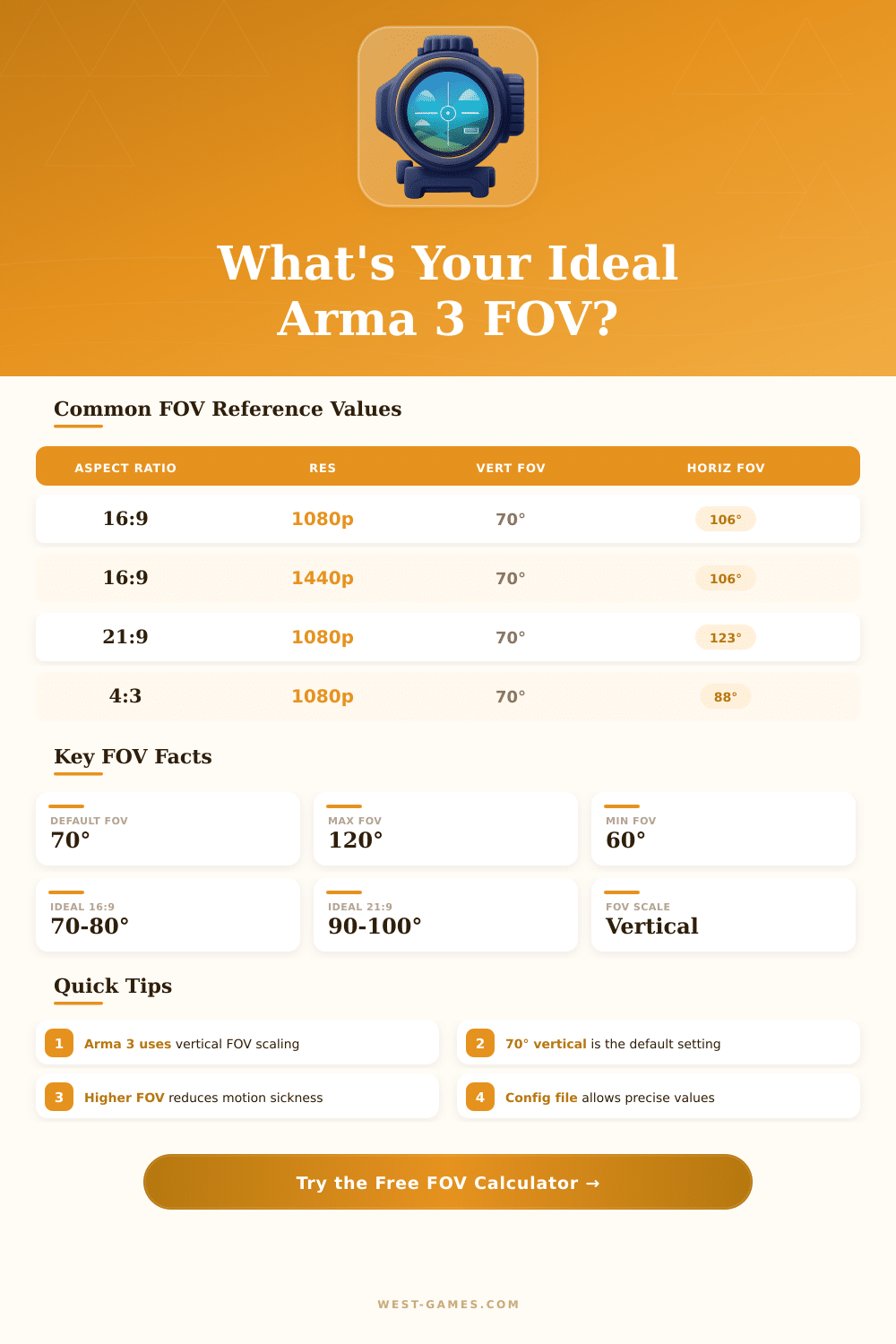
🎯 Arma 3 FOV Calculator
Calculate your perfect vertical & horizontal FOV — get exact config file values for any resolution & aspect ratio
| Vert FOV (°) | Radians | Horiz FOV 16:9 (°) | Feel / Use Case |
|---|---|---|---|
| 60 | 1.0472 | 96.4 | Very zoomed in, scoped feel |
| 65 | 1.1345 | 101.8 | Slightly narrow, sniper style |
| 70 | 1.2217 | 106.3 | ★ Default — recommended start |
| 74 | 1.2915 | 110.9 | Popular infantry setting |
| 80 | 1.3963 | 116.9 | Wide, good situational awareness |
| 85 | 1.4835 | 122.0 | Very wide, vehicle driving |
| 90 | 1.5708 | 127.0 | Competitive wide, fish-eye risk |
| 100 | 1.7453 | 136.1 | Extreme wide, distorted edges |
| Aspect Ratio | Example Res | Horiz FOV (°) | Wider Than 16:9? |
|---|---|---|---|
| 4:3 | 1024x768 | 88.2 | No (narrower) |
| 5:4 | 1280x1024 | 84.6 | No (narrower) |
| 16:10 | 1920x1200 | 101.8 | Slightly narrower |
| 16:9 | 1920x1080 | 106.3 | ★ Standard |
| 21:9 | 2560x1080 | 123.0 | Yes (+16.7°) |
| 21:9 | 3440x1440 | 123.0 | Yes (+16.7°) |
| 32:9 | 3840x1080 | 147.5 | Yes (+41.2°) |
| OS | Config File Path | Parameter Name | Value Type |
|---|---|---|---|
| Windows | %USERPROFILE%\Documents\Arma 3\ | fovTop | Radians (float) |
| Windows | %USERPROFILE%\Documents\Arma 3\ | fovLeft | Auto (from fovTop) |
| Windows | Arma3.cfg | fovTop=1.2217; | Semicolon required |
| Note | Backup before editing | Both fovTop & fovLeft | May need updating |
Note: This article is based on actual information from community discussions and guides about fixing the field of view in Arma 3.
In Arma 3 the normal field of view stands at 70 degrees. It commonly looks too narrow and suffocating. During long sessions it can even create headaches sometimes.
How to change the field of view in Arma 3
If you change it to 90 degrees, it seems entirely normal compared with other first-person shooters. Surprisingly, in the game itself there is no option or slider to change that, which is surprising for a computer game meant for PC users. Whether Bohemia will ever add a slider for the FOV after all those years stays a mystery.
To change the FOV, edit the profile file directly. The values fovTop and fovLeft, which control it, are found in the config file of the profile. Usually it sits in the directory Documents\Arma 3.
Other Profile\[username]. The file itself has a name similar to [username].Arma3Profile. To find the right numbers for your wanted FOV, use an online calculator.
There is a famous tool at hia3.com, and another at gamecalculator.netlify.app. Those tools require information about your screen resolution, so the width and hieght of the screen to properly count the values.
Do not simply enter random numbers in the profile file. The values fovTop and fovLeft need precise calculation based on your resolution. Otherwise, the game window can brake and various troubles will happen.
When you found the right numbers, enter them in the file, save the changes and close it. Going from 70 to 90 degrees helps a lot for better awareness and gives advantage in fights, whether in first-person or third-person viewpoint.
There is also a program called Arma FOV Changer, that handles the whole process. It allows the user to point to the place of the config file, enter the resolution and the wanted FOV, and the tool automatically adjusts the settings.
One annoying thing to mind: if you press the key Escape in some menus, the FOV goes back to the standard 70 degrees. The only fix is to exit from the game and again edit fovTop and fovLeft in the profile file manually. Also, changing those values will mess up the zoom and range of all scopes in the game, especially those based on magnification.
Be sure to recall that before changing something.
If you set the FOV at roughly 95 degrees, it will not cause blocks from BattlEye or servers with custom rules. Some like to go up to 120 degrees, but then the side vision can feel weird. The control of zoom is bound to the plus and minus keys of the numpad.
Pressing minus lowers the zoom, and plus brings it back to the normal state. Those controls seem to befirmly built in, without the option to change them.