⌨️ Gaming Keyboard Lifespan Calculator
Find out how long your gaming keyboard will last based on your usage habits and switch type
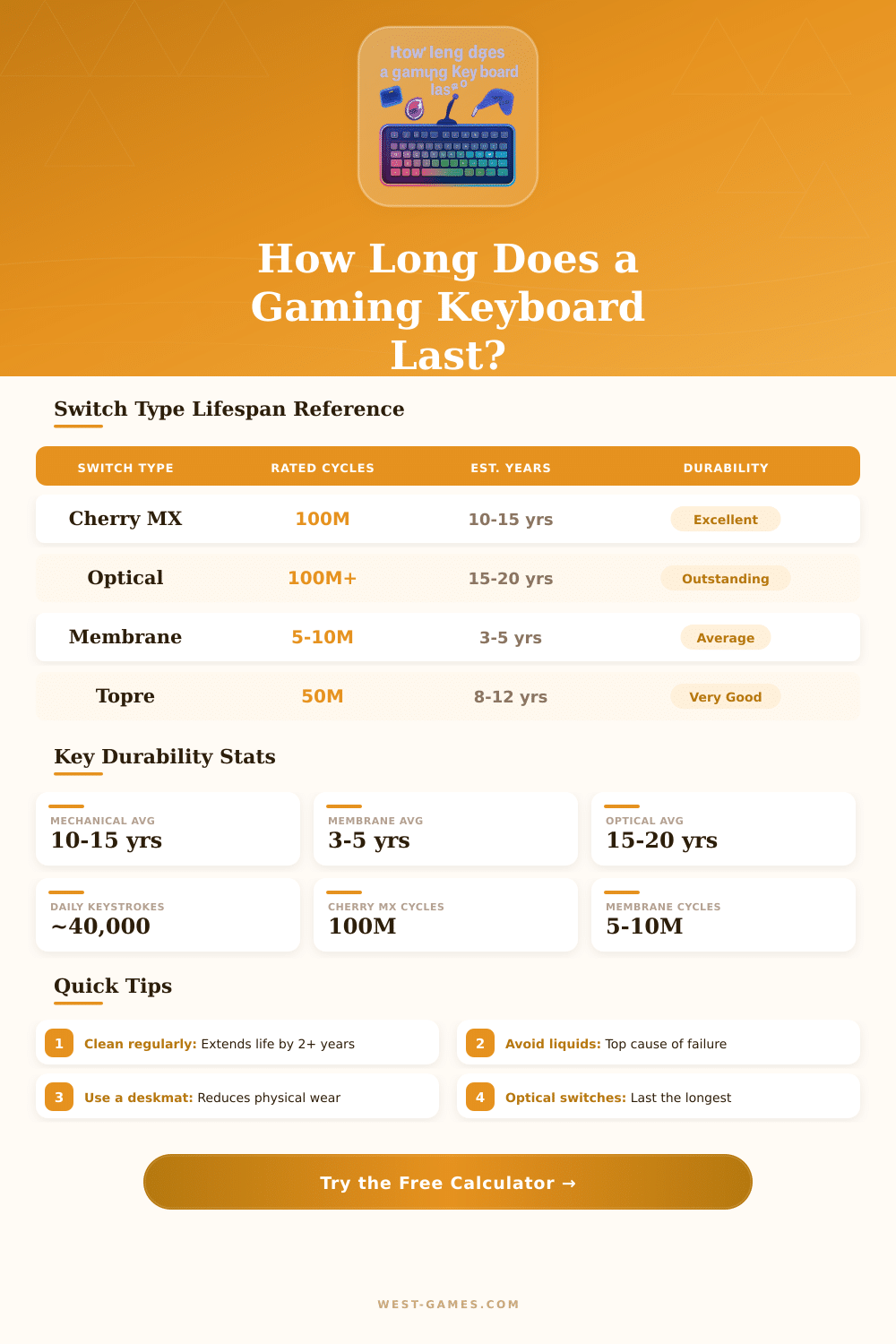
| Switch Type | Rated Actuations | Est. Lifespan (avg use) | Gaming Suitability | Durability |
|---|---|---|---|---|
| Cherry MX (Linear/Tactile) | 100 million | 10–15 years | Excellent | |
| Cherry MX Blue (Clicky) | 100 million | 10–15 years | Good | |
| Optical Switch | 100 million+ | 15–20 years | Excellent | |
| Hall Effect Magnetic | 100 million+ | 15–25 years | Excellent | |
| Topre Electrostatic | 50 million | 8–12 years | Very Good | |
| Membrane (standard) | 5–10 million | 3–5 years | Average | |
| Membrane (gaming grade) | 10–20 million | 5–7 years | Good | |
| Scissor Switch | 5–10 million | 3–6 years | Average | |
| Gateron Yellow | 50 million | 8–12 years | Excellent | |
| Razer Opto-Mechanical | 100 million | 12–18 years | Excellent |
| Factor | Impact on Lifespan | Description |
|---|---|---|
| Switch Type | +50% to –70% | Optical and hall effect outlast membrane significantly |
| Daily Usage Hours | Linear reduction | Each extra hour/day reduces total years proportionally |
| Keycap Legends Wear | Cosmetic, 2–5 yrs | Double-shot PBT keycaps last much longer than ABS legends |
| Liquid Exposure | –80% or instant death | Most common cause of premature keyboard failure |
| Dust & Debris | –10% to –30% | Builds up under keycaps, causes switch issues over time |
| Maintenance / Cleaning | +15% to +40% | Regular cleaning significantly extends life of all keyboard types |
| Build Quality | +20% to +60% | Aluminum frames, POM plates, and quality PCBs last longer |
| Keycap Material | Cosmetic factor | PBT keycaps outlast ABS; legends last 5+ years vs 1–2 years |
| Hot-Swap PCB | Extends indefinitely | Replace worn switches without soldering – virtually endless life |
| UV / Direct Sunlight | –15% cosmetic | Yellows ABS plastic, can affect rubber membrane material |
| Keycap Type | Material | Legend Method | Legend Lifespan | Rating |
|---|---|---|---|---|
| Double-Shot PBT | PBT Plastic | Molded 2-layer | Never fades | |
| Double-Shot ABS | ABS Plastic | Molded 2-layer | Never fades (gets shiny) | |
| Dye-Sublimated PBT | PBT Plastic | Heat-dyed ink | 5–10+ years | |
| Laser-Engraved | ABS or PBT | Engraved + infill | 3–6 years | |
| Pad-Printed ABS | ABS Plastic | Surface printed | 6–18 months |
A gaming keyboard in short words is a mechanical model with very low delay of input and reduced ghosting at the keys. Wireless keyboards indeed suffer a bit of delay because of the absence of cable link. Anti-ghosting forms a mainstream advantage that allows to press several keys at once without conflict, and that is needed for play with fast moves.
Mechanical keyboards give much more pleasant typing feeling than those on tablets, and they serve for a long time. Companies usually apply the color switch system of Cherry MX when one chooses switches. Red switches slip smooth and easily.
How to Choose a Gaming Keyboard
Blue switches click and have a bumpy feel. Brown switches combine smooth with a bump. Black switches sometimes hamper the transition through long gaming sessions.
Know your preferences about types of switches before you buy.
The form of the keyboard forms another key spot. One finds full-size keyboards, models without numerical pad that drops the numerical section, and 60-percent versions that keep only the mainstream keys and maybe the functions. Little keyboards work well for carrying with you.
A compact gaming keyboard commonly connects by Bluetooth and charges by USB-C, even though it lacks a numerical path and the layout can seem a bit pressed because of teh limited space.
RGB lighting usually matters to have, because it helps to see the keys in darkness. The Corsair K55 RGB gaming keyboard offers resistance against dust and water, six programmable macro keys, dedicated keys for media and a removable wrist rest. It originally costs around fifty dollars, but one finds it in stores for around forty.
GameStop also offers a wired tablet RGB gaming keyboard with a seven-button RGB wired gaming mouse in purple tone, that works for players of all levels.
The GameStop GS200 RGB mechanical gaming keyboard includes Outemu brown switches and 1000 Hz polling rate. Also budget options exist. Redragon offers wired and wireless gaming keyboards, among witch are hot swappable models, 60-percent layouts, full-size versions and keyboards with magnetic switches, everything in prices friendly to the pocket.
The Redragon K585 has a one-hand design with 42 keys, made for FPS games and those with heavy macros.
The kind of games affects the choice of keyboard. In combat games one requires precise and steady setup to execute combinations. For casual, indie and single-player games comfort, key quality and features matter more than tiny speed prizes.
FPS players find a strong option in the Logitech G915 TKL with linear switches. It forms a low-profile mechanical gaming keyboard with a very short trigger distance and little resistance at the switches. The battery life also can be good, the Lemokey L3 reaches up to 200 hours without lighting, although it is not really aimed at players as some others.
High-end gaming keyboards from Logitech, Corsair and Razer commonly come with extras like LED backlighting, macro keys and sometimes even LCD screens. Those extras can raise the price. It matters more to choose the most comfortable gaming keyboard thanrun after tiny speed differences, that will not change the result of most games.