🎮 PS4 Controller Warranty Calculator
Check if your DualShock 4 or PS4 controller is still covered — get your expiry date & days remaining
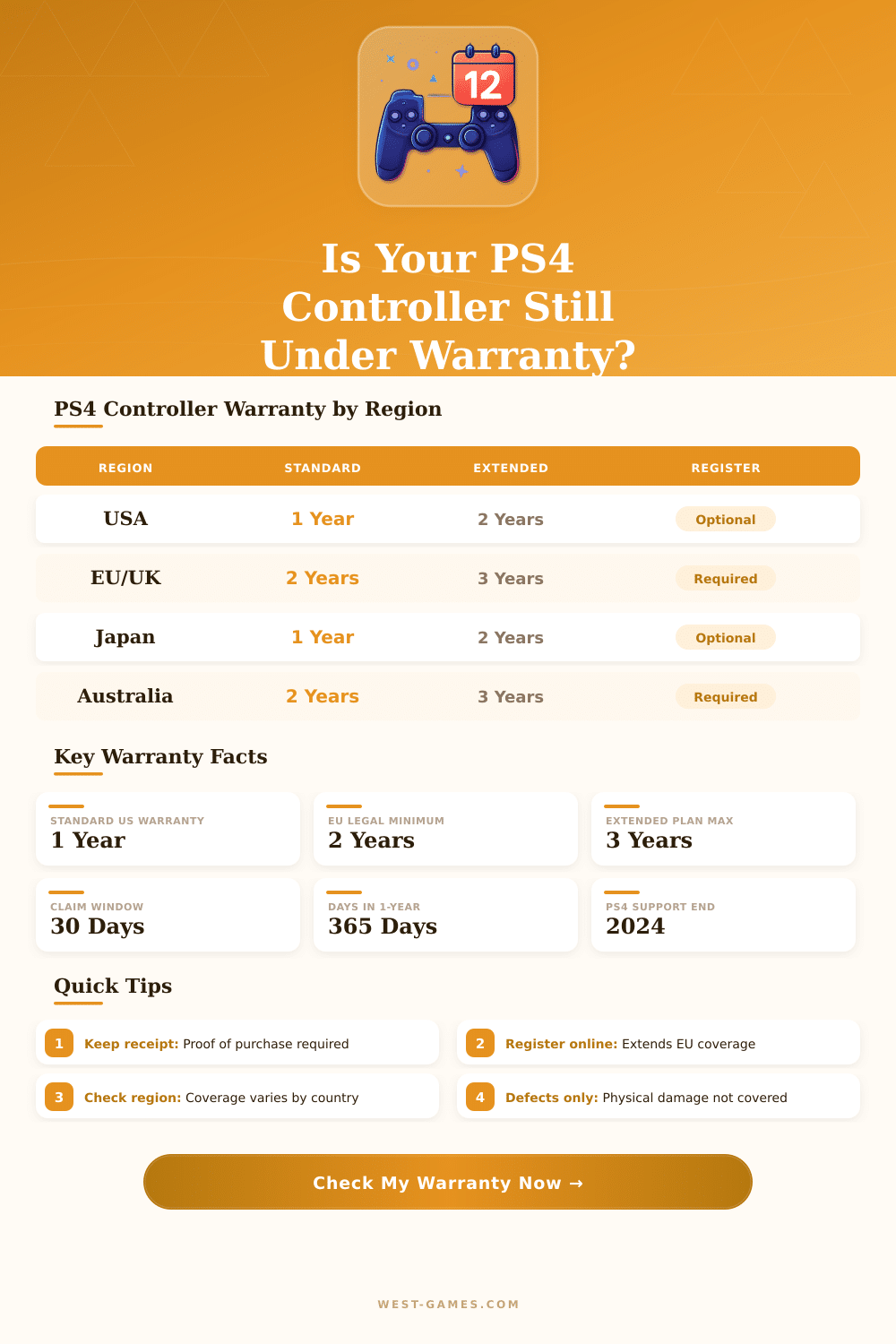
| Region | Standard Warranty | With Extended Plan | Legal Basis | Registration Required? |
|---|---|---|---|---|
| United States | 1 Year (365 days) | Up to 3 Years | Sony Limited Warranty | No (optional) |
| European Union | 2 Years (730 days) | Up to 3 Years | EU Consumer Directive | Recommended |
| United Kingdom | 2 Years (730 days) | Up to 3 Years | Consumer Rights Act 2015 | No |
| Australia / NZ | 2 Years (730 days) | Up to 3 Years | Australian Consumer Law | No |
| Japan | 1 Year (365 days) | Up to 2 Years | Sony Japan Limited Warranty | No |
| Canada | 1 Year (365 days) | Up to 3 Years | Sony Canada Warranty | No |
| Issue Type | Covered? | Details |
|---|---|---|
| Manufacturing defects | ✅ Yes | Buttons, analog sticks, triggers that fail without damage |
| Analog stick drift (manufacturing) | ✅ Yes | If caused by defect within warranty period |
| Connectivity issues (hardware) | ✅ Yes | Bluetooth or USB port failures from manufacture |
| Battery not charging (defect) | ✅ Yes | Internal battery defects within warranty |
| Physical damage (drops, cracks) | ❌ No | Accidental damage is excluded from standard coverage |
| Normal wear and tear | ❌ No | Worn grips, faded paint are excluded |
| Liquid / water damage | ❌ No | Spills and moisture damage not covered |
| Third-party repairs | ❌ No | Voids warranty immediately |
| Analog drift (from heavy use) | ⚠ Maybe | Varies by region; EU has stronger consumer protections |
| Step | Action | What You Need | Time Estimate |
|---|---|---|---|
| 1 | Confirm still in warranty period | Purchase date, receipt | 1 min (use this calculator) |
| 2 | Contact Sony Support | PlayStation.com or 1-800-345-7669 (US) | 15–30 min |
| 3 | Provide proof of purchase | Original receipt or order email | Immediate |
| 4 | Ship or drop off controller | Prepaid label (US) or local repair center | 1–3 business days |
| 5 | Receive repair or replacement | N/A — Sony handles | 7–14 business days |
The DualShock 4 is the standard controller for the PS4. It offers a wide range of colours, that allows you to choose according to your taste. Every new PS4 console comes with one controller in the box because that makes sense after everything the controller stays the basic way to use the console for anything.
The DualShock 4 has an accelerometer and gyroscope, that detects motions, tilts and turns. It works with both the PS4 and computer. The controller sits comfortably in the hand and has good weight.
All About the DualShock 4 Controller
The touchpad is a nice feature, even though for most games it almost does not exist. One could use it much more often, especially in menus. The PlayStation-camera and the button for sharing makes social networks and play with friends easier.
The first set of DualShock 4 controllers had rough black buttons together with thick thumb-pads, that stopped the light-bar from shining through. The updaetd version should be of higher quality, with visible light-bar above the touchpad. The new DualShock 4, that comes with the Slim and Pro versions, adds new features.
When one connects it through USB to the PS4, the connection passes through USB, what gives lower delay than Bluetooth.
Compared to the DualSense, the buttons of DualShock 4 seem flat and even because they rest on flat round surface. The buttons of DualSense and the D-pad feels a bit heavy and hard too press. The round button of DualSense leans truly on the side of the controller.
Off-brand PS4 controllers often fail or break. There is nothing as good as a cheap PS4 controller. Many of them suffer from slow input and feel big and lightweight.
They also lack the official PS4 calibration for dead zone. One off-brand controller stopped charging after six months. Refurbished controllers from GameStop cost less than new and work much better than those of other brands.
The original Sony controller stays the best in many ways and deserves the extra cost.
Finding real DualShock 4 controllers can be hard. They are missing in many regions and cost quite a lot in certain stores. Sony stopped making them in big lots, although small amounts come out sometimes.
Other controllers happen to show up brand-new and factory sealed on eBay for about forty-eight dollars each.
Connecting a PS4 controller to computer is fairly easy. It works through Bluetooth and USB. In Steam, simply go to settings, then to controllers and turn on the option for PS4 controller.
Holding the PS and Share-buttons together, you put the controller in pairing mode. A program called DS4Windows can help, making games believe that the PS4 controller is an Xbox One, what improves the support.
To restart a PS4 controller, use the small button on the left. A paper clip helps to press and hold it some seconds. To check if the controller works, look if the light-bar flashes up, andensure that every button reacts on the screen.