🖥️ Gaming Monitor Lifespan Calculator
Estimate how long your gaming monitor will last based on panel type, usage, and care habits
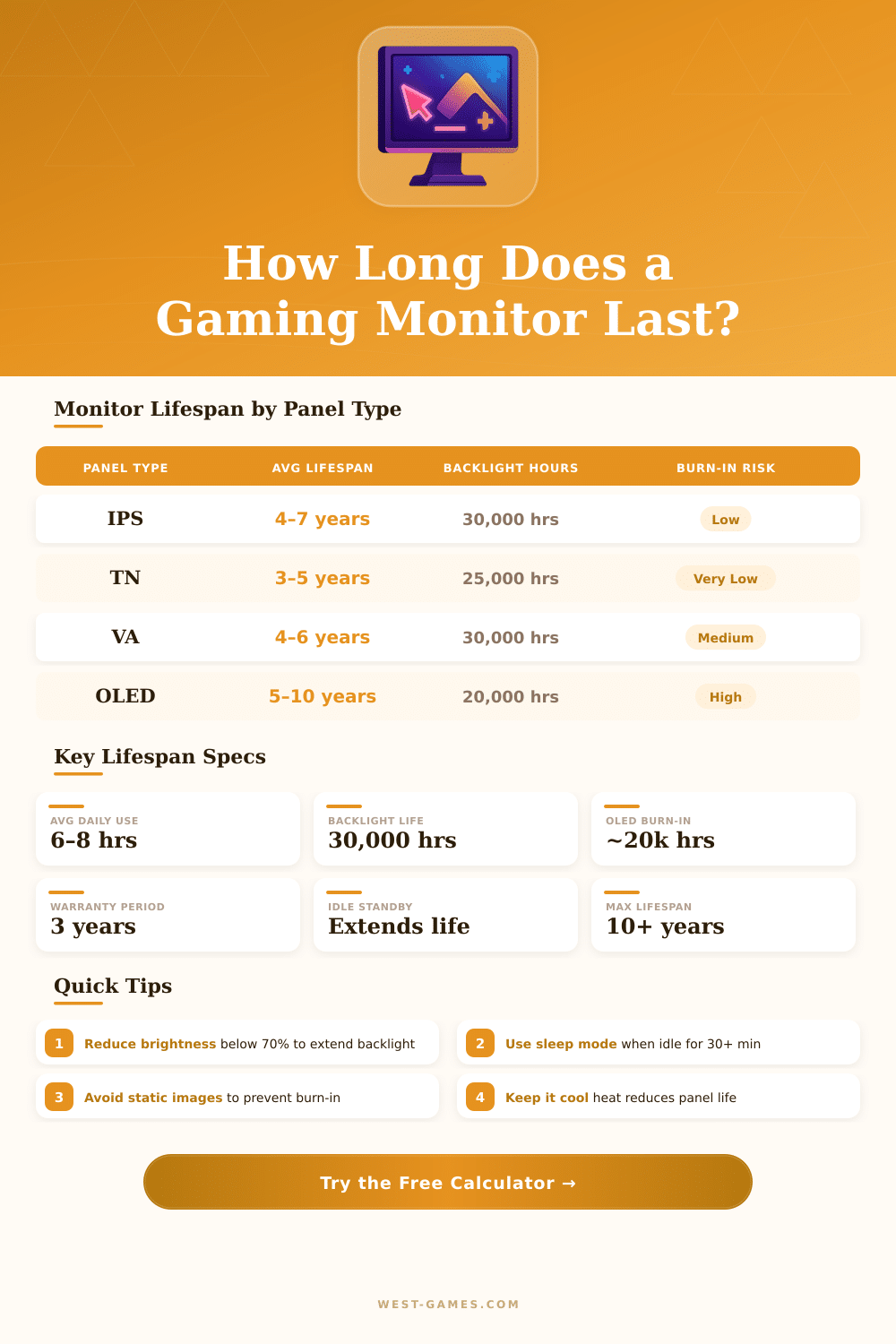
| Panel Type | Avg Lifespan | Backlight Hours | Burn-in Risk | Best For |
|---|---|---|---|---|
| IPS | 4–7 years | 30,000 hrs | Very Low | Color accuracy, general gaming |
| TN | 3–5 years | 25,000 hrs | Very Low | Competitive / high refresh rate |
| VA | 4–6 years | 30,000 hrs | Low | Dark scenes, contrast ratio |
| OLED | 5–10 years | 20,000 hrs | High (image retention) | Premium visuals, HDR gaming |
| QLED / Mini-LED | 7–12 years | 50,000 hrs | Very Low | Brightness, longevity |
| Brightness Level | Typical Setting | Life Impact | Equivalent Lifespan Adjustment |
|---|---|---|---|
| Low (under 40%) | 80–120 nits | +30% longer | Add ~1.5–2 years |
| Medium (40–70%) | 150–250 nits | Baseline | No adjustment |
| High (70–90%) | 280–380 nits | –15% shorter | Subtract ~0.5–1 year |
| Max (100%) | 400+ nits | –30% shorter | Subtract ~1.5–2 years |
| Daily Hours | Annual Hours | Estimated Lifespan | User Profile |
|---|---|---|---|
| 2 hrs/day | 730 hrs/yr | ~10–12 years | Casual / light user |
| 4 hrs/day | 1,460 hrs/yr | ~7–9 years | Regular gamer |
| 6 hrs/day | 2,190 hrs/yr | ~5–7 years | Dedicated gamer |
| 8 hrs/day | 2,920 hrs/yr | ~4–5 years | Hardcore / streamer |
| 12 hrs/day | 4,380 hrs/yr | ~2–3 years | Always-on / professional |
| 16+ hrs/day | 5,840+ hrs/yr | ~1.5–2 years | Commercial display use |
Gaming Monitor is not just any screen, it is made specially to get the best output from your graphics card and chip while you play. Choosing the right model really does make a big difference, and your graphics card is one of the first things that is worth thinking about before you even think about buying.
There are some kinds of panels that really matter. IPS panels give the most precise colour that you can find. What about VA panels?
How to choose a gaming monitor
They commonly reach those deep, black tones. TN panels usually win when it comes to response time. And then there is OLED, that really bloomed in the last years.
Especially the QD-OLED technology turned many heads. Right now, 27-inch 1440p 240Hz OLED Gaming Monitor is almost exactly what players want.
The refresh rate is where everything gets serious. Today you have options from 144 Hz up to 300 Hz and even more. Combining 240 Hz refresh with response time of 0.03 ms gives incredibly clear image during intense, fast actions, fewer blur and ghosts in competitive shooters.
If you care about e-sports titles like CS:GO or Valorant, search for something with fast reactions and features like DyAc. Otherwise, curved OLED screens in 34 inches or bigger really shine.
Resolution and size of the screen both affect the whole experience. 1440p sits between the simplicity of 1080p and the density of 4K pixels, some kind of ideal. A 27-inch 1440p IPS panel running at 165 Hz works well for everthing from Valorant to Warzone, and single-player titles look great on it.
You can go up to 4K at 240 Hz, if you are ready to spend more, because such monitors have a high price.
FreeSync and G-Sync match the refresh rate of your Gaming Monitor with the output of your graphics card, which really helps. FreeSync works well with AMD cards and reduces tearing. If you choose the FreeSync option, a DisplayPort link is almost needed to reduce tearing and sync problems.
Even so, when your refresh gets quite high, some say that G-Sync matters less, unless you want professional e-sports level.
Curved monitors give you that extra feeling of being there, that flat screens simply cannot reach. There are really good OLED curved options in 45, 39 and 34 inches with similar specs across the line: 3440×1440 resolution, 240 Hz and 800R curve. Ultrawide screens around 34 inches became quite popular, with good choices from Samsung and Gigabyte in the price of 350 too 500 dollars.
A Gaming Monitor works surprisingly well with Steam Deck. Connecting it to an outside screen opens a whole new world, everything looks bigger, more real and the detail jumps from the image easy. Some models even have built-in eye tracking, that creates a 3D effect without glasses, and others runSteam for games like Baldur’s Gate 3.