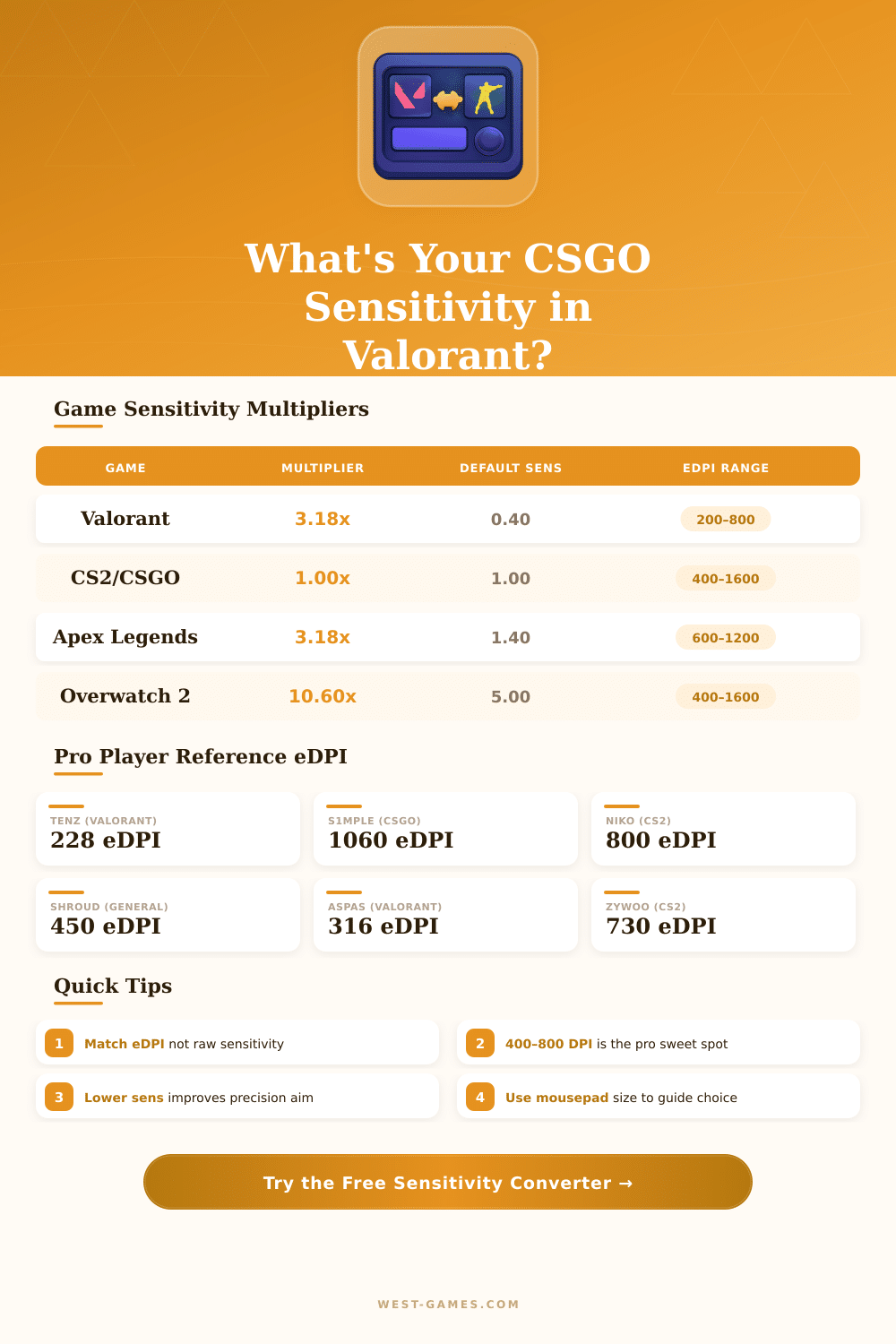
🎯 Valorant ↔ CS2/CSGO Sensitivity Converter
Convert your mouse sensitivity between Valorant and CS2/CSGO with precise eDPI matching
| Player | Game | DPI | In-Game Sens | eDPI | 360° (cm) |
|---|---|---|---|---|---|
| TenZ | Valorant | 800 | 0.285 | 228 | ~64 cm |
| Aspas | Valorant | 800 | 0.395 | 316 | ~46 cm |
| Derke | Valorant | 800 | 0.44 | 352 | ~41 cm |
| nAts | Valorant | 400 | 0.80 | 320 | ~45 cm |
| s1mple | CSGO/CS2 | 400 | 3.09 | 1236 | ~19 cm |
| NiKo | CS2 | 400 | 1.25 | 500 | ~46 cm |
| ZywOo | CS2 | 400 | 2.00 | 800 | ~29 cm |
| device | CS2 | 400 | 1.10 | 440 | ~52 cm |
| From | To | Multiplier | Formula |
|---|---|---|---|
| Valorant | CS2/CSGO | 3.1818 | CS = Val × 3.1818 |
| CS2/CSGO | Valorant | 0.3143 | Val = CS ÷ 3.1818 |
| Valorant | Apex Legends | 1.0000 | Apex = Val × 1.0 (same engine scale) |
| Valorant | Overwatch 2 | 10.600 | OW2 = Val × 10.6 |
| CS2/CSGO | Apex Legends | 0.3143 | Apex = CS ÷ 3.1818 |
| CS2/CSGO | Overwatch 2 | 3.3333 | OW2 = CS × 3.333 |
| DPI | Val Sens for 320 eDPI | CS2 Equivalent | 360° Distance (cm) |
|---|---|---|---|
| 400 | 0.80 | 2.545 | ~45 cm |
| 800 | 0.40 | 1.273 | ~45 cm |
| 1000 | 0.32 | 1.018 | ~45 cm |
| 1200 | 0.267 | 0.849 | ~45 cm |
| 1600 | 0.20 | 0.636 | ~45 cm |
| 3200 | 0.10 | 0.318 | ~45 cm |
All those tips base on real experiences from gaming groups and tools for changing Sensitivity.
Switching between Valorant and CSGO can hurt your accuracy if you do not mind the Sensitivity settings. Truly, it is one of those things that matters a lot in tournaments. Getting it right helps to shoot exactly and move on the map without that sad mismatch.
How to Convert Sensitivity Between Valorant and CSGO
The main secret? Changing Sensitivity between those games is not hard, when you understand the numbers behind it.
The basic multiplier that each uses is 3.18. Want to go from Valorant to CS2 or CSGO? Multiply your Sensitivity in Valorant by 3.18.
For example, Sensitivity of 1.5 in Valorant gives around 4.77 in CS2. To go the other way it is just as simple. Take your Sensitivity from CSGO and divide it by 3.18, to find the value in Valorant.
So, if you have 400 DPI with Sensitivity 2 in CSGO, you will get around 0.629 in Valorant after the division.
There is also another method, that goes around and works almost the same. Multiply your Sensitivity in CSGO by 11, then divide the result by 35. That gives the Sensitivity for Valorant.
After the calculation, round it to three decimals and enter it in your settnigs.
In CSGO, Sensitivity can be between 0.1 and 10, with 1 as default value to start. Valorant is similar in that range. You can change Sensitivity in CSGO with console commands or simply through the menu, if it is simpler.
In Valorant, all controls four Sensitivity are found under the section Keyboard/Mouse.
The good part is, that on the net there are free converters, that do everything for you right away. Enter your current values, and out comes the new Sensitivity. Those programs show also useful info like cm/360 or in/360…
So, how many centimeters or inches you must move the mouse for a full turn in 360 degrees. Programs like Aimlabs go further, with Universal Sens Finder, that lets you do practice runs in different sensitivities to find the best.
But stretched resolutions bring problems. Playing in 4:3 stretched makes everything seem bigger and fast, though targets are not really closer. The horizontal moves more quickly because of the stretched resolution, and that mixes the conversions.
Setting the value m_yaw in CSGO helps to smooth it. If you use stretched resolution, the multiplier 3.18 stays a good start, but you probably will find bigger mistakes in the conversions than with normal resolutions.
Other players prefer higher Sensitivity in Valorant, because fights happen more closely. Not always do you need to perfectly match Sensitivity between the games, they simply are different. Some play with 0.5 in Valorant and 1.5 in CSGO without problems.
Zoom Sensitivity converts differently. For example, 1.0 zoom Sensitivity in Valorant matches toaround 0.819 in CSGO.