📷 FOV Calculator for Camera Lenses
Calculate horizontal, vertical & diagonal field of view from focal length, sensor size & subject distance
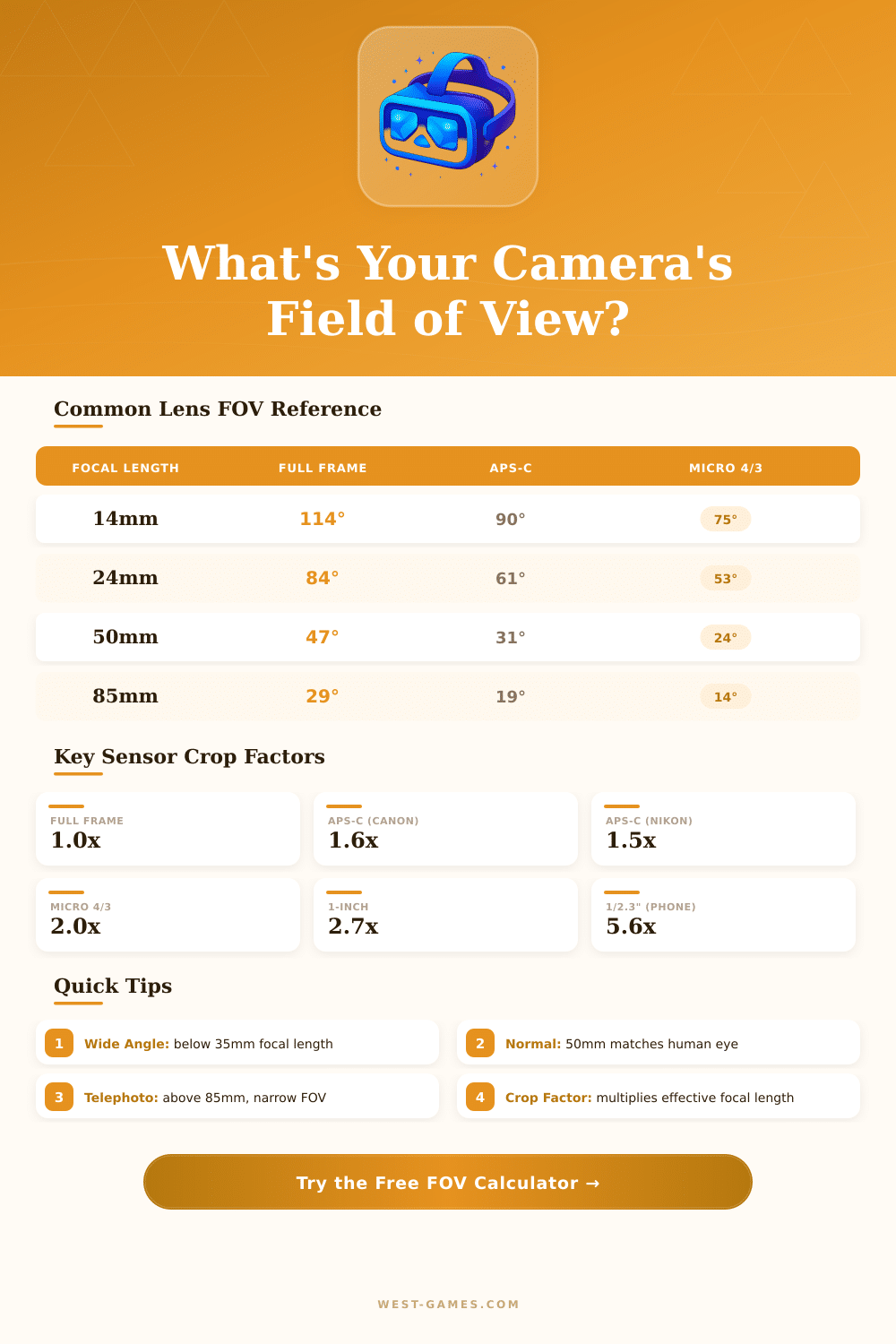
| Focal Length | Horiz. FOV | Vert. FOV | Diag. FOV | Category |
|---|---|---|---|---|
| 8mm (fisheye) | 180° | 180° | 180° | Fisheye |
| 14mm | 114° | 81° | 114° | Ultra-Wide |
| 16mm | 108° | 76° | 107° | Ultra-Wide |
| 20mm | 94° | 67° | 94° | Ultra-Wide |
| 24mm | 84° | 60° | 84° | Wide Angle |
| 28mm | 75° | 53° | 75° | Wide Angle |
| 35mm | 63° | 44° | 63° | Wide-Normal |
| 50mm | 47° | 32° | 47° | Standard Normal |
| 85mm | 29° | 19° | 29° | Short Telephoto |
| 105mm | 23° | 15° | 23° | Telephoto |
| 135mm | 18° | 12° | 18° | Telephoto |
| 200mm | 12° | 8° | 12° | Long Telephoto |
| 300mm | 8° | 5.5° | 8° | Super Telephoto |
| 500mm | 5° | 3.3° | 5° | Super Telephoto |
| Distance | Horiz. Coverage | Vert. Coverage | Use Case |
|---|---|---|---|
| 1m / 3.3ft | 1.56m / 5.1ft | 1.04m / 3.4ft | Close-up product |
| 2m / 6.6ft | 3.11m / 10.2ft | 2.07m / 6.8ft | Portrait full body |
| 5m / 16.4ft | 7.78m / 25.5ft | 5.19m / 17ft | Group photo |
| 10m / 32.8ft | 15.56m / 51ft | 10.37m / 34ft | Interior/arch. |
| 20m / 65.6ft | 31.1m / 102ft | 20.75m / 68ft | Street scene |
| 50m / 164ft | 77.8m / 255ft | 51.9m / 170ft | Event/sports |
| 100m / 328ft | 155.6m / 510ft | 103.7m / 340ft | Landscape wide |
| Application | Recommended FOV | Focal Length (eq.) | Sensor |
|---|---|---|---|
| YouTube Vlog | 70° – 90° | 20–28mm FF | Full Frame / APS-C |
| Security Cam (wide) | 90° – 120° | 2.8–4mm | 1/2.7" or 1/3" |
| Security Cam (narrow) | 25° – 40° | 8–12mm | 1/2.7" or 1/3" |
| Drone Aerial | 75° – 94° | 24mm (1-inch) | 1-inch |
| Live Streaming | 60° – 80° | 24–35mm FF | Full Frame |
| Sports / Wildlife | 5° – 15° | 200–600mm FF | Full Frame / APS-C |
| Architecture | 84° – 114° | 14–24mm FF | Full Frame |
| Portrait Studio | 24° – 35° | 70–105mm FF | Full Frame |
The calculator for FOV is a practical tool that helps to find the right field of view settings. It works by taking information about the size of the screen, the distance to it and the ratio of the screen. The idea itself is quite basic.
Imagine that you look through a window: the more close you stand to it the more of the outside world you can see. Also, a big window gives a clearer view. Just like this the calculators of FOV work, they show you the exact value based on the size of your monitor and the distance where you sit.
How FOV Calculators Work
Calculators for FOV enjoy big popularity among sim racers. Skilled players always use only fake races with the correct field of view settings. A special calculator for sim racing supports single, curved and three-screen setups for almost all games in that type.
Choosing the right FOV has a big effcet on the driving skill. That helps to create a safe feeling in the sim, which results in faster and steady play.
Some of those calculators are especially easy. They find the exact field of sight based on the size of the monitor and the distance of the viewer. Others go further and allow you to convert between horizontal and vertical FOV, even to get game-specific values in FPS-games or sim racing titles.
If a game requires vertical FOV, the calculator can change a normal horizontal value to vertical. Such features are useful, because sum simulators require horizontal values, while others insist on vertical.
Typical inputs store the ratio of the screen, for example 16:10 or 32:10, the size in inches, the distance in centimetres or inches, and whether it is about a single screen or multi-screen system. In case of three-screen setups, one can find horizontal FOV, vertical FOV and the angles of the views.
Even so, not everyone feels comfortable with the exact FOV. It is not always easy to adapt to the real 1:1 FOV on a single screen. Sometimes the correct value causes trouble, if the monitor is too small or the seat too far.
Raising the FOV becomes a compromise, but too high a level can remove the feeling of side movement. Some values maybe will seem stretched in speed, and too low FOV can fully remove the feeling of motion.
Also for cameras there are calculators of FOV. They estimate the field of sight for a Camera system based on given details like the focal length of the lens, the size of the sensor and the rotation. That helps preview what the lens of a Camera manages to fit at a certain distance.
In games on Source-engines, the setup of the ratio happens by expanding the horizontal FOV to keep the vertical FOV the same. That gives an edge to players with wider screens compared to those that use the same FOV-value. For games in Steam, one can set launch options to change the default FOV.
The standard value is 90 for 4:3, and online calculators of FOV help to find the right number for other ratios. Calculators for FOV above 180 degrees can create confusion, which happens often inthree-screen setups, where the whole FOV reaches 190 degrees or even more.