📺 CRT Refresh Rate Calculator
Calculate maximum refresh rate, required bandwidth & horizontal sync frequency for your CRT monitor
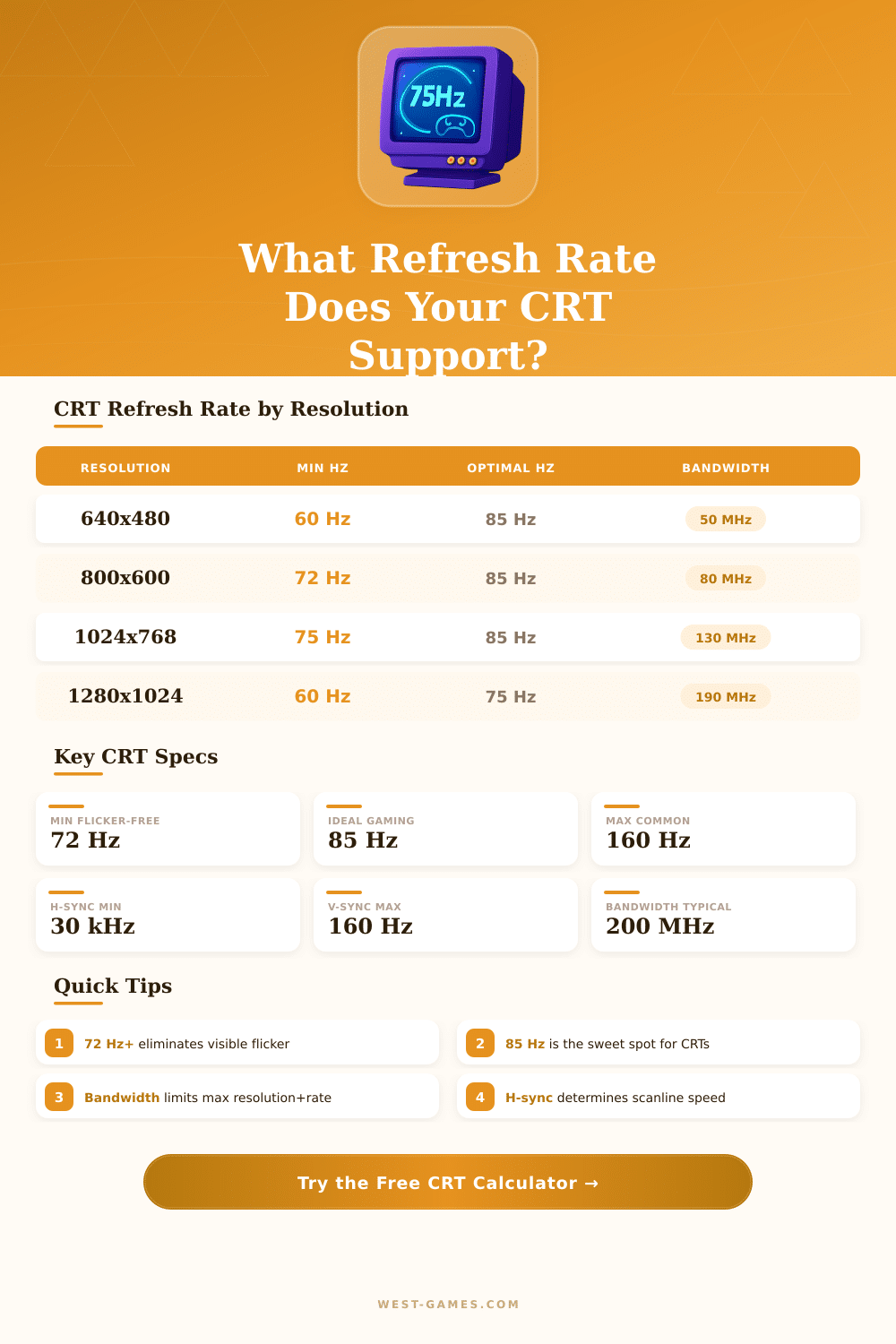
| Resolution | Min Bandwidth | H-Sync (kHz) | Max Refresh | Flicker Status |
|---|---|---|---|---|
| 640 × 480 | 28 MHz | 31.5 kHz | 85 Hz | Flicker-Free |
| 800 × 600 | 50 MHz | 48.0 kHz | 85 Hz | Flicker-Free |
| 1024 × 768 | 80 MHz | 60.0 kHz | 75 Hz | Flicker-Free |
| 1024 × 768 | 130 MHz | 68.7 kHz | 85 Hz | Flicker-Free |
| 1280 × 1024 | 135 MHz | 80.0 kHz | 75 Hz | Flicker-Free |
| 1280 × 1024 | 190 MHz | 91.1 kHz | 85 Hz | Flicker-Free |
| 1600 × 1200 | 202 MHz | 93.8 kHz | 75 Hz | Flicker-Free |
| 1600 × 1200 | 300 MHz | 106.3 kHz | 85 Hz | Flicker-Free |
| 1920 × 1440 | 340 MHz | 112.5 kHz | 75 Hz | Needs High-BW |
| 640 × 480 | 13 MHz | 15.6 kHz | 29 Hz | Flickering |
| Monitor Class | Max Bandwidth | Max H-Sync | Max V-Sync | Era |
|---|---|---|---|---|
| Budget 14" CRT | 50 MHz | 38 kHz | 90 Hz | 1990s |
| Mid-Range 15" CRT | 80 MHz | 56 kHz | 100 Hz | 1995–2000 |
| Standard 17" CRT | 135 MHz | 81 kHz | 120 Hz | 1998–2003 |
| Professional 19" CRT | 202 MHz | 96 kHz | 140 Hz | 1999–2004 |
| High-End 21" CRT | 300 MHz | 121 kHz | 160 Hz | 2000–2005 |
| Broadcast 24" CRT | 400 MHz | 150 kHz | 200 Hz | 2001–2006 |
Note: This article is based on real technical talks and conversations about Refresh Rate of CRT.
CRT monitors have a flexible link between resolution and Refresh Rate. Almost each of them can reach at least 75 Hz. Many of those devices accept higher frequency, when one lowers the resolution.
How CRT Refresh Rate and Resolution Work Together
Like this, if some monitor works with 1600×1200 at 75 Hz, it probably reaches 1400×1050 at 85 Hz. The main thing is about the horizontal scan rate. At CRT, the Refresh Rate and resolution that it can use, depend entirely on that scan rate.
Using advanced CRT monitors with scan rates of 120 kHz or more helps to expand both resolution and Refresh Rate.
During the time of CRT, the Refresh Rate range between around 50 and 160 Hz. Some screen models barely reached 65 Hz, but the best tubes from Mitsubishi and Sony managed 120 Hz or even more. The most many users chose frequencies bewteen 70 and 100 Hz.
Among those, 75 Hz was the most common. To get gear that backs stronger signal and higher frequencies, takes a bit of research and spending more money.
In low Refresh Rate, CRT monitors work with truly amazing resolutions, for instance 5760×4320. At high frequencies without flickering, they still handle really big resolutions like 4096×3072. Those monitors do not care truly about the horizontal resolution, so in theory it is possible too address infinite pixels in one line.
CRT monitors do not have a fixed resolution, only maximum. They look the same at any resolution. Old video games were made like this, that they work well on CRT monitors.
In motion clarity, 85 Hz at CRT are much more smooth than 144 Hz at LCD. When talking about input delay, even the best LCD monitors stay always 3 to 4 milliseconds behind CRT.
At CRT, 60 Hz show very clearly and can hurt the eyes. Low Refresh Rate cause strong tension for the eyes. If one keeps the frequency above 85 Hz, that helps to stop headaches.
The difference between 60 Hz and 85 Hz at a still image is easily noticed.
The maximum Refresh Rate at CRT monitors reach around 150 to 170 Hz. The horizontal scan rate forms the main technical limit, not the vertical. For instance, one CRT limits to 160 Hz in 800×600 resolution.
Frequencies of 144 Hz and up happened quite commonly at advanced CRT monitors from the late 1990s to the early 2000s. Most CRT monitors from the 2000s can do 100 Hz or 120 Hz. When a certain resolution and Refresh Rate do not appear in the list, one can create own settings in the control panel of Nvidia or AMD using those values. Some Refresh Rate can hide, if the system settings are set to hide modes, that the monitor supposedly can not show.
A monitor with horizontal scan rate of 96 kHz at 1280×1024 gives a Refresh Rate of around 89 Hz. Historically, Refresh Rate of CRT played an important role in programs for video games. Running CRT at higher levels of wear depends on the mix between resolution and Refresh Rate.
For instance, 640×480 at 150 Hz causes similar wear as 1280×1024 at 70 Hz, because double the number of lines at half the frequency results almost inthe same amount of lines each second.