🌡️ GPU Thermal Paste Lifespan Calculator
Find out when your GPU thermal paste needs replacing based on your usage habits and environment
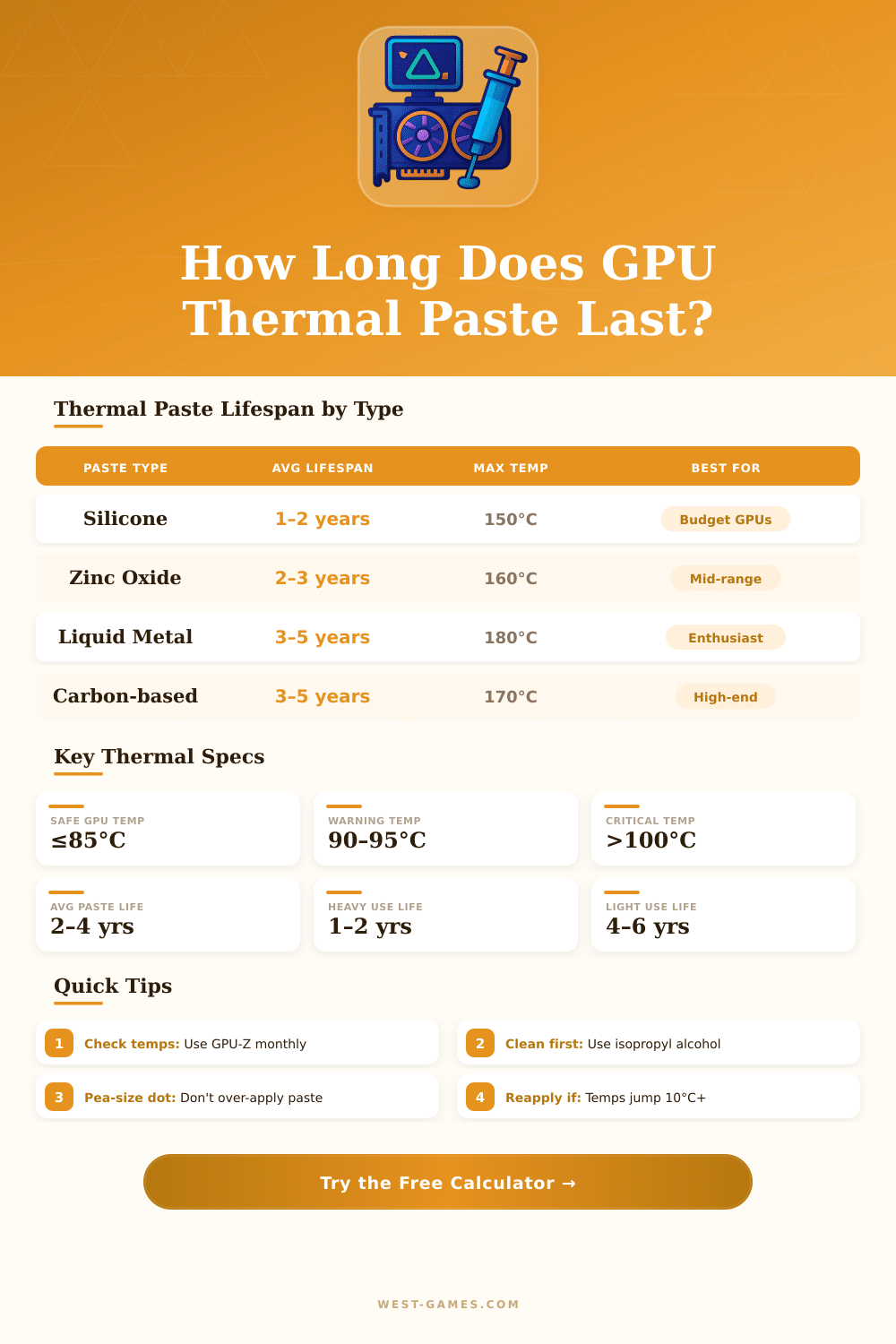
| Paste Type | Base Lifespan | Heavy Use | Conductivity | Electrically Safe | Status |
|---|---|---|---|---|---|
| Silicone-based | 1–2 years | 6–12 months | ~4 W/mK | ✅ Yes | Budget |
| Zinc Oxide | 2–3 years | 1–2 years | ~6 W/mK | ✅ Yes | Good |
| Carbon / Silver Compound | 3–5 years | 2–3 years | 8–12 W/mK | ✅ Yes | Excellent |
| Liquid Metal (Gallium) | 4–6 years | 3–4 years | 73–80 W/mK | ❌ No | Best |
| Graphene Pads | 5–8 years | 4–5 years | ~6 W/mK | ✅ Yes | Durable |
| Symptom | Likely Cause | Urgency | Action |
|---|---|---|---|
| Temps up 10°C+ vs before | Dried / cracked paste | High | Replace immediately |
| Thermal throttling | Poor heat transfer | Critical | Replace + clean heatsink |
| Fan noise increases | GPU overheating | Medium | Check temps, replace if high |
| GPU over 3 years old | Paste aging normally | Medium | Inspect & replace proactively |
| Random crashes under load | Thermal shutdown | Critical | Check temps + replace paste |
| Visible paste cracking | Paste fully dried out | High | Replace immediately |
🧪 Cleaning: Use 90%+ isopropyl alcohol and a lint-free cloth or cotton swab. Clean both the GPU die and heatsink base thoroughly before reapplication.
⚠️ Liquid Metal Warning: Never use liquid metal on aluminum heatsinks (galvanic corrosion). Only use on copper or nickel-plated surfaces and keep away from PCB components.
| Usage Type | Hours/Day | Silicone | Carbon/Silver | Liquid Metal |
|---|---|---|---|---|
| 💻 Office / Browsing | 1–3 hrs | 2–3 years | 5–7 years | 6–8 years |
| 🎮 Casual Gaming | 2–4 hrs | 1.5–2 years | 3–5 years | 4–6 years |
| 🔥 Heavy Gaming | 6–10 hrs | 1–1.5 years | 2–3 years | 3–4 years |
| 🖥️ Workstation | 8–12 hrs | 10–14 months | 2–3 years | 3–5 years |
| ⛏️ Crypto Mining | 24 hrs | 6–10 months | 1–1.5 years | 2–3 years |
Note: This text is based on actual experience and practical advice from discussions in PC-hardware-forums.
Thermal Paste for GPU is material that fills the little spaces between the heatsink and the chip of the GPU itself. It ensures good contact, so that the heat goes well. Not necessarily required to use exactly Thermal Paste, but something must fill the gap between the GPU and the cooler, to help with the heat transfer.
Thermal Paste for GPUs: What It Does and How to Change It
GPUs come with Thermal Paste that the maker already applied. Even so the most many makers use quite weak Thermal Paste. It commonly becomes dry without clear reason, and high-end cards truly can have problems because of that.
Changing to better and more efficient paste, one can improve the situation. Graphics cards usually have Thermal Paste on the GPU chip and thermal pads for the memory and the parts of the voltage control. Thermal pads are less good at heat transfer, but the memory and voltage control parts do not requrie such intensive cooling.
Almost any Thermal Paste works well on GPU. Something that is designed for CPUs entirely works. The newest top Thermal Pastes, whether based on metal oxide, ceramics or non-conductive silicone, were designed to work well on both CPU and GPU surfaces.
GPUs use more watts than CPUs, but they have much more big surface area, so the best possible paste is not absolutely necessary.
Among the various Thermal Paste options, MX-6 and the products of Thermalright are affordable and reliable. Arctic MX-4 is more liquid and simpler to apply then MX-6. Arctic Silver 5 offers similar results as MX-4, and all three are great paste that lasts eight to ten years.
Kryonaut works well for enthusiasts, but it can break down if the temperature goes past 85 degrees. For uses directly on the chip, thicker paste works better for long-term stability and low temperatures. PTM7950 and KryoSheet are phase-change types.
KryoSheet is electrically conductive however, so one should use safe cover around the GPU chip.
When one applies Thermal Paste, one must spread it over the chip area, because modern GPUs do not have IHS covering as CPUs. Bare silicon can easily get damaged. The method of the buttered bread helps newcomers control how much paste truly covers the surface.
The pea-sized method works for expert builders. A spatula or flat bit of plastic, like a card, can be used to spread. First one cleans the old paste using rubbing alcohol.
Replacing the Thermal Paste makes sense for older cards that start to have warm problems. Leaving Thermal Paste on GPU for more than four years is probably a bad idea. High temperatures and issues in output during gaming can point that the old paste needs replacing.
Test the GPU temperatures by means of play or stress-test before taking it apart helps to ease the removal. It only requires some screws to open. Thermal Paste always should one replace afterany taking apart, fresh update or thermal event like cooler failure.