🎯 Fortnite Sensitivity Converter
Convert your sensitivity from any game to Fortnite with accurate 360° distance matching
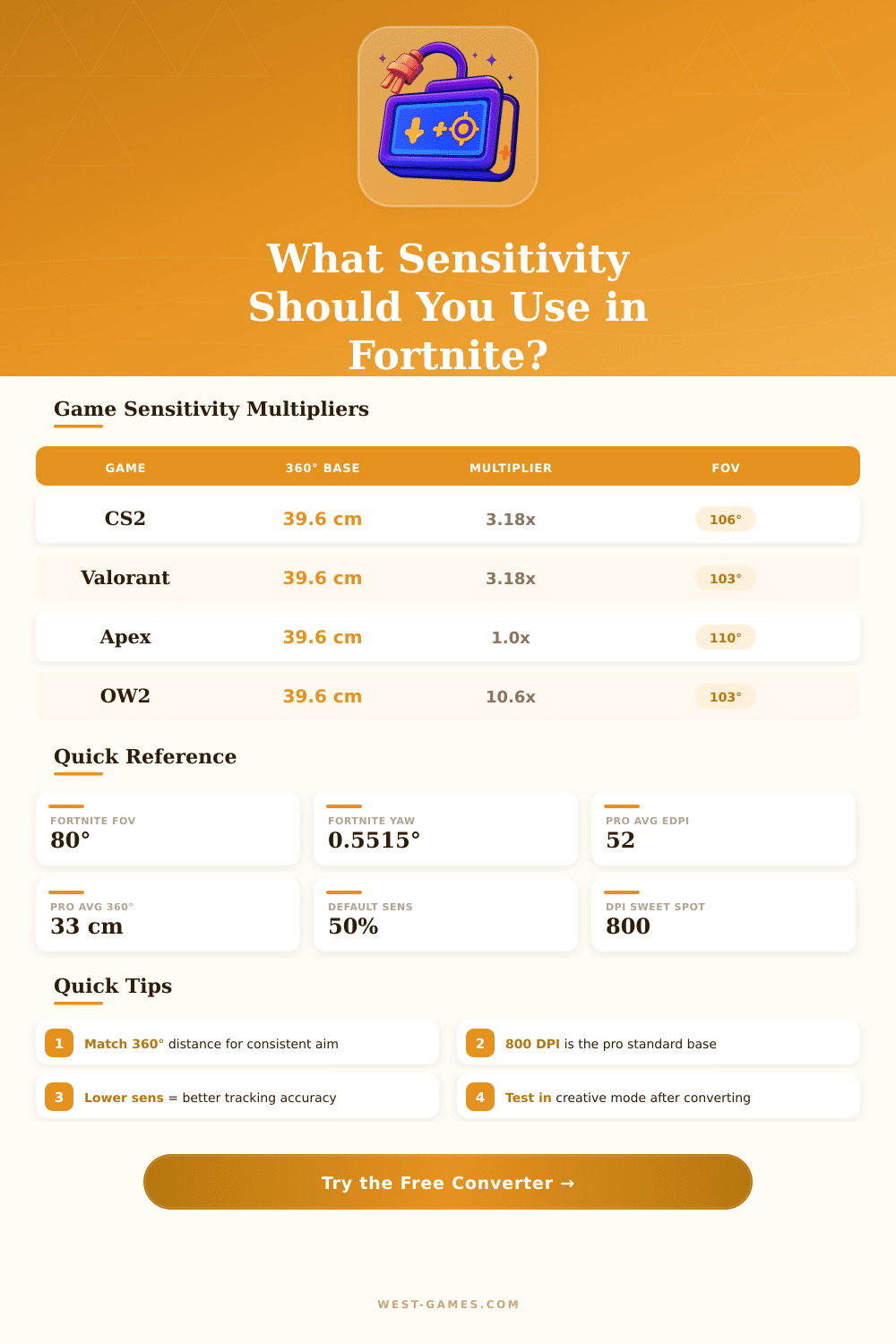
| Game | Yaw (°/count) | 360° at Sens 1.0 & 800 DPI | Conversion Factor |
|---|---|---|---|
| Fortnite | 0.5515 | 81.8 cm / 32.2 in | 1.000x |
| CS2 / CS:GO | 0.022 | 2045.5 cm / 805.3 in | 0.02695x |
| Valorant | 0.07 | 642.9 cm / 253.1 in | 0.08579x |
| Apex Legends | 0.022 | 2045.5 cm / 805.3 in | 0.02695x |
| Overwatch 2 | 0.0066 | 6818.2 cm / 2684.3 in | 0.00809x |
| Call of Duty | 0.0066 | 6818.2 cm / 2684.3 in | 0.00809x |
| R6 Siege | 0.00572958 | 7861.5 cm / 3094.7 in | 0.00701x |
| PUBG | 0.0044 | 10227.3 cm / 4026.5 in | 0.00540x |
| Battlefield 2042 | 0.0044 | 10227.3 cm / 4026.5 in | 0.00540x |
| Player | DPI | Fortnite Sens (%) | eDPI | 360° Distance |
|---|---|---|---|---|
| Bugha | 800 | 6.0% | 48.0 | 34.6 cm / 13.6 in |
| Mongraal | 800 | 8.0% | 64.0 | 25.9 cm / 10.2 in |
| Clix | 800 | 6.5% | 52.0 | 31.9 cm / 12.6 in |
| MrSavage | 800 | 7.5% | 60.0 | 27.7 cm / 10.9 in |
| EpikWhale | 400 | 11.0% | 44.0 | 37.7 cm / 14.9 in |
| Mero | 800 | 5.5% | 44.0 | 37.7 cm / 14.9 in |
| Anas | 1600 | 3.5% | 56.0 | 29.7 cm / 11.7 in |
| 360° Distance (cm) | 360° Distance (in) | Fortnite Sens @ 800 DPI | Play Style |
|---|---|---|---|
| 20 cm | 7.9 in | 10.38% | Very High (fast edits) |
| 25 cm | 9.8 in | 8.31% | High (aggressive) |
| 30 cm | 11.8 in | 6.92% | Medium-High (balanced) |
| 35 cm | 13.8 in | 5.93% | Medium (tracking focus) |
| 40 cm | 15.7 in | 5.19% | Low-Medium (AR aim) |
| 50 cm | 19.7 in | 4.15% | Low (precision aim) |
| Input Method | eDPI Range | 360° Range (cm) | Notes |
|---|---|---|---|
| KB&M Competitive | 40–65 | 25–41 cm | Most FNCS pros sit here |
| KB&M Casual | 50–100 | 17–33 cm | Higher sens for comfort |
| Controller (Linear) | 40–50% X/Y | N/A | Expo curve preferred by some |
| Controller (Expo) | 45–55% X/Y | N/A | Smoother micro-adjustments |
Note: This article is based on real advice and experiences from the Fortnite community.
Finding the right Sensitivity for Fortnite can be hard because there is no one perfect setup that works for all. It depends on the player on his play style and on what feels comfortable. Some players perform best with 1000 DPI, while others prefer 5000.
How to Find the Right Fortnite Sensitivity
Everything comes down to personal taste.
Right now, 800 DPI is the usual base for video games. Even so, many pros already moved to 1600 DPI, which is double of that. Because 1600 DPI is twice fatser, the in-game Sensitivity simply halves to keep the same total impact, measured in cm for 360 degrees.
An important idea to understand is eDPI, which means effective DPI. It is found by multiplying the mouse DPI by the in-game Sensitivity. For instance, if the Sensitivity in game is 10% and DPI is 800, then eDPI is 80.
A player with 10% Sensitivity at 800 DPI has the same real Sensitivity as one with 20% at 400 DPI. So eDPI shows the real Sensitivity in Fortnite.
Practice with low Sensitivity and later slowly raise it is a good method. Many pros play with very low values, usually around 800 DPI with 5 to 10 percent in-game Sensitivity. For Fortnite, a good range four Sensitivity is from 5.8 at 800 DPI to 8.4 at 800 DPI, which gives around 25 to 35 cm for a full turn of 360 degrees.
In Fortnite, the mouse Sensitivity has separate values for X and Y, so players can set different horizontal and vertical Sensitivity. Pros also care about many options like look Sensitivity, aim Sensitivity, multipliers for building and editing, ADS Sensitivity, boosts for turns and more. The settings in the program can seem really complex.
One key thing to know is that Fortnite does not allow you to set Sensitivity to a precise value directly from the game menu. Even using the slider, the Sensitivity can end a bit off from the shown amount. Also, if the mouse DPI is too high in the software and fast movement barely registers in game, the max turn speed of the game can reach its limit.
A good way to test Sensitivity is to enter a creative map with targets and practice aim moves without shooting for real. There are also Sensitivity converters that help to match the Fortnite Sensitivity with that of other games easily. Checking what settings the best Fortnite players use for Sensitivity, DPI and resolution, can guide the process.
Looking at theprofessional setups gives a strong starting point for anyone that wants to fix his choices.