🎯 Deadlock Crosshair Generator
Build, preview, and export your perfect custom crosshair for Deadlock
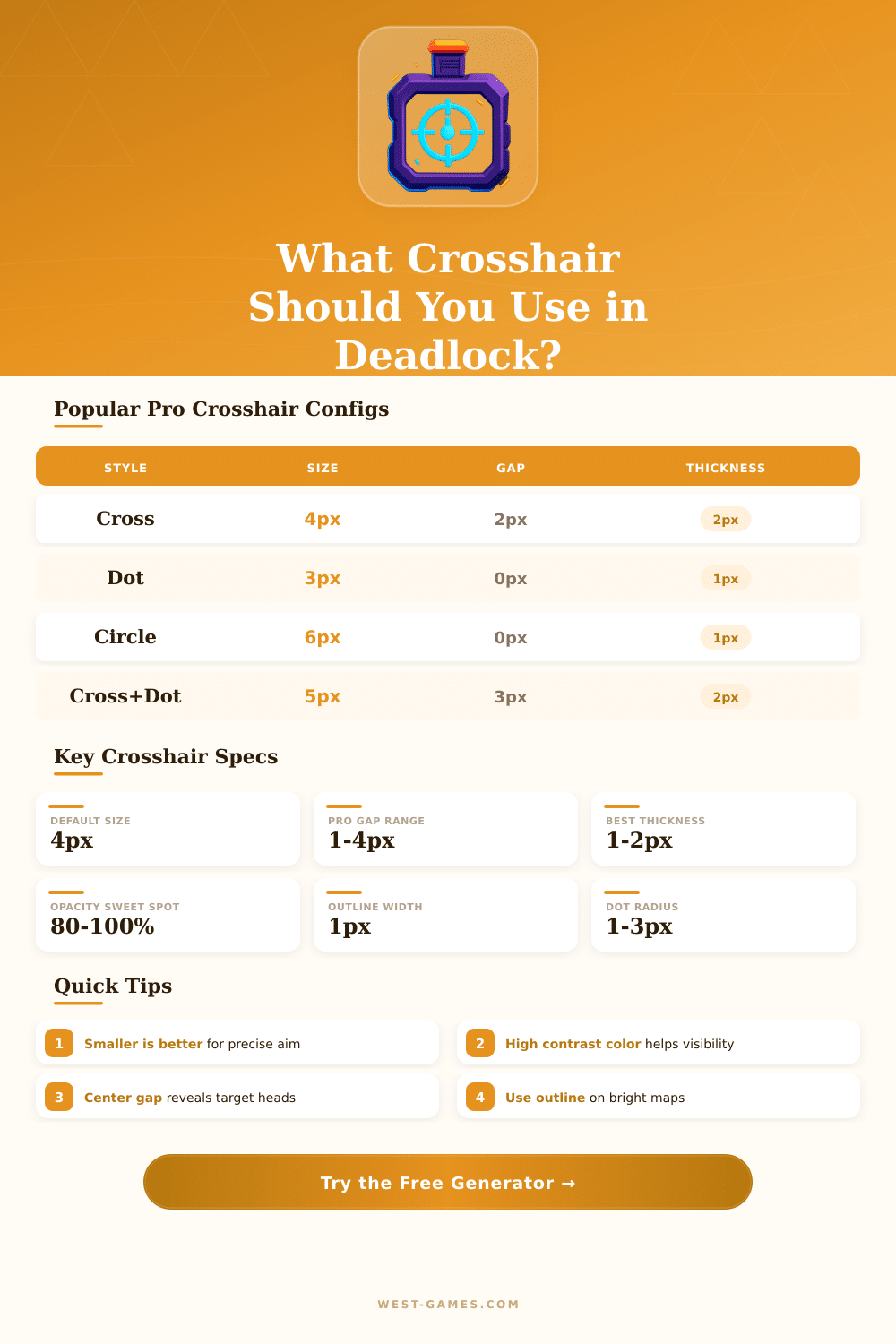
| Playstyle | Style | Size (px) | Gap (px) | Thickness | Color |
|---|---|---|---|---|---|
| Aggressive Rusher | Cross + Dot | 5 | 2 | 2px | Cyan |
| AWP / Sniper | Dot Only | 3 | 0 | 1px | Green |
| Support / Healer | Circle + Dot | 6 | 0 | 1px | White |
| Flex / All-round | Classic Cross | 4 | 3 | 2px | Green |
| Spray Control | Cross + Circle | 8 | 4 | 2px | Yellow |
| Tap / Burst | Small Cross | 3 | 1 | 1px | White |
| Monitor | Resolution | PPI | 1px Size (mm) | 1px Size (in) |
|---|---|---|---|---|
| 24″ | 1920×1080 | 92 | 0.277 | 0.0109 |
| 27″ | 1920×1080 | 82 | 0.311 | 0.0122 |
| 24″ | 2560×1440 | 122 | 0.208 | 0.0082 |
| 27″ | 2560×1440 | 109 | 0.233 | 0.0092 |
| 27″ | 3840×2160 | 163 | 0.156 | 0.0061 |
| 32″ | 2560×1440 | 92 | 0.277 | 0.0109 |
| 32″ | 3840×2160 | 138 | 0.184 | 0.0072 |
| 34″ UW | 3440×1440 | 110 | 0.232 | 0.0091 |
| Genre / Game | Rec. Length | Rec. Gap | Rec. Thickness | Notes |
|---|---|---|---|---|
| Tactical Shooter | 3–5 px | 1–3 px | 1–2 px | Precision focus |
| Hero Shooter | 4–7 px | 2–4 px | 2 px | Balanced visibility |
| Battle Royale | 5–8 px | 2–5 px | 2–3 px | Long range + CQC |
| MOBA Shooter (Deadlock) | 4–6 px | 2–4 px | 1–2 px | Mixed engagement ranges |
| Arena Shooter | 3–5 px | 1–2 px | 1 px | Fast flick aim |
| Color | Hex Code | Dark BG Visibility | Light BG Visibility | Best With Outline |
|---|---|---|---|---|
| Green | #00FF00 | ★★★★★ | ★★★ | Black |
| Cyan | #00FFFF | ★★★★★ | ★★★ | Black |
| Yellow | #FFFF00 | ★★★★ | ★★ | Black |
| White | #FFFFFF | ★★★★★ | ★ | Black |
| Red | #FF0000 | ★★★ | ★★★ | White |
| Magenta | #FF00FF | ★★★★ | ★★★ | Black |
Valve works on Deadlock, that is third-person MOBA in early access with status of Early Access and limited access for testing. The game has test mainstream elements and locked content everywhere. Really important for any game is your crosshair, setting it well can help your accuracy when fights become intense.
Finding the options for crosshair is easy. Go to the pause menu, click “settings” in the bottom left-hand corner then go to the tab Choices and look at “Settings of Crosshair” in the right side. Players clearly can change them, but there is a limit…
How to Set Up a Crosshair in Deadlock
The game yet does not have built-in preview features. If you mess up, there is a button for restart, that will erase all your changes and right away will restore the default crosshair.
But here is the problem: the options for setting in the game itself are quite limited. So browser based tools for crosshair became very liked. Websites like deadlockcrosshair.com and the tool at deadlocklab.crosshair.com allow you build something custom right in your browser without limits.
Also Mcipenuks.github.something has that. All they have databases of crosshair designs, so you can create your own, copy codes, save designs and share them with otehr players.
Adding a crosshair from those websites to your screen is not hard. Copy the code of settings, press F7 to open the console, paste it and press Enter. Under the surface, commands like citadel_crosshair_colour_r, citadel_crosshair_pipe_beam, citadel_crosshair_pipe_height, citadel_crosshair_pipe_absence and citadel_crosshair_spot_opacity control all details of settings.
Important to know: some quirks deserve to mind. When citadel_crosshair_pipe_beam sets to a weird number, the crosshair can appear strange on the screen. Turn on “Linear limit” with thickness 1, and sometimes the bottom line seems darker then the rest.
Players also mentioned unwanted lines appearing above their crosshair after updates, even if they did not touch settings.
Green tones are commonly chosen as main color for crosshair in Deadlock among players. Those that got good at their aim usually favor the dot style, because it reduces visual noise. A good simple method that works is four pipes going to the center with absence of 1, quite visible to control your target during shot.
The settings of Conceal in Deadlock almost match his crosshair in CS2, only with a little blue line and dotted outline in the center. Even so, what works for one player, can not please another, so tryout various options.
Third-party programs like CrosshairX on Steam can keep your crosshair the same across different heroes, if you want. Also custom crosshair work free in the game. Because Deadlock is still early, the crosshairsystem probably will get a big update soon.