🐔 FF14 Chocobo Color Calculator
Calculate the exact fruits needed to change your chocobo to any color in Final Fantasy XIV
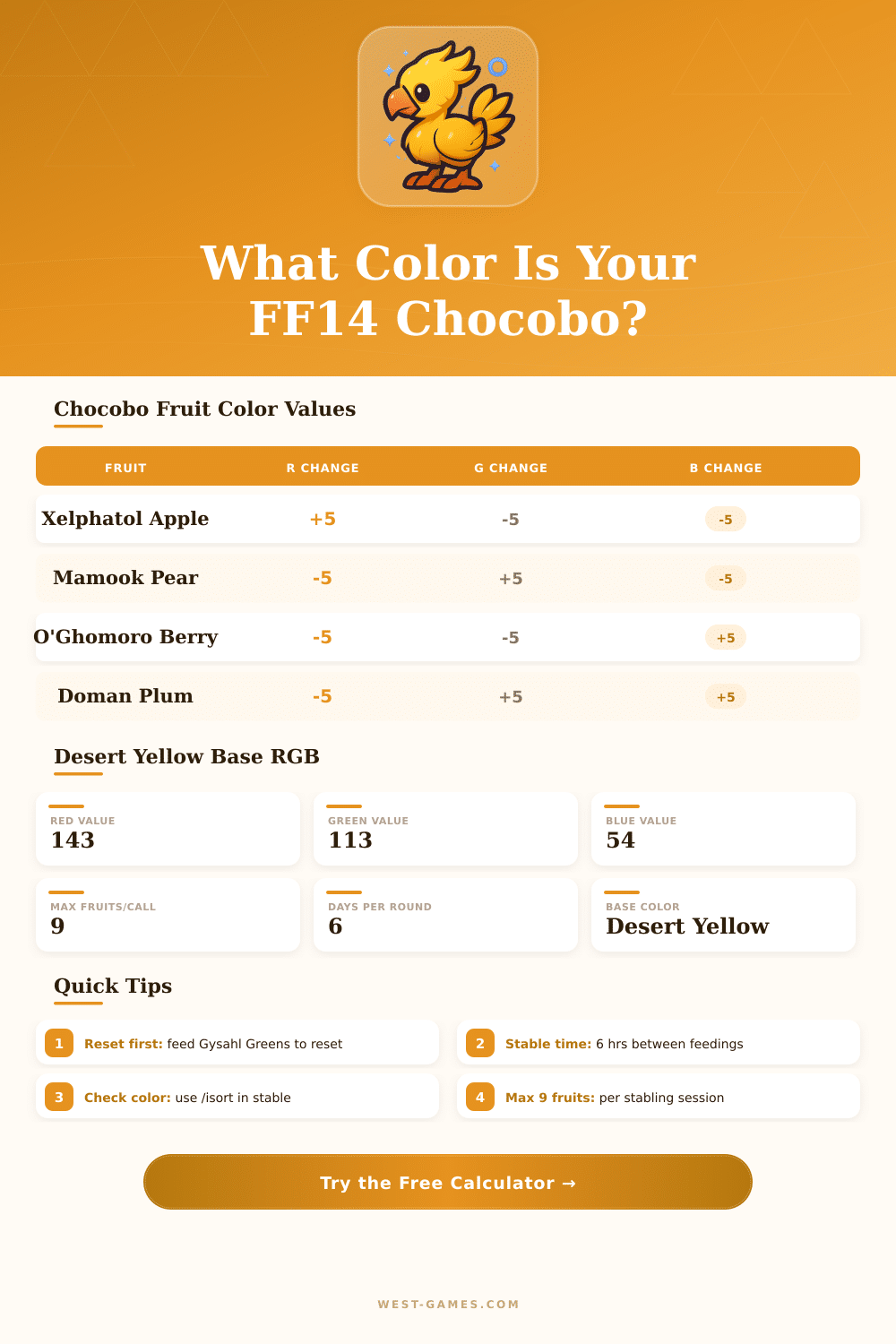
| Fruit Name | Red Change | Green Change | Blue Change | Primary Effect |
|---|---|---|---|---|
| Xelphatol Apple | +5 | −5 | −5 | Increases Red |
| Mamook Pear | −5 | +5 | −5 | Increases Green |
| O'Ghomoro Berry | −5 | −5 | +5 | Increases Blue |
| Doman Plum | −5 | +5 | +5 | Decreases Red (Cyan) |
| Valfruit | +5 | −5 | +5 | Decreases Green (Magenta) |
| Cieldalaes Pineapple | +5 | +5 | −5 | Decreases Blue (Yellow) |
| Color Name | Red | Green | Blue | Preview | Difficulty |
|---|---|---|---|---|---|
| Desert Yellow (Default) | 143 | 113 | 54 | — | |
| Snow White | 255 | 255 | 240 | Hard (many sessions) | |
| Jet Black | 15 | 14 | 13 | Very Hard | |
| Rolanberry Red | 148 | 23 | 23 | Medium | |
| Bark Brown | 99 | 54 | 32 | Easy | |
| Pumpkin Orange | 192 | 83 | 29 | Easy–Medium | |
| Olive Green | 82 | 98 | 38 | Medium | |
| Pastel Blue | 149 | 196 | 216 | Medium–Hard | |
| Currant Purple | 78 | 27 | 56 | Hard | |
| Aldgoat Brown | 124 | 82 | 49 | Easy | |
| Rose Pink | 215 | 127 | 141 | Medium | |
| Sky Blue | 109 | 169 | 209 | Medium–Hard | |
| Grape Purple | 86 | 44 | 97 | Hard | |
| Hunter Green | 38 | 74 | 38 | Hard | |
| Iris Purple | 100 | 79 | 133 | Medium–Hard |
| Fruits Needed | Sessions Required | Real Time (hrs) | Days (approx) |
|---|---|---|---|
| 1 – 9 | 1 | 0 | <1 day |
| 10 – 18 | 2 | 6 | ~1 day |
| 19 – 27 | 3 | 12 | ~1 day |
| 28 – 36 | 4 | 18 | ~2 days |
| 37 – 45 | 5 | 24 | ~2 days |
| 46 – 54 | 6 | 30 | ~3 days |
| 55 – 63 | 7 | 36 | ~3–4 days |
| 64+ | 8+ | 42+ | 4+ days |
• The calculator shows minimum fruits needed assuming direct transitions. RGB values are always multiples of 5 after rounding.
• Use Gysahl Greens at the stable to reset to Desert Yellow before starting a new color journey for best results.
• Fruits are obtained from Grand Company vendors and some hunts. Stock up before starting.
• Your chocobo must be Rank 10+ and have completed the "My Little Chocobo" quest to access the stable.
Changing the Color of your Chocobo in Final Fantasy 14 results in funny, although sometimes tender outcomes. Each of them starts originally with the shade Desert Yellow. That forms the basic Color that one can restore anytime by giving a Han Lemon to the Chocobo.
Just feed it one time, so that the feathers again become their first yellow tone.
How to Change Your Chocobo’s Color
To change the Color of your Chocobo, one first must place it in the Chocobo Stable. From that place, various foods can be given to it. Every kind of food acts differently on the feathers.
When the right mix of them is given, the feathers will change after six hours of real time.
The system for colors works on the RGB scale. Every fruit adds or takes away in the levels of red, green or blue. One fruit moves the score by around five spots each way.
The hard part is that those levels can reach the maximum or minimum. If a level already reached its limit, adding more of the same fruit does not work. That can cause waste of fruits and lead too surprisingly different final shade.
Giving fruits in the wrong order is a common mistake. When the order does not match the advised one, the colors can reach their ceiling too soon, and the Chocobo will end with a totally other shade. For instance, trying for Snow White maybe will end with Lotus Pink or Bone White instead.
Trying for Deep Black can cause Kobold Brown. Going too far in red could give a strange purple.
A practical way is to use a calculator for colors of Chocobo. Those programs let players choose the current shade and the wanted one, then point out exactly which fruits to use. The version on ffxivchocobo.com has big popularity.
One can also just give around eight to twelve fruits, wait the six hours, and then check again based on the fresh Color. This slow method in little stages gives bigger safety than putting everything in at once.
Every time a fruit is given, there should appear a message about the change of feathers. If that does not show, the fruit did not work. Switching between different fruits helps to avoid reaching the top of value on one part of the RGB range.
The possible colors for Chocobo look mostly like the dyes for clothing in the game. Even so some differences happen. Shades like Pure White, Jet Black, metallic or pastel from the general dye list are not possible for Chocobo.
You do not need to reach perfectly exact values. Just get close enough to the target, so that the Chocobo gets thewanted tone.
Although the standard yellow does not bother anyone, many players like to choose shades like Wine Red, Raptor Blue, Colibri Pink or Charcoal Gray, so that their mount stands out.