⚡ CPU — GPU Bottleneck Calculator
Identify performance imbalances and optimize your PC build for any resolution
| CPU | Cores / Threads | ST Score | MT Score |
|---|---|---|---|
| i3-12100F | 4C / 8T | 3,450 | 10,200 |
| i5-10400F | 6C / 12T | 2,560 | 12,300 |
| i5-12400F | 6C / 12T | 3,660 | 14,400 |
| R5 5600X | 6C / 12T | 3,280 | 15,100 |
| i5-13600K | 14C / 20T | 4,050 | 23,500 |
| R5 7600X | 6C / 12T | 3,900 | 16,800 |
| i7-13700K | 16C / 24T | 4,180 | 30,200 |
| R7 7800X3D | 8C / 16T | 3,850 | 18,500 |
| R9 7950X | 16C / 32T | 4,100 | 38,200 |
| i9-14900K | 24C / 32T | 4,350 | 41,000 |
| GPU | VRAM | Time Spy | TDP |
|---|---|---|---|
| RX 7600 | 8 GB | 11,200 | 165W |
| RX 6700 XT | 12 GB | 12,400 | 230W |
| RTX 4060 | 8 GB | 13,100 | 115W |
| RTX 4060 Ti | 8 GB | 15,400 | 160W |
| RX 7700 XT | 12 GB | 16,500 | 245W |
| RTX 4070 | 12 GB | 18,400 | 200W |
| RX 7800 XT | 16 GB | 18,800 | 263W |
| RTX 4070 Ti | 12 GB | 22,200 | 285W |
| RTX 4080 | 16 GB | 28,500 | 320W |
| RX 7900 XTX | 24 GB | 29,100 | 355W |
| RTX 4090 | 24 GB | 36,500 | 450W |
| CPU + GPU Pair | 1080p | 1440p | 4K |
|---|---|---|---|
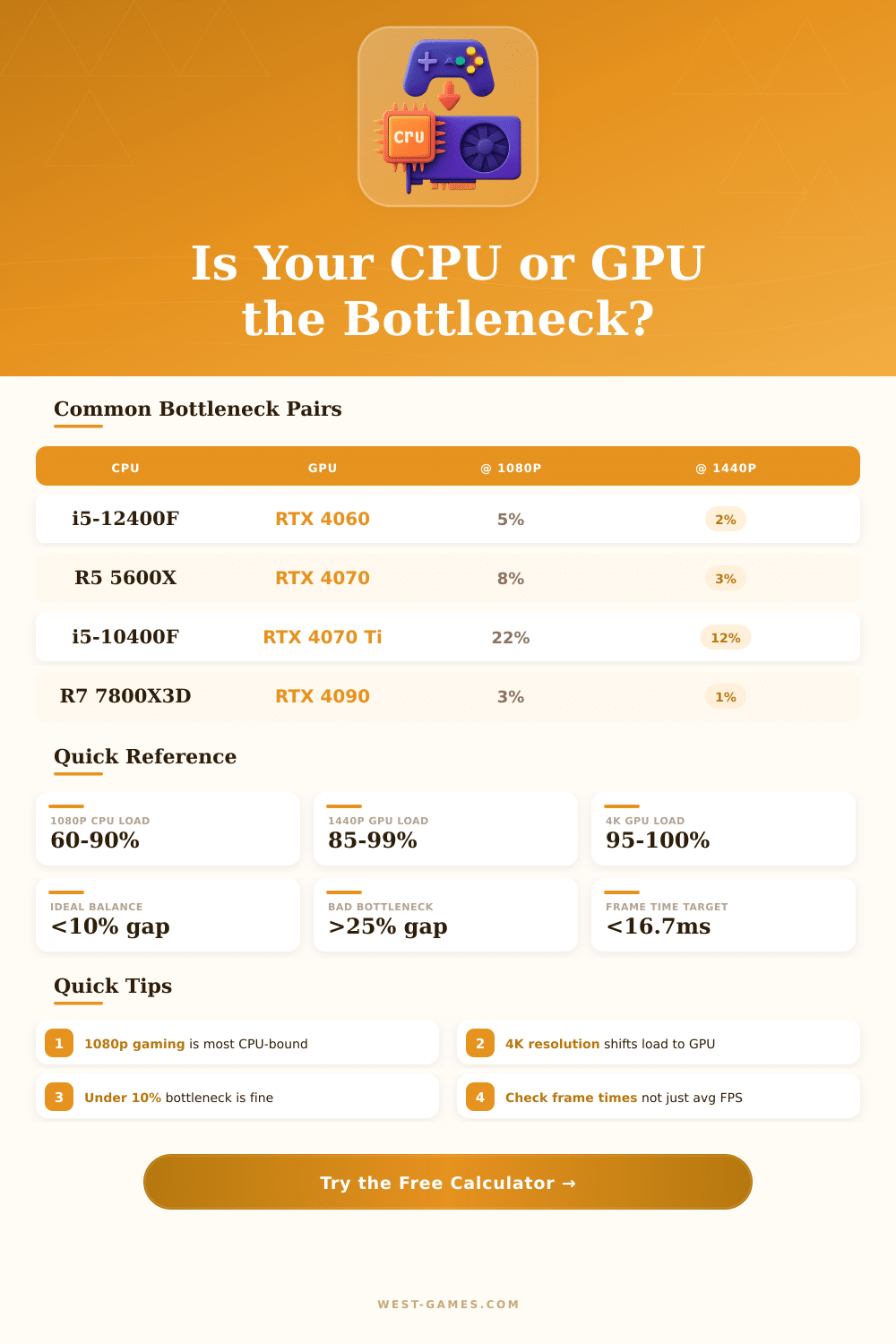
| i5-12400F + RTX 4060 | 5% CPU | 2% GPU | 8% GPU |
| R5 5600X + RTX 4070 | 8% CPU | 3% CPU | 5% GPU |
| i5-10400F + RTX 4070 Ti | 22% CPU | 12% CPU | 4% GPU |
| i7-13700K + RTX 4070 Ti | 3% GPU | 5% GPU | 10% GPU |
| R7 7800X3D + RTX 4090 | 3% CPU | 1% GPU | 5% GPU |
| i5-13600K + RTX 4080 | 5% CPU | 2% GPU | 8% GPU |
| i3-12100F + RTX 4060 | 12% CPU | 5% CPU | 3% GPU |
| i9-14900K + RTX 4090 | 1% CPU | 2% GPU | 5% GPU |
| Refresh Rate | Frame Time (ms) | Use Case | Min GPU Tier |
|---|---|---|---|
| 60 Hz | 16.67 ms | Casual / Console | RX 7600 / RTX 4060 |
| 75 Hz | 13.33 ms | Budget Gaming | RX 7600 / RTX 4060 |
| 144 Hz | 6.94 ms | Competitive | RTX 4070 / RX 7800 XT |
| 165 Hz | 6.06 ms | High Refresh | RTX 4070 Ti / RX 7800 XT |
| 240 Hz | 4.17 ms | Esports | RTX 4080 / RX 7900 XTX |
| 360 Hz | 2.78 ms | Pro Esports | RTX 4090 |
At 1080p, Ive seen CPU utilization jump to 60 or even 90% while the GPU barely breaks a sweat, maybe 50-ish percent load. Flip that to 4K and the GPU pins at 99% while the CPU drops to 30%. Thats a huge swing.
A 7800X3D paired with a 4090 at 1440p gives roughly 1 to 3% bottleneck, which is basically nothing. Frame times matter more than average FPS, 6.9ms at 144Hz versus a sluggish 16.7ms at 60Hz. Pairing an older i5-10400F with a 4070 Ti?
When the CPU or GPU Slows Your Game
Thats 22% CPU-limited at 1080p. Drop to 12% at 1440p though. Competitive esports players target 240Hz, needing sub-4.2ms frame delivery, a 4080 barely keeps up there. RAM below 16 gigs adds about 3 to 5% extra bottleneck at higher resolutions, which honestly threw me off.
The cause below comes directly from actual experiences of folks, forum posters, people in communities and reactions scattered through the internet. It is not something a calculator simply makes.
bottleneck happens when one bit of the gear in your computer decides to slow down the whole other output. Imagine your computer as a relay team: if one runner does not manage to keep the rhythm, the whole team slows. In gaming computers, the cpu and the gpu are the two “runners” most important.
Basically bottleneck means that the weakest link, the part that does not want to let the others shine, pulls everything down.
If your cpu is the weaker part, then you have a cpu bottleneck. The gpu ends up almost only sitting and waiting, until the chip will deliver the next set of instructions. Those two parts must stay in constant conversation: the cpu sends commands, and the gpu sends back the ready results.
But when the chip does not manage to carry commands quite quickly enough, it forms like a traffic jam. It is like having a sports car who could reach 300 miles per hour, but stays stuck in thick traffic on 5. For instance, your graphics card maybe could push 300 frames per second, but teh cpu feeds it with work only for 100 frames per second.
Then about two thirds of the possible power of your gpu simply stay idle. Probably you spent too much for that graphics card.
On the other hand, gpu bottleneck appears when your graphics card is much less strong than your chip. In that case the cpu does his work fully well, but the gpu can not follow the given workload. That puts a ceiling to the frame rate and damages the whole gaming experience.
You notice that as falling FPS, stuttering, or in very bad cases, sessions that are simply not playable.
So flip the image; here is gpu bottleneck. When the chip sits above the graphics card in raw power, the gpu becomes the limiting factor. The cpu handles everything; game logic, sound, physics calculations; while the gpu focuses almost only on pushing pixels.
If your strong chip starts to send instructions more quickly than the graphics card can finish them, you wood receive better results with a more balanced pairing.
gpu bottlenecks most strongly hit the image quality and the frame rates, especially when you raise the resolution. Start games in 2K or 4K and the graphics card can be fully pressed, unless you use old or really weak gear. Cpu bottlenecks more commonly show up in competitive esports games, simulators and vast open world titles.
Gpu bottlenecks appear more commonly in newer AAA-games, that need serious graphics muscle. In most modern AAA-games the gpu does much more of the heavy work than the chip, so you commonly see the graphics card at max while the cpu simply cruises at maybe 30 or 40 percent and even so everything stays smooth.
Here is the spot, gpu-limited setup is actually what you usually want. Keep the graphics card at full force while the cpu still has a bit of breathing space is basically the sweet spot. Gpu bottleneck also tends to give smoother overall experience.
Stuttering and freezes commonly come from a cpu that does not manage to handle the load, or from RAM that is too strained. Cpu-limited systems bother everything in your machine, not only games.
A good fast check is look at the gpu usage with V-sync fully turned off. If the graphics card stays under 90 percent, your cpu almost certainly holds it back. Whether it is above 95 percent?
Then the gpu is the weak link. A well balanced gaming computer usually keeps the gpu around 99% while the cpu floats between 40 and 70 percent.
Lowering graphics settings does not really help, when you are cpu-limited. That only pushes the gpu to finish its part sooner, but because the cpu already is at the limit, it can not deliver more work to the graphics card. Raising resolution or visual settings simply pushes the gpu more strongly; what the cpu manages to handle stays the same.
You could overclock the cpu and the RAM for some FPS gains, but honestly modern gear does not reward that effort that much anymore.
The budget does matter. Smart balance commonly means to spend somewhere around 1.5 to 3 times more for the gpu than for the cpu. If you match a top chip like Ryzen 7 3700X with something old like GTX 960, that cpu barely reaches 30 to 40 percent of usage.
Most bottleneck situations in the end come from either a mismatch between the parts, or from some system settings thatare not very well set up.