🎮 Twitch Stream Calculator
Optimize your bitrate, resolution & encoder settings for smooth, high-quality live streaming
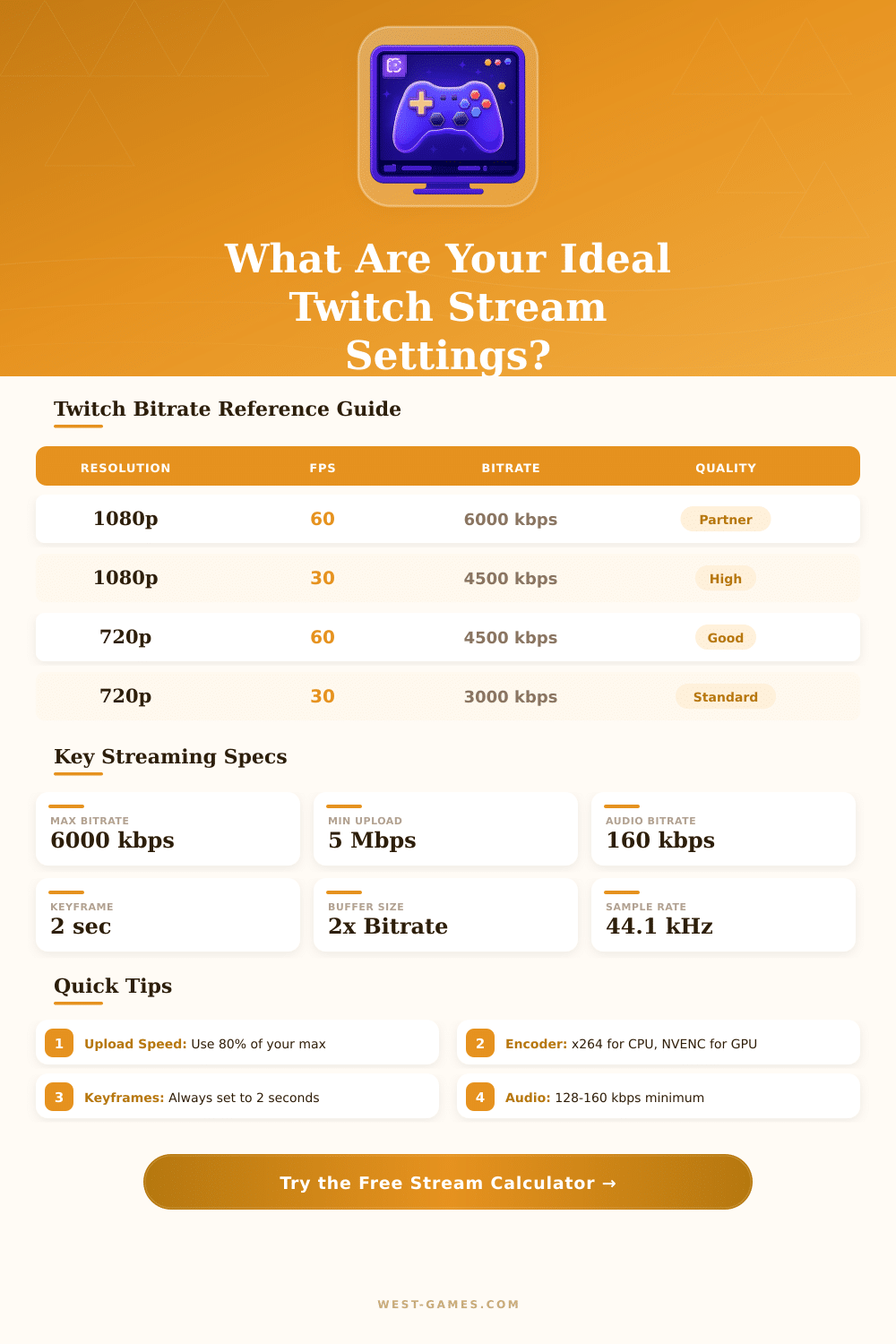
| Resolution & FPS | Min Upload | Recommended | Max Bitrate | Viewers |
|---|---|---|---|---|
| 1080p 60fps | 7 Mbps | 10 Mbps | 6000 kbps | Partner Only |
| 1080p 30fps | 5 Mbps | 8 Mbps | 4500 kbps | Affiliate+ |
| 720p 60fps | 5 Mbps | 8 Mbps | 4500 kbps | Affiliate+ |
| 720p 30fps | 3 Mbps | 5 Mbps | 3000 kbps | All Users |
| 480p 30fps | 1.5 Mbps | 3 Mbps | 1500 kbps | All Users |
| 360p 30fps | 0.8 Mbps | 1.5 Mbps | 800 kbps | All Users |
| Encoder | CPU Load | Quality | Latency | Best For |
|---|---|---|---|---|
| x264 (veryfast) | High (30-70%) | Excellent | Low | Most games |
| NVENC (RTX) | Very Low (<5%) | Very Good | Very Low | RTX GPUs |
| AMD VCE/AMF | Very Low (<5%) | Good | Very Low | AMD GPUs |
| Intel QuickSync | Low (<10%) | Good | Low | Intel iGPU |
| x264 (medium) | Very High (80%+) | Best | Moderate | Low-action |
| Preset | Quality | CPU Usage | Recommended Bitrate Boost | Notes |
|---|---|---|---|---|
| ultrafast | Poor | ~10-20% | +40% | Only for very weak CPUs |
| superfast | Fair | ~20-35% | +25% | Older or budget CPUs |
| veryfast | Good | ~30-50% | 0% | Default / recommended |
| faster | Very Good | ~45-65% | -5% | Modern mid-range CPUs |
| fast | Excellent | ~55-75% | -10% | High-end CPUs |
| medium | Best | ~75-95% | -15% | Dedicated stream PC only |
Twitch is an interactive platform for live broadcasting, that covers games, fun, sports, music and many other topics. It acts as the main video space and community for players, where more than 100 millions of folks meet monthly to broadcast, watch and discuss about gaming.
In a typical Twitch Stream on Twitch, the host broadcasts his play of games to viewers in real time. The viewers then can send messages, that the host reads and responds to during the stream. Those exchanges between viewers and host form the core of the platform, what makes it so attractive.
Twitch: What It Is and How to Start Streaming
One knows Twitch chiefly because of its content about games, even so it goes beyond only that. It offers live broadcasts about music, sports, tournaments, podcasts, cooking and other everyday events. Some channels about gaming even organize nights dedicated to cooking.
Even if one would combine all games under one category instead of separate them, gaming would involve more than 95 percent of the viewing on Twitch. Even so, calling it simply a game-site would be a mistake. It is truly a streaming space.
To start broadcasting live content, one requires some resources. A strong computer, good camera and good microphone is needed. Programs for live broadcasting, as Streamlabs, allow to mix sound, image of the camera and game screen in one easy system.
With Streamlabs, one can customize the streams with text and own warnings on the screen. It also helps to broadcast at the same time to Twitch, Facebook and YouTube. OBS is another commonly used program.
To connect everything, one must enter the stream key of Twitch in OBS. Some games operate only in window mode for broadcasting, while others require capture of the whole screen.
Focusing on certain themes is key. Choose a specific game, theme or creative style and think, what makes you different than others. Combine a niche with known resources and escape the temptation to create everything at once.
Set same days and hours for broadcasting weekly also is useful. Copying successes of other creators is a wrong step. Why wood some viewer choose your copy of a famous streamer, when they can simply watch the original?
Presence on social media matters a lot.
Growing on Twitch is a challenge. The platform hardly shows new users, unless one is already famous elsewhere. Promoting through other social media is almost needed today.
Creating channels on YouTube and TikTok for funny clips helps a lot. Use the same name through all websites to strengthen the ties with viewers. Building a career here is like trying to become an actor.
Only few of those, that try, truly manage to earn money. Some partnered streamers work more than full-time hours weekly on broadcasting, editing and community growth, and they receive around twothousand dollars monthly.
Steam accounts can connect to accounts of Twitch, what makes viewers able to get random prizes during official tournaments.