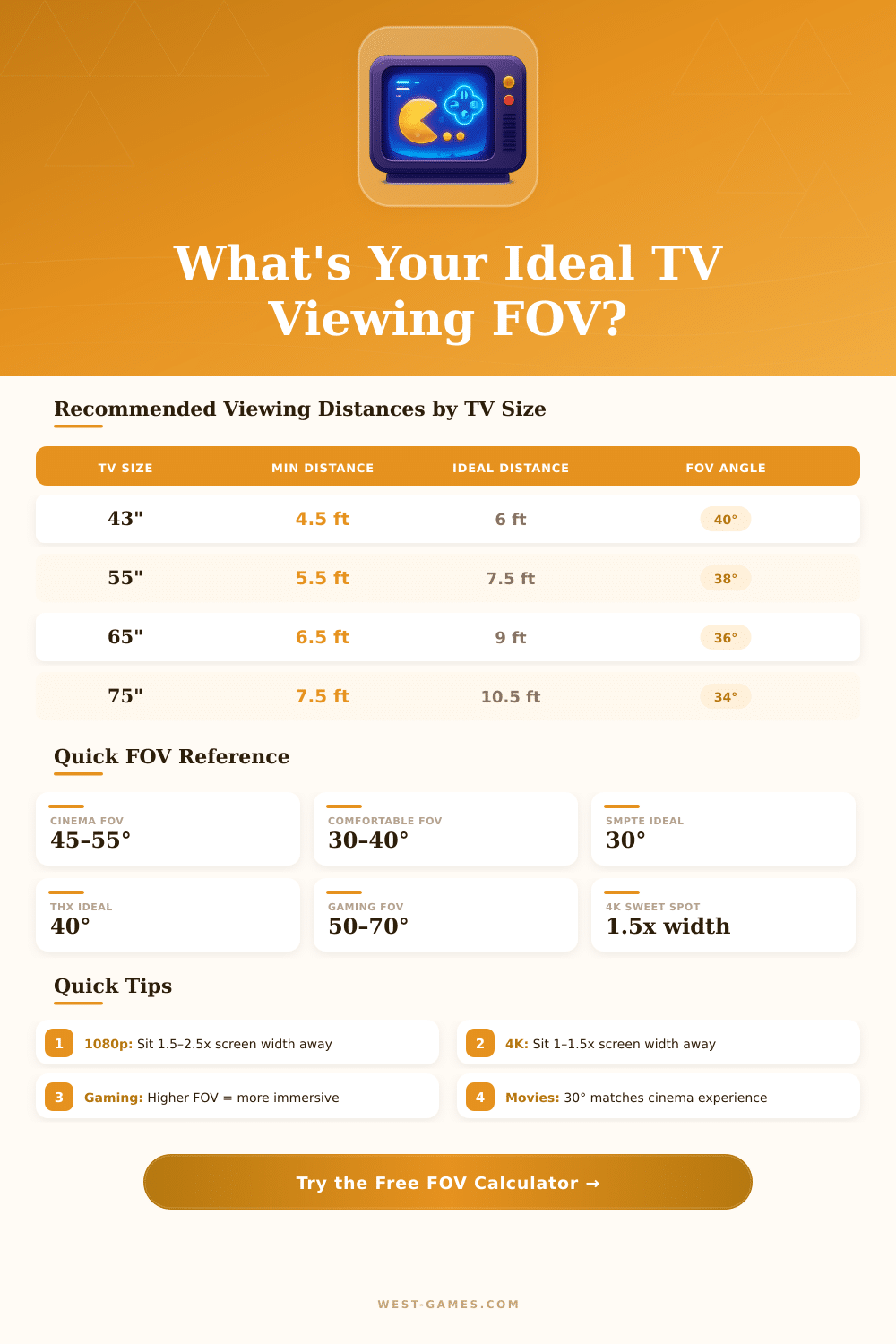
📺 TV FOV Calculator
Calculate your horizontal field of view based on TV size and viewing distance
| TV Size | 1080p Min Dist | 4K Min Dist | SMPTE Dist (30°) | THX Dist (40°) | Screen Width |
|---|---|---|---|---|---|
| 32" | 4.0 ft (1.2 m) | 2.5 ft (0.8 m) | 6.0 ft (1.8 m) | 4.5 ft (1.4 m) | 27.9" (70.9 cm) |
| 40" | 5.0 ft (1.5 m) | 3.0 ft (0.9 m) | 7.5 ft (2.3 m) | 5.6 ft (1.7 m) | 34.9" (88.6 cm) |
| 43" | 5.5 ft (1.7 m) | 3.5 ft (1.1 m) | 8.1 ft (2.5 m) | 6.0 ft (1.8 m) | 37.5" (95.3 cm) |
| 50" | 6.3 ft (1.9 m) | 4.0 ft (1.2 m) | 9.4 ft (2.9 m) | 7.0 ft (2.1 m) | 43.6" (110.7 cm) |
| 55" | 7.0 ft (2.1 m) | 4.5 ft (1.4 m) | 10.4 ft (3.2 m) | 7.7 ft (2.3 m) | 47.9" (121.7 cm) |
| 65" | 8.0 ft (2.4 m) | 5.0 ft (1.5 m) | 12.2 ft (3.7 m) | 9.1 ft (2.8 m) | 56.7" (144.0 cm) |
| 75" | 9.3 ft (2.8 m) | 6.0 ft (1.8 m) | 14.1 ft (4.3 m) | 10.5 ft (3.2 m) | 65.4" (166.1 cm) |
| 85" | 10.5 ft (3.2 m) | 6.5 ft (2.0 m) | 16.0 ft (4.9 m) | 11.9 ft (3.6 m) | 74.1" (188.2 cm) |
| 98" | 12.2 ft (3.7 m) | 7.5 ft (2.3 m) | 18.4 ft (5.6 m) | 13.7 ft (4.2 m) | 85.4" (216.9 cm) |
| Use Case | Ideal FOV Range | Recommended Dist | Immersion Level | Eye Strain Risk |
|---|---|---|---|---|
| Casual TV Watching | 20° – 30° | 1.6x – 2.5x width | Low | Very Low |
| Movies / Streaming | 30° – 45° | 1.2x – 1.6x width | Medium | Low |
| Console Gaming | 40° – 60° | 1.0x – 1.5x width | High | Low–Medium |
| Competitive Gaming | 55° – 75° | 0.8x – 1.2x width | Very High | Medium |
| Home Theater | 30° – 40° | 1.4x – 1.8x width | Medium–High | Low |
| Sports Viewing | 35° – 50° | 1.0x – 1.5x width | Medium–High | Low |
Note: This text is based on real experiences and useful advice from several resources about tv fov.
fov is about the Field of Sight. It shows the visual angle between the viewer and the visible part of the tv screen. Simply it points to how the screen covers your sight.
How to Choose the Right TV FOV
The more near you seat to the tv, the higher the value and the wider the fov. That goes for both film watching and game play.
The best fov for looking at tv falls between 30 and 40 degrees. 40-degree fov gives a truly deep feeling during film viewing. At 45 degrees it becomes even more gripping, but can feel tiring during comedy, drama or sci-fi.
The advised tv fov ranges from 36 to 40 degrees. Sitting too near the screen hurts the right focus.
The typical range of human eye fov is about 140 degrees. With side sight, the whole view of people reaches around 170 to 180 degrees. It is much more wide than what a normal tv fills from a typical seat.
The real fov of your eyes to the far edges of the screen probably falls between 30 and 45 degrees, based on the screen size and the seating distance.
fov during gaming is a whole other case. Casual games are usually played on tv from enough distance to the player, but computer games happen more near a monitor. For those casual games you want them with a bit low fov, around 55 to 75, because the players seat more far.
Between 90 and 105 it works well four big tv. At a 40-inch screen, a max of 110 for fov works. Bigger tv sets do not expand the view, they simply grow the image.
fov is simply personal taste. There is no single right fov. The screen size does not matter as much as people believe.
Curved screens do not bring any gains for fov. The image ratio truly decides it. You can count fov in different ways using different methods.
Too high fov setting on tv can create troubles. Around 80 to 90 degrees can seem slanted and odd on tv. In third-person games, 70-degree fov works as a good ceiling, because bigger values cause fisheye, especially on tv screens.
On a monitor, 84-degree fov goes well for a 24-inch screen. Different tasks showdifferences between various fov choices, so low fov on tv sometimes helps.
fov also plays a big role in building a deep home theater system, but people skip it often. Choosing the right watching distance based on screen size and fov math can change a lot of the whole experience.