🌡️ Thermal Paste Lifespan Calculator
Find out how long your thermal paste lasts & when to replace it for peak gaming performance
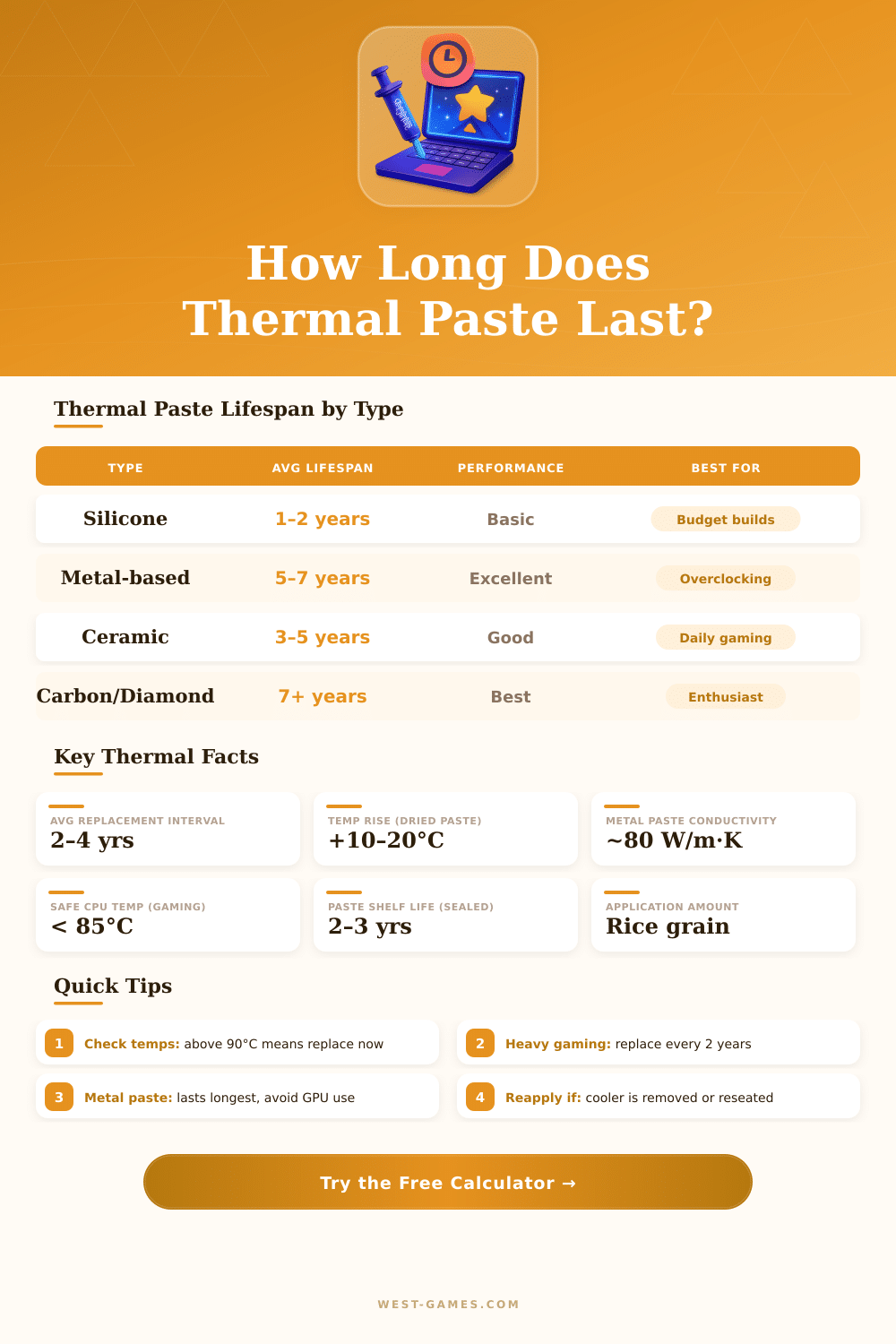
| Paste Type | Avg Lifespan | Heavy Gaming Lifespan | Conductivity (W/m·K) | Best Use Case |
|---|---|---|---|---|
| Silicone-based | 1–2 years | 6–12 months | 1–4 | Budget / stock coolers |
| Ceramic-based | 3–5 years | 2–3 years | 4–10 | Everyday gaming PCs |
| Carbon / Nano | 5–7 years | 3–5 years | 10–25 | High-end air cooled rigs |
| Metal-based (non-liquid) | 5–8 years | 4–6 years | 25–50 | Overclocked desktops |
| Liquid Metal | 5–10 years | 4–7 years | 50–80+ | Enthusiast / extreme OC |
| Phase Change Compound | 3–6 years | 2–4 years | 4–12 | Precision thermal control |
| CPU Temp While Gaming | Paste Health Status | Action Required | Performance Impact |
|---|---|---|---|
| Below 65°C (149°F) | 🟢 Excellent | No action needed | None — optimal |
| 65–75°C (149–167°F) | 🟢 Good | Monitor only | Minimal |
| 75–85°C (167–185°F) | 🟡 Fair | Plan replacement soon | Possible throttling |
| 85–90°C (185–194°F) | 🟠 Warning | Replace within 1–2 months | Throttling likely |
| Above 90°C (194°F) | 🔴 Critical | Replace immediately | Severe throttle / shutdown |
| Gaming Intensity | Hours/Day | Silicone Paste | Ceramic Paste | Metal/Carbon Paste |
|---|---|---|---|---|
| Light / Casual | 1–2 hrs | 18–24 months | 4–6 years | 7–10 years |
| Moderate | 3–5 hrs | 12–18 months | 3–4 years | 5–7 years |
| Heavy / Hardcore | 6–10 hrs | 6–12 months | 2–3 years | 3–5 years |
| Extreme / 24-7 | 10+ hrs | 3–6 months | 1–2 years | 2–4 years |
| Product | Type | Conductivity | Rated Lifespan | Electrically Conductive? |
|---|---|---|---|---|
| Arctic MX-6 | Carbon / Nano | ~12.6 W/m·K | 8 years | No (safe) |
| Thermal Grizzly Kryonaut | Ceramic / Nano | ~12.5 W/m·K | 5–8 years | No (safe) |
| Noctua NT-H2 | Hybrid ceramic | ~5 W/m·K | 5 years | No (safe) |
| Thermal Grizzly Conductonaut | Liquid Metal | ~73 W/m·K | 5–10 years | Yes (use caution) |
| Cooler Master MasterGel Pro | Silicone / nano | ~6.5 W/m·K | 3–4 years | No (safe) |
| Arctic Silver 5 | Metal particle | ~8.9 W/m·K | 3–5 years | Mildly (caution) |
Thermal Paste is known under many names. One also calls it thermal compound, thermal fat, heat paste, thermal gel, fat for chip, compound for warm bath and thermal interface material or simply TIM. Whatever it is called it always does the same role.
Thermal Paste is meant to mainly cover little tiny spaces between a chip and its cooler. Bases of chips and coolers have tiny holes and bumps on their surface. Because air blocks heat, those spaces strongly slow the heat transfer.
What Is Thermal Paste and How to Use It
The paste flows into those holes and helps heat spread evenly from the whole surface of the chip to the cooler. Without such help, the cooling would work much more poorly.
Thermal Paste simply helps heat move. It works as a bridge for heat transport. Only a thin layer is enough for good results.
Too much paste rather causes a bigger thermal barrier than help. An amount equal to half a pea, laid on well cleaned surfaces, is enough for both laptops and desktop computers. The layer must stay as tihn as possible, yet cover the whole contact.
When applying the paste, different methods exist. A common method is to lay a dot in the center of the chip, then press the cooler down. That pressure spreads the paste to the edges and pushes the air away.
The X-shaped method is another good one, because it lowers the risk of air bubbles. Some folks spread the paste before by means of a card, but if surfaces of the chip or cooler are not flat, that creates air pockets. Paste must be laid on the IHS of the chip before installing the cooler.
Many brands are popular. Arctic MX-4 sells best, it is easy to use and gives good results. It is made of carbon tiny bits, that covers small holes, which brings high heat flow and fast heat removal from a chip or graphics card.
Arctic MX-6 is another prize winner, with far higher heat flow. Thermal Grizzly Kryonaut is rated among the best by specs, though it costs a lot and is hard too apply.
Thermal Paste, that comes already applied to coolers, commonly lasts years. One laptop worked eight years with factory paste without problems. Even so, heavy usage and high heats can speed up the wear.
How long it lasts depends on temperatures, their changes and the number of heat cycles, that the paste goes through. Removing and replacing old paste in a laptop commonlydrops temps quite noticeably.