🎯 Tarkov eDPI Calculator
Calculate your effective DPI, ADS sensitivity & optimal settings for Escape from Tarkov
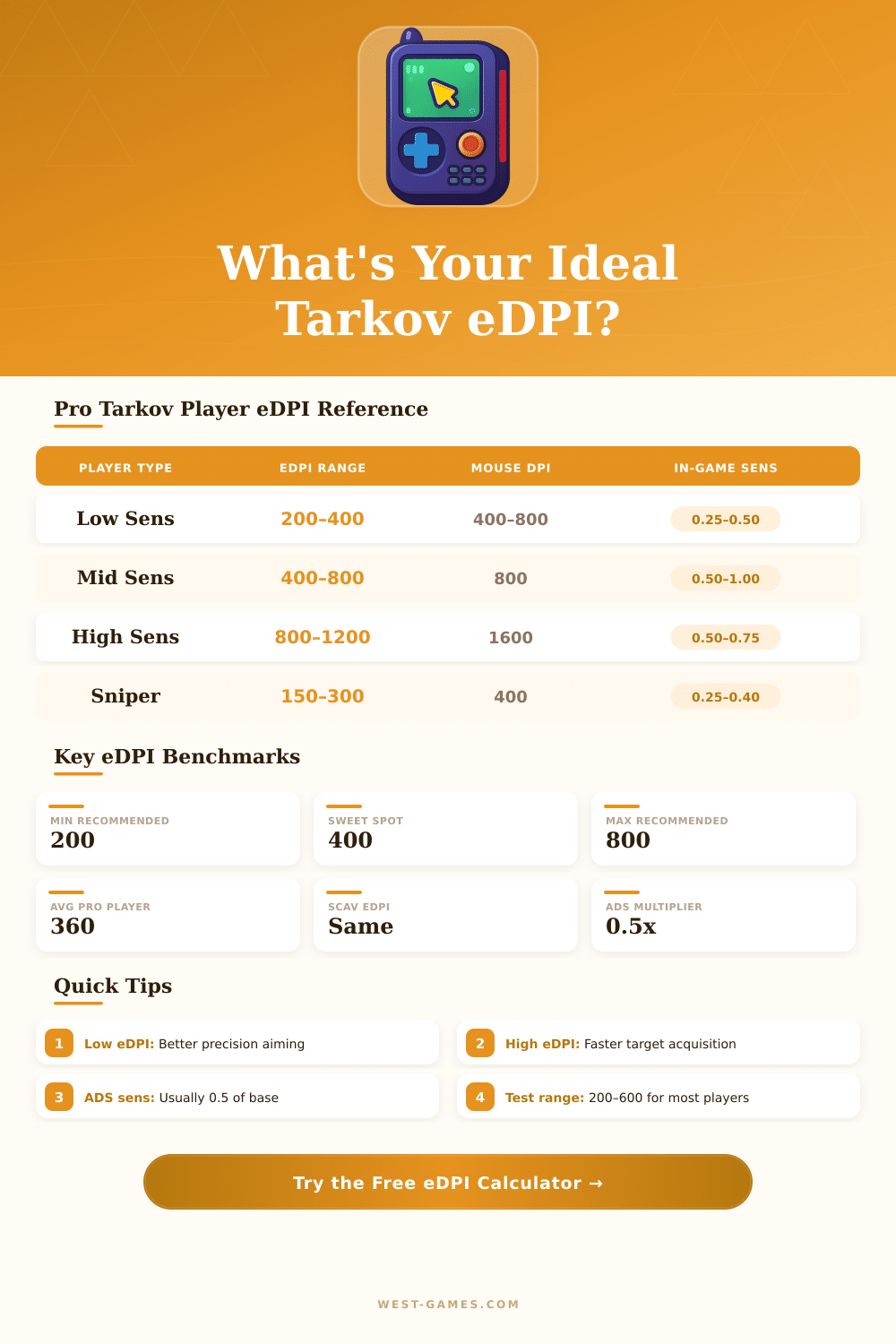
| Playstyle | eDPI Range | Recommended DPI | In-Game Sens | ADS Mult | Category |
|---|---|---|---|---|---|
| Precision Sniper | 150 – 300 | 400 | 0.25 – 0.50 | 0.5 | Low |
| Tactical Rifler | 300 – 500 | 400 – 800 | 0.38 – 0.63 | 0.75 | Mid |
| Balanced All-Rounder | 400 – 600 | 800 | 0.50 – 0.75 | 1.0 | Mid |
| SMG / Close Combat | 600 – 900 | 800 – 1600 | 0.50 – 0.75 | 1.0 | High |
| Hyper-Aggressive Rusher | 900 – 1400 | 1600 | 0.56 – 0.88 | 1.0 | High |
| Competitive / Pro | 250 – 450 | 400 – 800 | 0.31 – 0.56 | 0.5 – 0.75 | Pro |
| Mouse DPI | In-Game Sens for eDPI 200 | In-Game Sens for eDPI 400 | In-Game Sens for eDPI 600 | In-Game Sens for eDPI 800 |
|---|---|---|---|---|
| 400 DPI | 0.50 | 1.00 | 1.50 | 2.00 |
| 800 DPI | 0.25 | 0.50 | 0.75 | 1.00 |
| 1200 DPI | 0.17 | 0.33 | 0.50 | 0.67 |
| 1600 DPI | 0.13 | 0.25 | 0.38 | 0.50 |
| 3200 DPI | 0.06 | 0.13 | 0.19 | 0.25 |
| eDPI | Small Pad (250mm) | Medium Pad (350mm) | Large Pad (450mm) | XL Pad (900mm) |
|---|---|---|---|---|
| 200 | 2.86 rotations | 4.00 rotations | 5.14 rotations | 10.3 rotations |
| 400 | 1.43 rotations | 2.00 rotations | 2.57 rotations | 5.14 rotations |
| 600 | 0.95 rotations | 1.33 rotations | 1.71 rotations | 3.43 rotations |
| 800 | 0.71 rotations | 1.00 rotation | 1.29 rotations | 2.57 rotations |
| 1000 | 0.57 rotations | 0.80 rotations | 1.03 rotations | 2.06 rotations |
Note: This article is based on real conversations and descriptions from the community about Escape from Tarkov.
The EDPI for Tarkov is a simple count. It matches the in-game sensitivity multiplied by the DPI of the mouse. One single number helps to compare setups between players.
Simple EDPI Guide for Escape from Tarkov
For Escape from Tarkov, the best range falls between 120 and 800 EDPI. The sweet spot for many shooters falls between 600 and 1200 EDPI, depending on the space on the desk. Less high EDPI help for bigger accuracy so lowering it as much as possible without feeling too slow shows good practice.
Players two can own the same in-game sensitivity, but totally different experiences. When the DPI of one player matches half of the other, that person must move the mouse twice more to cover the same distance. Here is the main idea behind EDPI, it tells the real speed of the cursor not only one single number.
This clearly shows the difference between high DPI with low sensitivity against low DPI with high sensitivity. At 400 DPI it shows the most. Going to 800 DPI is a good choice especially for Tarkov.
Higher DPI with less high in-game sensitivity delivers much better pixel tracking. That results in fewer pixels skipped during aiming and mouse movement, especially for those that aim with the wrist and do fast 180 turns.
In Tarkov, carrying heavy gear really lowers the sensitivity. Because of that, using several EDPI settings for various loadouts is worth remembering for anyone that wants too play at a high level. That is quite a unique feature of this game.
In the game there is also a bit of difference between aiming with optical sights against iron ones. Around 30 centimeters of mouse movement for a 180 turn forms a commonly used reference. Starting with high sensitivity and later lowering it over time is a totally normal way.
Commonly one for example starts at 75 in-game sensitivity, soon notices that it is too high, and then sets around 60 sensitivity at 1600 DPI.
There are free sensitivity converters that allow players to match their Tarkov sensitivity with that of other games. Those programs convert sensitivity between Escape from Tarkov and more than 1654 other games. They also show useful stats like cm/360 and inches for 360.
Even so, perfectly matching sensitivity between games like CS and Tarkov can still feel weird. The sensitivity in Tarkov commonly ends a bit higher than in CS even during attempts to match them.
Calculators for EDPI are available for many games besides Tarkov, Apex Legends, CS2, Valorant, Overwatch 2, Fortnite, Rainbow Six Siege and others. Those resources arefree and help players keep a steady feeling through different games.