🔋 Steam Deck Battery Life Calculator
Estimate your playtime based on game type, TDP, brightness & settings
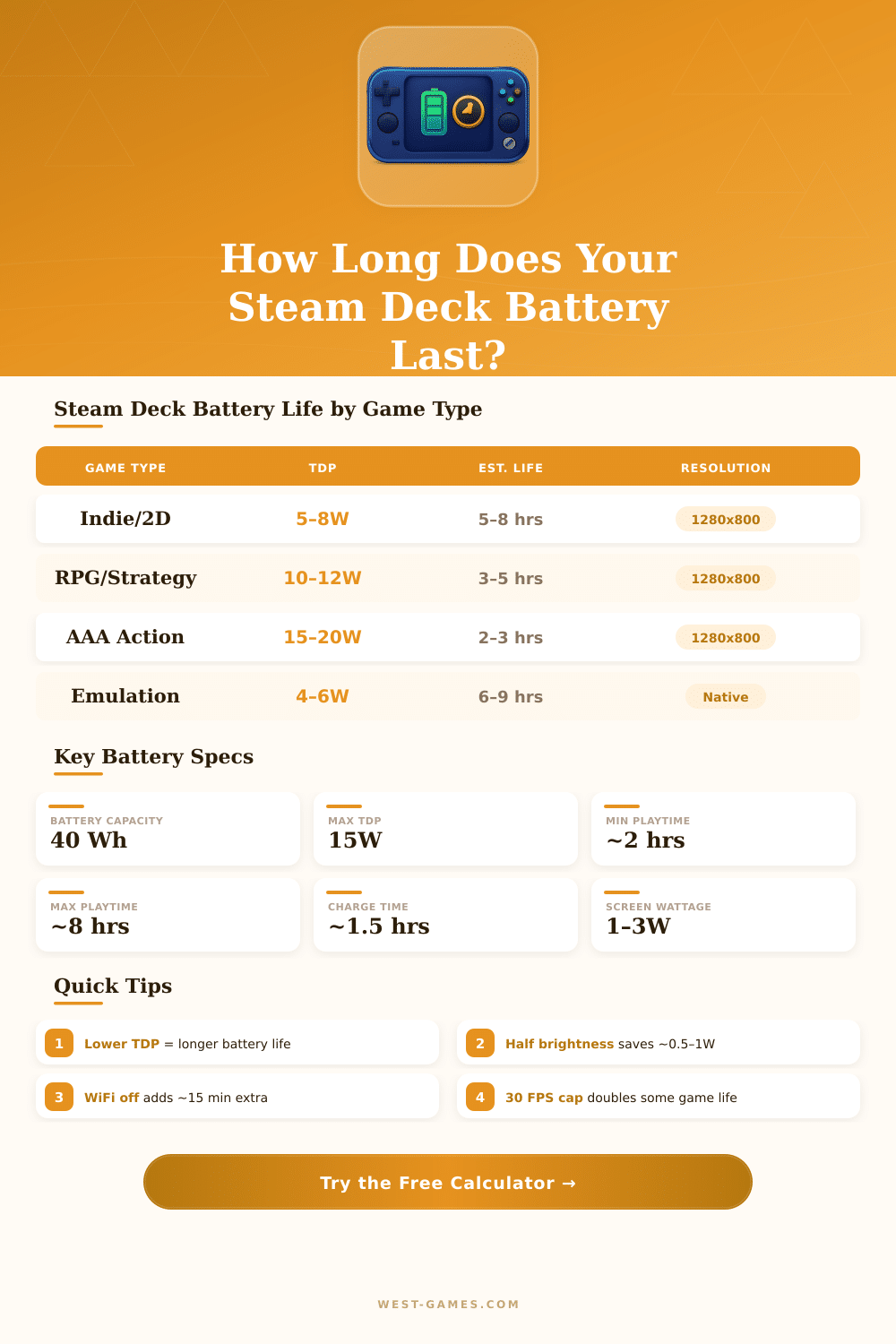
| Game Type | Typical TDP | Est. Battery Life | Best FPS Cap | Notes |
|---|---|---|---|---|
| Visual Novel / Idle | 2–4W | 7–10+ hrs | 30 FPS | Minimal GPU load |
| Indie / 2D Platformer | 5–8W | 5–8 hrs | 60 FPS | Low GPU demand |
| RPG / Turn-Based | 8–11W | 4–6 hrs | 40 FPS | Moderate load |
| Action RPG / Open World | 10–13W | 3–5 hrs | 40 FPS | Consistent GPU load |
| AAA FPS / Racing | 13–15W | 2–3 hrs | 30–40 FPS | Max GPU/CPU strain |
| Emulation (PS1/N64) | 3–6W | 6–9 hrs | 60 FPS | Low overhead |
| Emulation (PS2/GC) | 6–10W | 4–6 hrs | 60 FPS | CPU-intensive |
| Video Streaming | 4–6W | 5–8 hrs | N/A | WiFi & display active |
| Component | Min Draw | Max Draw | Savings Tip |
|---|---|---|---|
| APU (GPU + CPU) | 2W | 15W | Lower TDP limit in settings |
| Display (at 50%) | 0.8W | 2.5W | 50% brightness is optimal |
| WiFi Module | 0.3W | 0.8W | Disable when offline |
| Bluetooth | 0.1W | 0.3W | Off if not using accessories |
| Storage (NVMe/eMMC) | 0.3W | 0.7W | MicroSD uses slightly less |
| Fan | 0.1W | 0.5W | Lower TDP = quieter fan |
| Haptics / Gyro | 0.1W | 0.3W | Disable in game settings |
| FPS Cap | Relative TDP | Battery Impact | Best For |
|---|---|---|---|
| Uncapped | 100% | Baseline / Worst | Charging or short session |
| 60 FPS | 85–95% | ~5–10% longer | Most games, action titles |
| 40 FPS | 65–75% | ~25–35% longer | Best balance of life & feel |
| 30 FPS | 50–60% | ~40–55% longer | Maximum battery life |
- Set a TDP limit of 8–10W in the Quick Access menu — most games remain very playable.
- 40 FPS cap is the sweet spot: noticeably smoother than 30 FPS but uses far less power than 60 FPS.
- Keep brightness at 50% or below — the display is a surprisingly large power draw.
- Turn WiFi off during offline play to save an extra 10–15 minutes per session.
- Enable half-rate shading in compatible games for a 10–20% TDP reduction with minimal visual loss.
The Steam Deck is a portable computer for games, created by the Valve Company. It is meant to run games from the Steam store. Based on experiences from prior versions of Valve, like the Steam Machine and the Steam Controller, it runs with a special AMD chip and uses SteamOS.
Now it is already available for purchase.
Steam Deck: Play PC Games Anywhere
One describes it as the strongest and most complete portable gaming device globally. It brings the Steam gaming in a handheld device that one can take anywhere. The full experience of the Steam store is available directly on the Deck.
One can stream games from a home computer directly to the device, regardless of the place of the player.
The Steam Deck starts with Linux-based SteamOS directly from the box. Valve always works to improve the fit of games, evolving SteamOS and its Proton tool, that allows many Windows games to run on Linux. The version 3.7.8 of SteamOS adds several fixes and workarounds, and first brings mainstream support for spare Battery.
It has also new energy saving mode that means to download games while saving energy.
The shape looks like that of a controller, so it is easy to hold. There is a stand mode to use it on a table, as if it were a normal computer. It works to run many emulators four old consoles, like PS2 and GameCube.
For simple or old games and copies, the Battery life is almost unbeatable. The touchpads work very well, especially when one combines them with settings of the Steam system for strategy games and home games.
Even so not every game on Steam works perfectly on it. Some games are hard to play, and others simply impossible, because the graphics chip does not handle the most demanding titles. Some games require a keyboard.
But Valve already confirmed many mainstream AAA games and independent titles as Deck compatible, sothey are fully backed.
The model with 512 GB NVMe comes with anti-glare glass, matte, and a case. The 1 TB version includes also a travel case with a removable expansion slot, which helps to fit it in a bag without needing big and heavy protection. For folks with limited budget, the basic model with a fast microSD card forms a good cheap solution.
With a USB-C dock one can connect the Deck to a television or monitor.
The prices start at 400 dollars and reach 650 for the best model which is around half of the competition. The hardware is modern, the layout of buttons pleases, and the software eases the gaming on computers. It gives simple entry to PC gaming, because the costs for hardware and programs stay low, especially during the Steam sales.
Play in short sessions on the sofa is entirely possible.