🎯 Marvel Rivals Sensitivity Converter
Convert your sensitivity from any game to Marvel Rivals — perfect 1:1 aim transfer
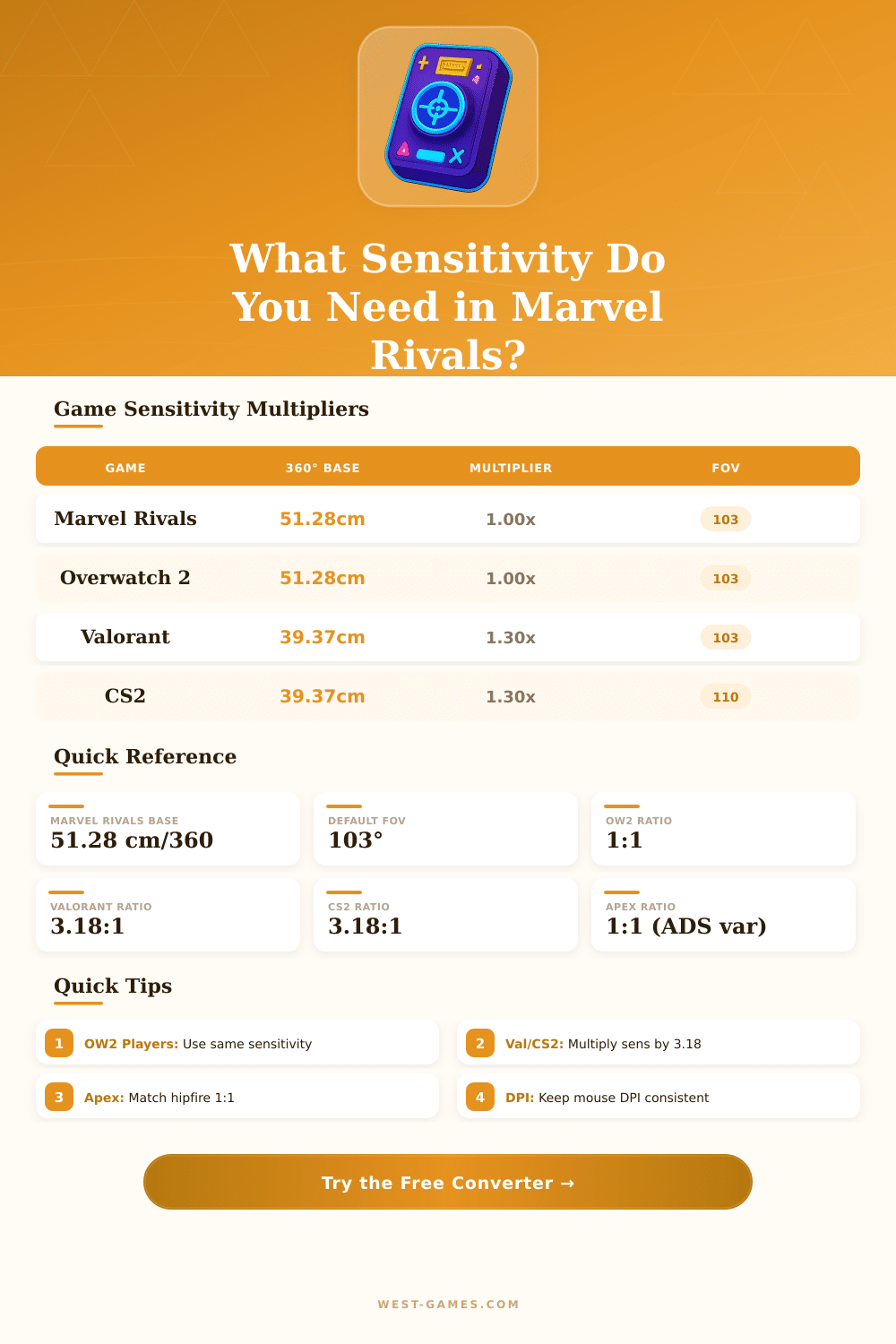
| Source Game | Yaw (°/count) | Multiplier to MR | 360° at 1 Sens / 800 DPI |
|---|---|---|---|
| Marvel Rivals | 0.0220 | 1.000 | 20.45 cm |
| Overwatch 2 | 0.0220 | 1.000 | 20.45 cm |
| Valorant | 0.0700 | 3.182 | 6.43 cm |
| CS2 / CS:GO | 0.0220 | 1.000 | 20.45 cm |
| Apex Legends | 0.0220 | 1.000 | 20.45 cm |
| Fortnite (%) | 0.5500 | 25.000 | 0.82 cm |
| R6 Siege | 0.00572 | 0.260 | 78.67 cm |
| PUBG | 0.000264 | 0.012 | 1704.5 cm |
| CoD (MW/WZ) | 0.0066 | 0.300 | 68.18 cm |
| Role / Playstyle | cm/360° Range | in/360° Range | eDPI (MR) Range |
|---|---|---|---|
| Hitscan DPS (tracking) | 25 – 38 cm | 9.8 – 15.0 in | 2,400 – 3,600 |
| Projectile DPS | 20 – 30 cm | 7.9 – 11.8 in | 3,000 – 4,600 |
| Flanker / Duelist | 22 – 35 cm | 8.7 – 13.8 in | 2,600 – 4,200 |
| Tank / Vanguard | 18 – 28 cm | 7.1 – 11.0 in | 3,200 – 5,100 |
| Support / Healer | 24 – 36 cm | 9.4 – 14.2 in | 2,500 – 3,800 |
| DPI | MR Sens | eDPI | cm/360° |
|---|---|---|---|
| 400 | 8.00 | 3200 | 28.41 |
| 800 | 4.00 | 3200 | 28.41 |
| 800 | 5.00 | 4000 | 22.73 |
| 800 | 6.50 | 5200 | 17.48 |
| 1600 | 2.00 | 3200 | 28.41 |
| 1600 | 3.50 | 5600 | 16.23 |
| 3200 | 1.00 | 3200 | 28.41 |
Well setting the Sensitivity in Marvel Rivals can make the difference between hitting the right shots and simply missing them. Because it is a team-based superhero shooter where precise aim really matters value the time to find that ideal level. Experts commonly use 800 DPI together with around 2.6 in-game Sensitivity, what serves as a good base.
After that, a bit up or below by one-two clicks helps you find what feels right in your hand.
Choose the right mouse sensitivity for Marvel Rivals
If you watch the setups of streamers and professionals, you will find many setups between 800 and 900 DPI, with in-game Sensitivity around 3. One method, that seems to work for many, is start at 800 DPI with 2.33 Sensitivity, later give yourself some days to adapt before deciding whether it works. Lower Sensitivity usually works better here, because tracking of targets matters more than fast spins.
The perfect spot ensures that you can follow exactly even when enemies are very close, keeping your aim easily without weird shaking and stay stuck to the targets without struggle with the mouse.
Marvel Rivals offer you separate sliders for horizontal and vertical Sensitivity, found in the main menu, under the keyboard in the section about controls. Even so players range very a lot on that. Some set it at only 1.35, while others raise it to 6.00 on 1000 DPI mouse.
There is even a player that dropped from 9.5 to 5.5 only for Hawkeye, and later chose 6 for the other heroes. That shows the big flexibility.
Overwatch feels most like Marvel Rivals, and the average Overwatch player aims around 35 centimetres for a full 360 turn. With 800 DPI in Marvel Rivals that matches to around 1.88 in-game Sensitivity. Games like CS:GO or Valorant favour 40 centimetres or more, because enemy moves are more slow, but Marvel Rivals requires otherwise…
You must be equally fast and precise.
Here is wear everything becomes hard: mouse boost is built into Marvel Rivals and you can not turn it off from the main menu. Your Sensitivity moves depend on the speed of your mouse movement, what causes missed shots in the worst moments. Professionals do not have that problem, because boost does not affect them really, but users of keyboard and mouse feel it strongly.
Even so, local mods can remove it, and Rivals do not punish you for using them, because they stay only locally. The mouse movement also feels sliding for many, what makes spins and tracking hard on heroes that depend on aim.
But there is a good start; free Sensitivity calculators found online, that work for Marvel Rivals and more than 1600 other games. Those programs give eDPI, centimetres for 360 and inches for 360. Before entering ranked matches, use the practice mode and test various setups until something clicks.
Well choosing thatright Sensitivity can help you climb in the ranks more quickly than you imagine.