🎯 Rust Sensitivity Converter
Convert DPI & sensitivity to cm/360 — cross-game, cross-DPI, instantly accurate
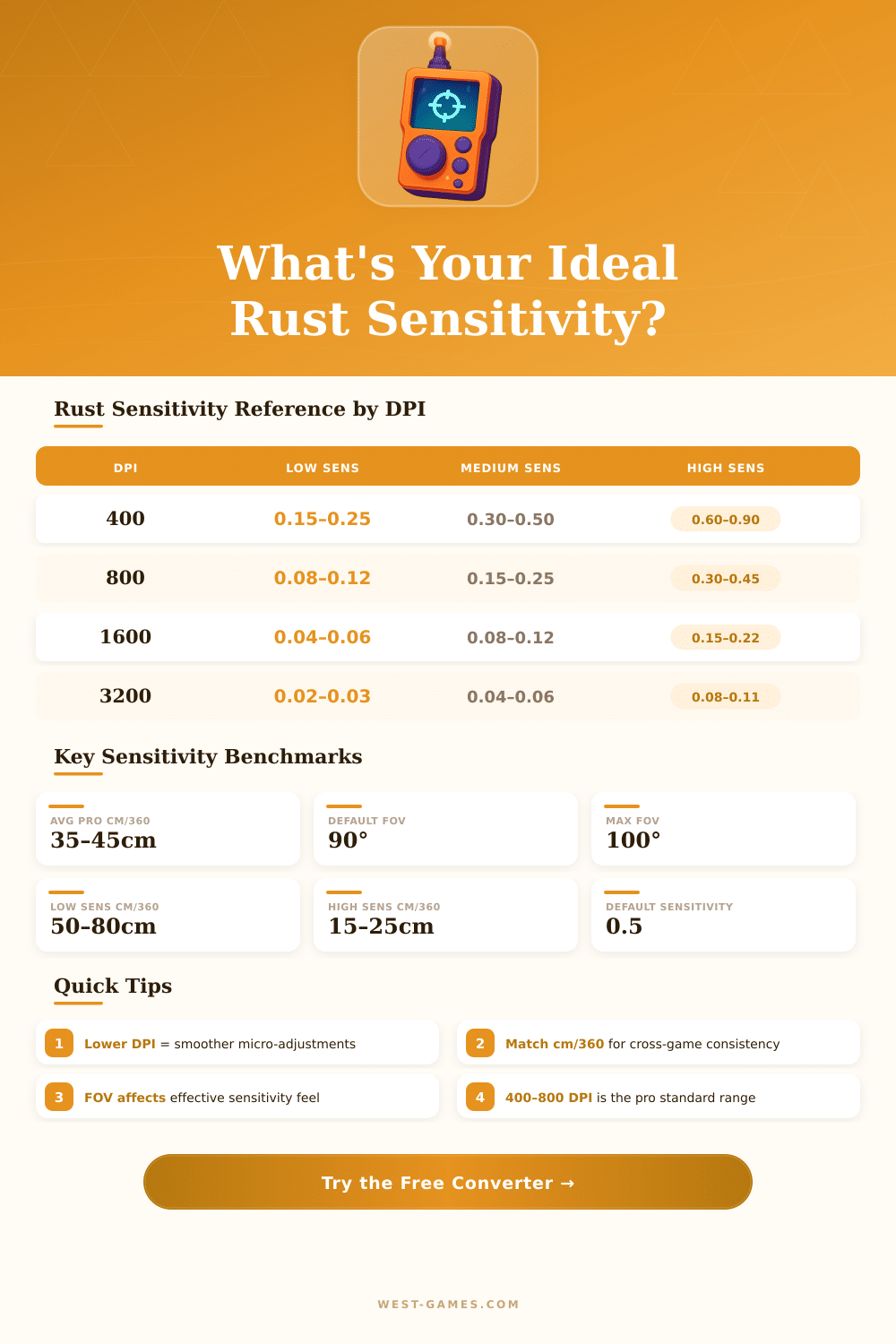
| DPI | In-Game Sens | cm/360 | in/360 | Feel |
|---|---|---|---|---|
| 400 | 0.15 | 79.58 | 31.33 | Very Slow |
| 400 | 0.25 | 47.75 | 18.80 | Slow |
| 400 | 0.50 | 23.87 | 9.40 | Medium |
| 800 | 0.15 | 39.79 | 15.67 | Slow |
| 800 | 0.30 | 19.90 | 7.83 | Medium |
| 800 | 0.50 | 11.94 | 4.70 | Fast |
| 1600 | 0.15 | 19.90 | 7.83 | Medium |
| 1600 | 0.25 | 11.94 | 4.70 | Fast |
| 1600 | 0.50 | 5.97 | 2.35 | Very Fast |
| Game | Rust Multiplier | Notes | Yaw (deg/count) |
|---|---|---|---|
| Rust | 1.000x | Base reference | 0.0486 |
| CS2 / CSGO | 1.000x | Direct match | 0.0486 |
| Valorant | 0.818x | Slightly slower | 0.0700 |
| Apex Legends | 1.000x | Direct match | 0.0486 |
| Fortnite | 0.500x | Half Rust sens | 0.0300 |
| PUBG | 1.000x | Direct match | 0.0486 |
| Escape from Tarkov | 1.000x | Direct match | 0.0486 |
| FOV | FOV Scalar | Effect on Aim | Adjust Sens By |
|---|---|---|---|
| 70° | 0.778 | Zoomed in feel | +28% |
| 80° | 0.889 | Slightly narrow | +12% |
| 90° | 1.000 | Standard (default) | Baseline |
| 95° | 1.056 | Slightly wider | –5% |
| 100° | 1.111 | Wide, more peripheral | –10% |
Note: This article is based on actual experience and talks in the community of gamers about Rust.
Have you tried to set the sensitivity for Rust? Honestly, that is harder than it seems. If you set it too low, you will hit the shots easily, but turning to face someone that sneaks up behind becomes real pain.
Choose the Right Mouse Sensitivity for Rust
There is no magic setting that works for all, though some ranges do appear more commonly with players that honestly know what they do.
Many folks use around 200 to 400 DPI together with in-game sensitivity of 20 to 50. Even so, what feels good for you matters much more than any setting that I could mention. In Rust I saw good results with about 800 DPI and sensitivity between 0.2 and 0.4.
One setup that commonly works is 800 DPI with 0.3 sensitivity, good for shooting AK spray patterns and for general PvP gameplay quite a lot more easily.
Low sensitivities shine when you aim at long distances above 100 metres with sprays. You want the cm/360 value to be around 40 to 50, or even higher, for such control. But here is teh problem: if you set it too low, moving around your bases or handling corners becomes boring.
Today, the need to turn and quickly put up PvP-walls is built in, so raising the sensitivity a bit commonly helps more than it hurts.
Dropping your DPI down over weeks or months usually works better than jumping straight to a low value. Start at around 2000 DPI and slowly lower it until something like 600 with 0.5 in-game sensitivity can truly improve your accuracy after the change. Even switching from 1450 to 800 DPI, while you keep 1.0 in-game sensitivity, creates a clear difference when tracking moving targets.
The sensitivity slider in Rust tops out at 2.0, which limits how high you can push it in the game. Some players choose low DPI with higher in-game values, relying on smaller and controlled moves of the mouse instead of big slides across the pad. Others stay at 400 DPI with truly low sensitivity like 0.3, so that there muscular memory stays steady if they switch between Rust and Counter-Strike.
There are free calculators for sensitivities that cover Rust and more than 1600 other games. They give useful data like eDPI, cm/360 and inches for full rotation of 360 degrees. All you need to do is enter your current setup from Rust, ideally to match sensitivity with CS:GO or other shootergames.
For weapons with scope, setting the aim sensitivity multiplier to 1.0 commonly is the best spot for better tracking. Setting your gaming mouse to 1000 Hz also helps for faster response times. The recoil update changed everything.
Old setups simply do not work for many players. Now the recoil adjusts strongly based on the weapon (SMGs almost do not jump), but something like M2 with 8x scope? That is real pain, covering the whole screen.
The steadiness went out the window.
The sensitivity for ADS adds extra trouble to the mix. Your full sensitivity, multiplied by the aim sensitivity, decides how it truly feels. To reach the same feeling through every weapon and scope?
That takes real effort and careful setup.