🏎️ rFactor 2 FOV Calculator
Calculate your perfect Field of View for realistic, immersive sim racing in rF2
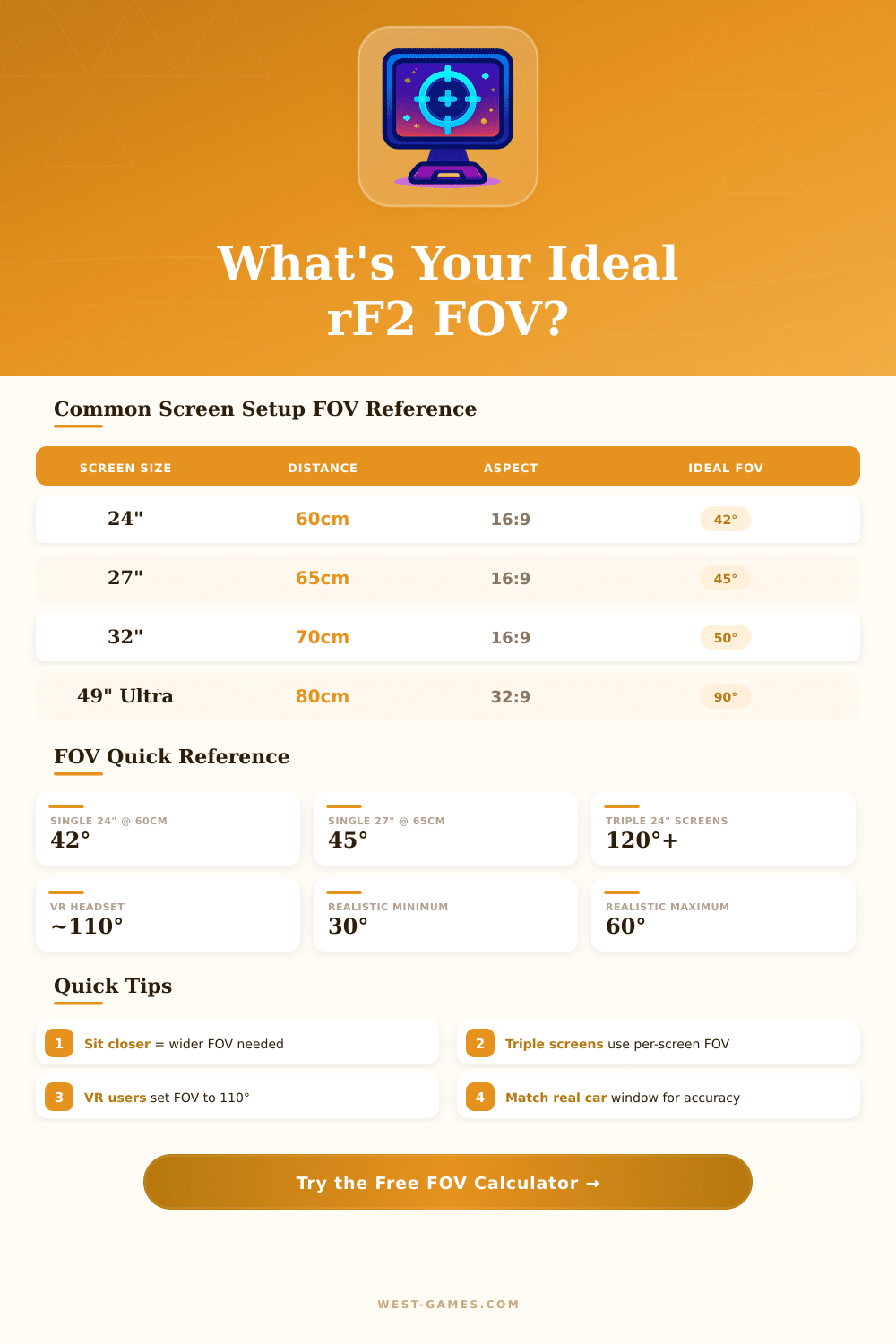
| Screen Size | Aspect Ratio | Distance 50cm | Distance 60cm | Distance 70cm | Distance 80cm |
|---|---|---|---|---|---|
| 24" (61cm) | 16:9 | 47° | 40° | 35° | 31° |
| 27" (69cm) | 16:9 | 52° | 45° | 39° | 34° |
| 32" (81cm) | 16:9 | 60° | 51° | 45° | 39° |
| 34" (86cm) | 21:9 | 69° | 59° | 51° | 45° |
| 38" (97cm) | 21:9 | 76° | 65° | 57° | 50° |
| 49" (124cm) | 32:9 | 98° | 85° | 75° | 67° |
| 55" TV (140cm) | 16:9 | 108° | 94° | 82° | 73° |
| Per-Screen Size | Side Angle | Distance 60cm | Combined FOV | rF2 Setting |
|---|---|---|---|---|
| 24" each | 30° each | 60cm | ~120° | 120° |
| 24" each | 45° each | 60cm | ~130° | 130° |
| 27" each | 30° each | 65cm | ~135° | 135° |
| 27" each | 45° each | 65cm | ~145° | 145° |
| 32" each | 30° each | 70cm | ~151° | 150° |
| FOV Range | Setup Type | Realism | Notes |
|---|---|---|---|
| 25° – 35° | Single, far seat | High | Narrow but very accurate perspective |
| 36° – 50° | Single, standard | High | Best range for most single-screen setups |
| 51° – 65° | Single, large screen | Medium | Good for 32"+ or close seating |
| 66° – 90° | Ultrawide / 49" | Medium | Acceptable with wide aspect ratios |
| 91° – 150° | Triple screen / VR | High | Use triple-screen mode in rF2 |
| 151°+ | Wide triple screens | High | Max visual immersion, high GPU cost |
**Note:** The info in this article is based on forum discussions and experiences from a community of sim-racing fans.
Setting the right fov in rf2 can truly change the whole feeling of the sim. By default it stands at 50 degrees vertically in rf2. With seat in position 0,0 and that basic setup, the view already points a certain direction that not always works for every setup.
How to Set FOV in rFactor 2
When rivals show directly beside you on one single screen, then clearly the fov is too high.
Using a calculator for fov is a good way to start. For instance, the one from Sampsoid works very well. The idea is to enter the vehicle and move the seat forward or backwards, until the hands in the game seem just as big as real hands on the wheel.
There are programs that figure out the precise angles and screen values for three-screen setups in various sim-racing games, among them rf2. Those programs need data like screen ratio, size in inches, distance to the viewpoint and whether it is one or several screens. The vertical result of the calculation goes directly in rf2.
Some setups need really low fov. 24 degrees for example work perfectly in rf2 without any trouble. In other simulations the minimum does not let you go that much down, which can cause warp.
Luckily, rf2 allows you to set very precise values.
It is important to understand that setting. If the fov option stays on “Default”, then each module or car model will use its own internal value. Setting it to a real number, like 58, you force it to apply to all rides.
The file all_vehicles.ini stores values for fov, seat position, mirrors, FFB multiplier and other key data for every car. This way you do not need to repeat the settings each time when you load a new vehicle. Even so, changing the fov value in that file too 28 for instance does not always give the expected result.
For ultrawide monitors like the G9, multi-screen mode is not needed, because it is meant for three-screen setups. Rather, simply set the fov to suit the wide ratio of the ultrawide.
In VR it is not wise to change the fov, and usually there is not even a way to do that. Such a change twists the scale of the world and creates a fisheye look, which bothers expert users of VR.
Mirrors in rf2 can be hard to set. You change them using combiantions of Ctrl, Alt and arrow keys together with controls for forward, backwards, up and down. You can assign buttons for seat position and fov in the control settings.
Not all third-party cars have separate left and right mirrors, which makes their precise placement harder. Sometimes the mirror fov itself is more important than the position of the mirrors.
Beyond the fov, it matters more to keep stableperformance than to reach maximum FPS. Match the rotation of the wheel in the driver software and in the game itself. Set the FFB strength to avoid clipping in heavy turns.
Smooth driving and control are key, because rf2 punishes overly aggressive actions.