🎯 R6 Sensitivity Converter
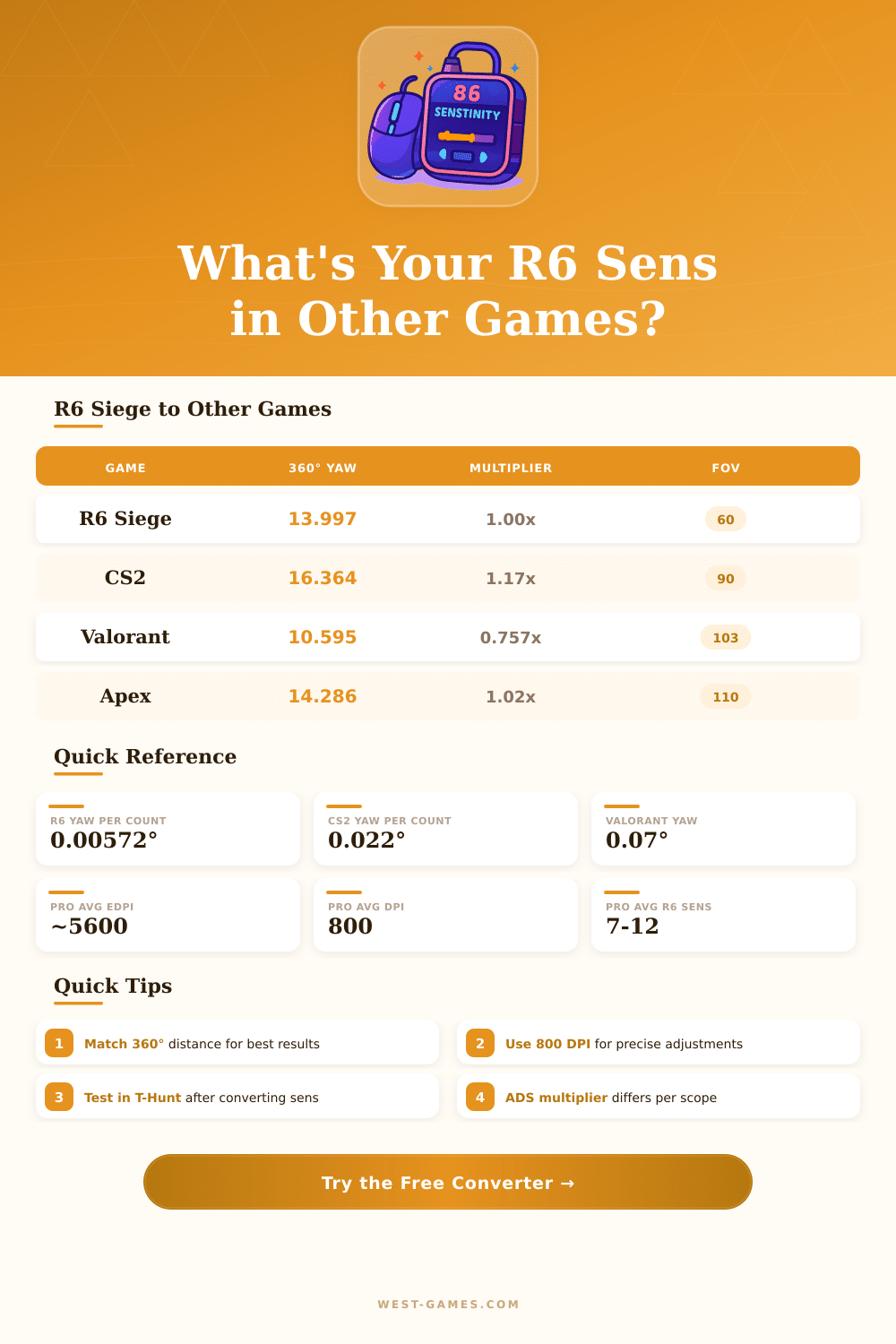
Convert your Rainbow Six Siege sensitivity to any FPS game — or convert from other games to R6
| Game | Yaw (°/count) | 360° at Sens 1, 800 DPI | Default FOV |
|---|---|---|---|
| R6 Siege | 0.00572° | ~78.7 cm (31.0 in) | 60 (V) |
| CS2 / CS:GO | 0.022° | ~204.5 cm (80.5 in) | 90 (H) |
| Valorant | 0.07° | ~64.3 cm (25.3 in) | 103 (H) |
| Apex Legends | 0.022° | ~204.5 cm (80.5 in) | 110 (H) |
| Overwatch 2 | 0.0066° | ~681.8 cm (268.4 in) | 103 (H) |
| Fortnite | 0.5585° | ~8.1 cm (3.2 in) | 80 (H) |
| CoD MW/WZ | 0.0066° | ~681.8 cm (268.4 in) | 80 (H) |
| PUBG | 0.002222° | ~2025 cm (797.2 in) | 103 (H) |
| R6 Sens (800 DPI) | CS2 | Valorant | Apex |
|---|---|---|---|
| 5 | 1.30 | 0.409 | 1.30 |
| 7 | 1.82 | 0.572 | 1.82 |
| 8 | 2.08 | 0.653 | 2.08 |
| 10 | 2.60 | 0.817 | 2.60 |
| 12 | 3.12 | 0.980 | 3.12 |
| 15 | 3.90 | 1.225 | 3.90 |
| Scope / Sight | Magnification | Default ADS Mult. | Effective Sens Reduction |
|---|---|---|---|
| Iron Sights / 1x | 1.0x | 50 (legacy) / 1:1 (updated) | ~42% slower |
| 1.5x | 1.5x | 50 | ~52% slower |
| 2.0x | 2.0x | 50 | ~60% slower |
| 2.5x | 2.5x | 50 | ~66% slower |
| 3.0x | 3.0x | 50 | ~70% slower |
| 5.0x (Glaz) | 5.0x | 50 | ~80% slower |
| 12.0x (Kali) | 12.0x | 50 | ~92% slower |
| R6 eDPI (DPI × Sens) | 360° (cm) | 360° (inches) | Category |
|---|---|---|---|
| 2400 | ~26.2 | ~10.3 | Very Low |
| 4000 | ~15.7 | ~6.2 | Low |
| 5600 | ~11.2 | ~4.4 | Medium (Pro Avg) |
| 8000 | ~7.9 | ~3.1 | High |
| 12800 | ~4.9 | ~1.9 | Very High |
Get the right Sensitivity for Rainbow Six Siege is not easy. The trouble comes from that, that you must handle three different settings: horizontal, vertical and ADS-Sensitivity. Find that right balanced spot, where your speed works together with accuracy, instead of that they fight, takes care.
Many pros, that you will see, use Siege with DPI of 400 or 800. Is good reason for that. If you too high turn the whole Sensitivity, your aim moves become wild and messy.
Choose the right mouse sensitivity for Rainbow Six Siege
I watched folks, that bid 7800 DPI together with 22 in-game Sensitivity, what simply invites trouble in Siege. Of course, that could work in other shooters, but Siege punishes sloppy play and requires high accuracy.
When deal about mouse movement, I noticed, that the most many players choose values between 30 and 50 centimetres for full 360-degree turn. If you too low or too high go, the control disappears right away. Between pros you find some, that get by with only 3 centimetres, while others favour somthing near to 50.
Actually, each has his own style, so does not exist one number, that works for all.
One setting, that well works on PC, is 1600 DPI with 9-9 Sensitivity and multiplier in default value. Even so, recoil patterns act different on PC than on consoles, so worth to spend time in shooting tests. If the vertical recoil bothers you, putting a compensator on you’re weapons can fix the cause.
ADS-feeling is the place, where everything becomes tricky. The new ADS-system in Siege use visual gain, what ensures steady feeling no matter the zoom-level. New players start with ADS-value of 50 through all zoom-levels.
But reach real 1:1 relation between mouse movement and ADS? Here where many mess up. The R6 ADS-calculator removes the guesswork.
Use lower mouse-Sensitivity commonly help, when you want accuracy. Even so, high Sensitivity absolutely can work. Exists Asian pro, that uses 1600 DPI with 53-53 Sensitivity; that are almost 2 centimetres for full turn.
Crazy fast, yet good on the highest level.
If you change your DPI from 400 to 800, simply double the in-game Sensitivity, and your ADS will stay same as before. Coming from game like CS2? Tools like mouse-Sensitivity.com help you keep muscle memory without pause.
Keep same feeling through your collection ofshooting games really help.
Sometimes the in-game Sensitivity changes sharply, especially when you switch to other R6-account. If something sharply feels strange, check, whether your settings moved. Also, setting texture quality to low gives clearer sight through destroyed walls, and shadow quality affects, whether enemy shapes show on your screen.