🎮 PS4 Controller Battery Life Calculator
Find out exactly how long your PS4 controller lasts on 3 bars — or any charge level
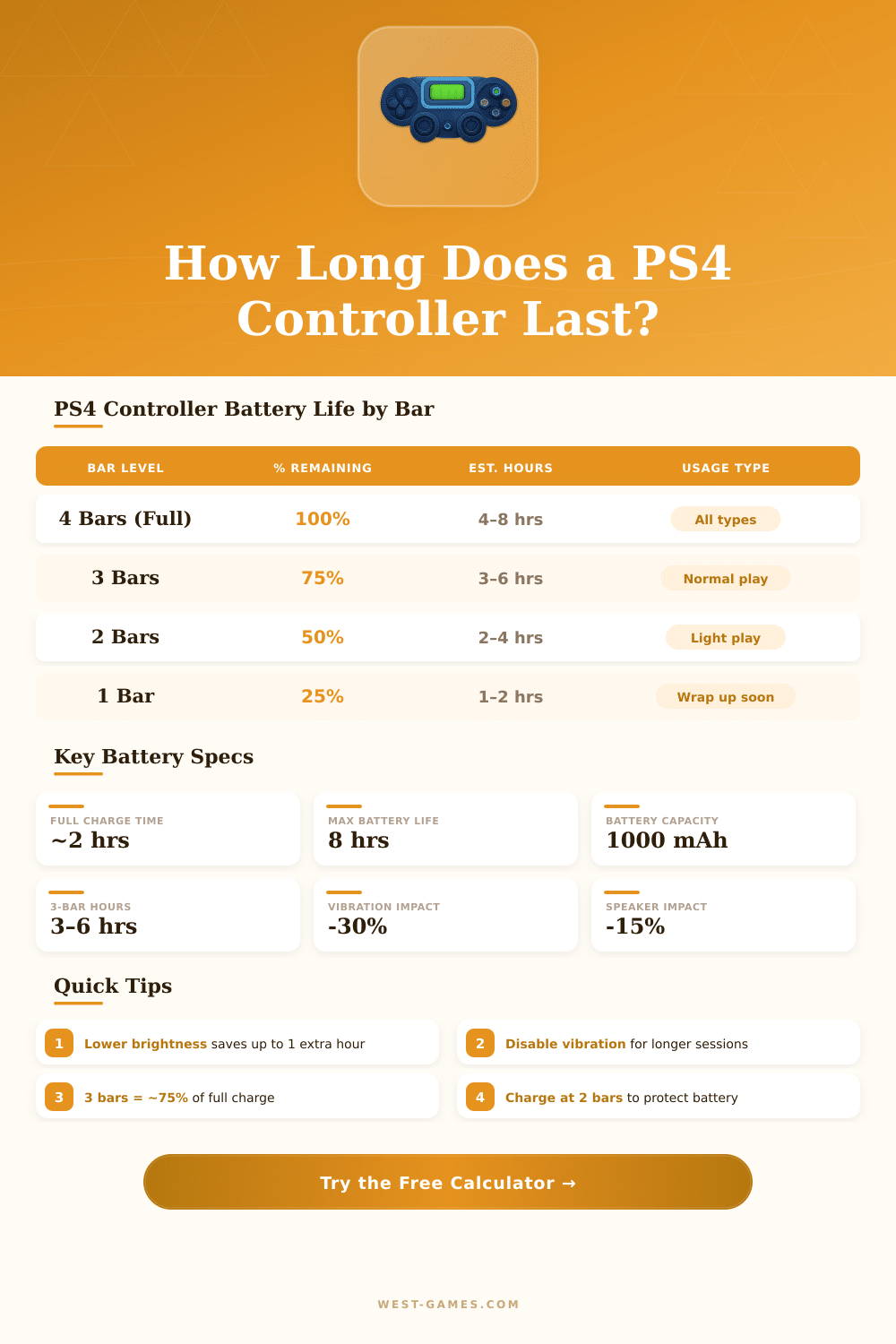
| Bar Level | Approx % | Casual Use | Normal Gaming | Intense Gaming |
|---|---|---|---|---|
| 🟡 4 Bars (Full) | 100% | 7–8 hrs | 5–6 hrs | 4–5 hrs |
| 🟠 3 Bars | ~75% | 5–6 hrs | 3.5–4.5 hrs | 3–4 hrs |
| 🟤 2 Bars | ~50% | 3.5–4 hrs | 2.5–3 hrs | 2–2.5 hrs |
| 🔴 1 Bar | ~25% | 1.5–2 hrs | 1–1.5 hrs | 0.5–1 hr |
| Feature | Drain Impact | Time Lost | Recommendation |
|---|---|---|---|
| 📳 Vibration (ON) | High — ~25–30% | 0.5–1.5 hrs | Turn off for long sessions |
| 💡 Lightbar (Full) | Medium — ~10–15% | 0.3–0.8 hrs | Dim or disable if possible |
| 🔊 Speaker (ON) | Low-Med — ~8–15% | 0.2–0.6 hrs | Use TV audio instead |
| 🎧 Headphone Jack | Low — ~5–10% | 0.1–0.4 hrs | Minor impact, use freely |
| 📶 Bluetooth Range | Minimal — ~2–5% | Negligible | Stay within 10m / 32ft |
| Game Genre | Vibration Use | Avg Life (Full) | Avg Life (3 Bars) |
|---|---|---|---|
| 🎯 FPS (Call of Duty, etc.) | High | 4–5 hrs | 3–3.75 hrs |
| ⚔ RPG (Witcher, RDR2) | Medium | 5–6 hrs | 3.75–4.5 hrs |
| ⚽ Sports (FIFA, NBA 2K) | High | 4–5 hrs | 3–3.75 hrs |
| 🏃 Platformer (Crash, LBP) | Low-Med | 6–7 hrs | 4.5–5.25 hrs |
| 📺 Media / Netflix | None | 7–8 hrs | 5.25–6 hrs |
| 🏆 Competitive (No Vibration) | Off | 6.5–8 hrs | 5–6 hrs |
• Turn off vibration in PS4 Settings → Devices → Controllers to gain up to 30% more life.
• Dim the lightbar by connecting your DS4 to a PC via DS4Windows (cannot be changed natively on PS4).
• Charge before 1 bar — lithium batteries last longer when kept between 20%–80%.
• The PS4 Slim controller has the same 1000 mAh battery as the original PS4 controller.
The DualShock 4 is the main PS4 controller and it appears in various colors. Every new PS4 console carries one PS4 controller in the box, what makes sense because the PS4 controller stays the main tool for using the console. The DualShock 4 has a motion sensor and gyroscope that detects motions, tilts and turns.
It works with PS4 and computers.
DualShock 4 Controller: Features, Problems and How to Connect
The PS4 controller sits nicely in the hand and has good weight. The touchpad was built for it but in most games it almost does not exist. One could use it much more often, especially in shooting games from first person.
The buttons for PlayStation-Camera and Share helps with social networks and playing with friends. The DualShock 4 has flat buttons, that feel good even if they sit on a flat round base.
The first set of DualShock 4 PS4 controllers had firm black buttons and thick thumb cushion, that stopped the light of the strip from shining through it. The updated version bears the light strip on the touchpad and should have higher quality. The newer DualShock 4 models include the Slim and Professional versions, with a feature wear the USB link ensures talking through cable instead of Bluetooth, what often gives lower delay.
Generic PS4 controllers often fail. There is nothing as good cheap PS4 controller. One generic PS4 controller from Amazon seemed very good, but it had big input delay.
Generic PS4 controllers weigh much more lightly and lack the official PS4 calibration for dead zones. One generic PS4 controller stopped charging after six months. The original DualShock 4 stays the best option in many ways, although it costs around 50 to 60 dollars.
Fixed PS4 controllers from GameStop cost less than new andwork well.
Connecting a PS4 controller to a computer is possible by Bluetooth or USB. Steam simplifies that by going to settings, then to controllers and turning on PS4 support. Pressing at the same time the PS and Share buttons puts the PS4 controller in pairing mode.
Some games detect the PS4 controller, but do not take input, what sometimes gets fixed by turning off Steam-Input in the game options. A program called DS4Windows makes games believe that the PS4 controller is an Xbox One, what improves the compatibility.
Thumbsticks often drift. PS4 controllers can quickly drift and lag. The hinge of the R2 button can break after around six months of usage.
Some PS4 controllers last years, with only the rubber cover of the thumb stick wearing out, what gets fixed with parts from aftermarket. Batteries keep their charge over time, although not that much well as when new. One can add Smart Triggers and Smart Bumpers for faster reactions and fatser shots, and they come in several colors for personal style.