🎯 Mouse Sensitivity Converter
Convert your mouse sensitivity between games — match your aim everywhere
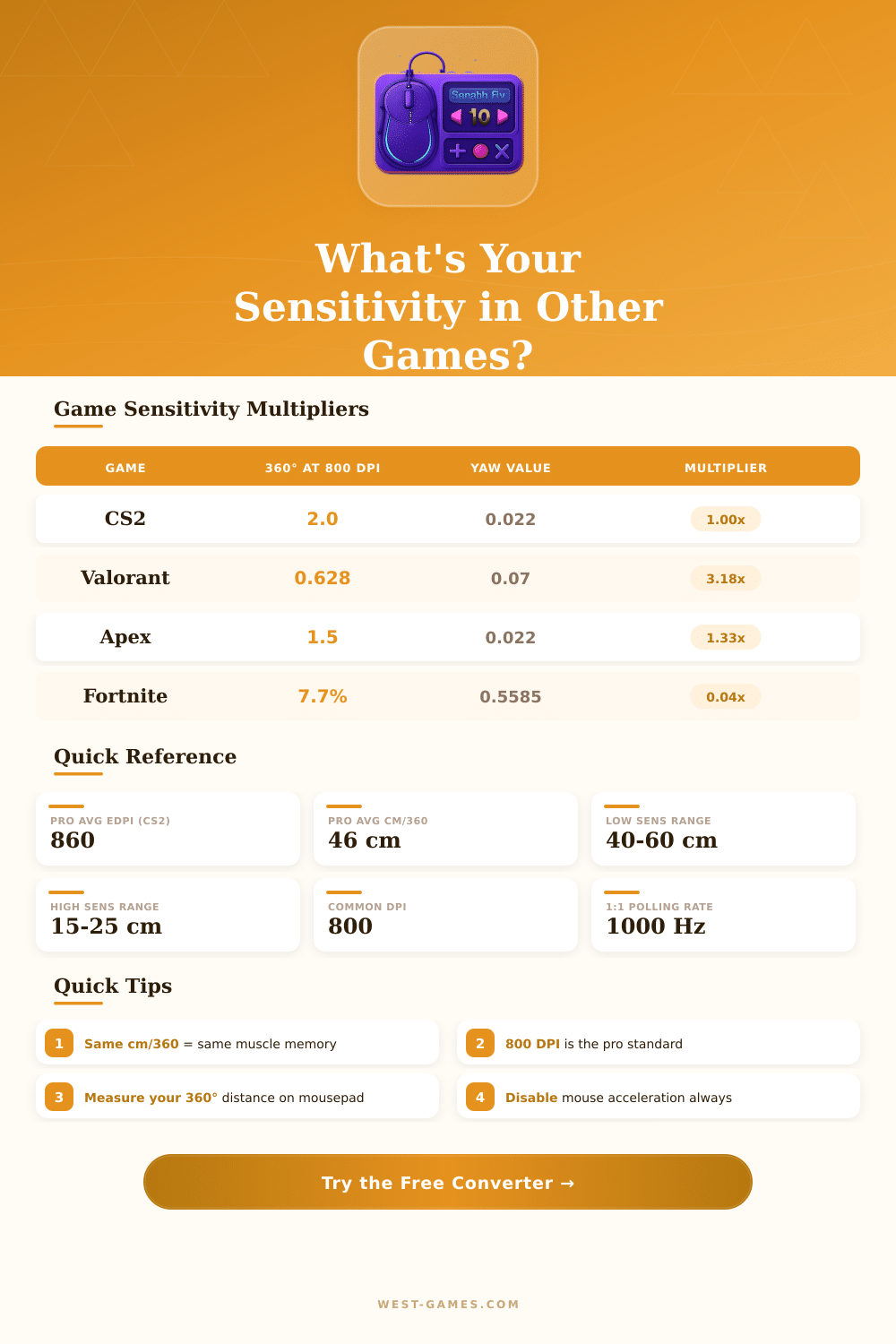
| Game | Yaw (°/count) | 360° at 800 DPI | eDPI Formula |
|---|---|---|---|
| CS2 / CS:GO | 0.022 | Sens 2.0 = 50.5 cm | DPI × Sens |
| Valorant | 0.07 | Sens 0.628 = 50.5 cm | DPI × Sens |
| Apex Legends | 0.022 | Sens 1.5 = 67.3 cm | DPI × Sens |
| Overwatch 2 | 0.0066 | Sens 5.0 = 48.4 cm | DPI × Sens |
| Fortnite | 0.5585 | 7.7% = 52.4 cm | DPI × (% / 100) |
| R6 Siege | 0.00572958 | Sens 10 = 62.8 cm | DPI × Sens |
| PUBG | 0.002222 | Sens 50 = 64.3 cm | DPI × Sens |
| CoD MW / Warzone | 0.0066 | Sens 5.0 = 48.4 cm | DPI × Sens |
| Quake / QC | 0.022 | Sens 2.0 = 50.5 cm | DPI × Sens |
| Team Fortress 2 | 0.022 | Sens 2.0 = 50.5 cm | DPI × Sens |
| Destiny 2 | 0.0066 | Sens 5.0 = 48.4 cm | DPI × Sens |
| Halo Infinite (M&K) | 0.022 | Sens 2.0 = 50.5 cm | DPI × Sens |
| Playstyle | cm/360° | inches/360° | Best For |
|---|---|---|---|
| Very Low | 50–70 cm | 19.7–27.6 in | CS2, Valorant (entry frags) |
| Low | 35–50 cm | 13.8–19.7 in | Tactical FPS (riflers) |
| Medium | 25–35 cm | 9.8–13.8 in | Apex, Fortnite, OW2 |
| High | 15–25 cm | 5.9–9.8 in | Arena shooters, casual |
| Very High | 8–15 cm | 3.1–5.9 in | Wrist aimers, MMO |
| DPI | Use Case | Pixel Skip Risk | Pro Usage |
|---|---|---|---|
| 400 | Classic CS players | Possible at high sens | ~20% of CS2 pros |
| 800 | Most popular overall | None at normal sens | ~55% of all FPS pros |
| 1600 | High-res / fast desktop | None | ~18% of pros |
| 3200+ | High-end mice, 4K displays | None | ~5% of pros |
Here some tips that based on experiences of players and discussions in tech groups.
mouse sensitivity mostly determines how your physical move of the hand matches with the events on the screen. If you push the mouse one inch and the cursor jumps through the whole screen? That means high sensitivity.
How to Set Mouse Sensitivity for Games
Or if almost nothing moves even though you move a lot? Then you have low level of it. Both cases can be set whether by the built-in tools of your system, or by special software that usually comes together with gaming mice.
DPI, dots per inch, are the main measure for that relation. It shows how many pixels move on the screen for every inch, that the mouse does physically. Look at it as a standard way to measure sensitivity in various games and setups.
The big plus of current gaming mice are, that almost all allow to change the DPI right on the device, or by separate software, or by buttons on the mouse.
In gaming groups commonly one stresses: low DPI together with low sensitivity in the game works most effectively. The reason seems logical; it needs move of the whole arm instead of only the fingers, what helps to avoid strain and repeated injuries. For FPS-players especially, low sensitivity helps to stay calm, because it reduces tremor in the hand and improves accuracy.
Good starting point cuold be 800 DPI with value around 35 for the in-game sensitivity, later set based on whether you can follow targets easily.
Although different games require different levels of sensitivity. For instance, Valorant rewards accuracy and stability, so low settings work great here. But at League of Legends?
It requires fast moves and sudden changes of direction, what maybe requires a completely different approach. Changing the sensitivity between games is not hard, it even helps you build better general control and attention.
To settle exactly that problem there are sensitivity converters. They are free and simple programs, where you pick your current game, enter the present sensitivity, then choose the target game. The new value appears immediately.
Add your mouse DPI, and it becomes even more useful. Those calculators count, how many centimeters of mouse move matches to a full 360-degree turn. For instance, CS:GO at 1.14 sensitivity with 800 DPI converted to Valorant gives around 0.358, and both setups require 45.6 cm four complete rotation.
Turning off mouse boost in Windows helps to keep everything steady and stable. Set the Windows mouse sensitivity to 6/11 seems the best spot. Raise your polling rate to the maximum, it deserves the effort.
And do not forget your mousepad, a smooth gaming pad with flat surface really doesmake a difference.
Mainly, sensitivity depends on what feels good for you. Start with a safe approach and raise only when needed is a good plan. Many pro players use low settings and still do great.