🖥️ GPU Mining Lifespan Calculator
Estimate how long your GPU will last running 24/7 — based on temperature, fan speed, power load & usage intensity
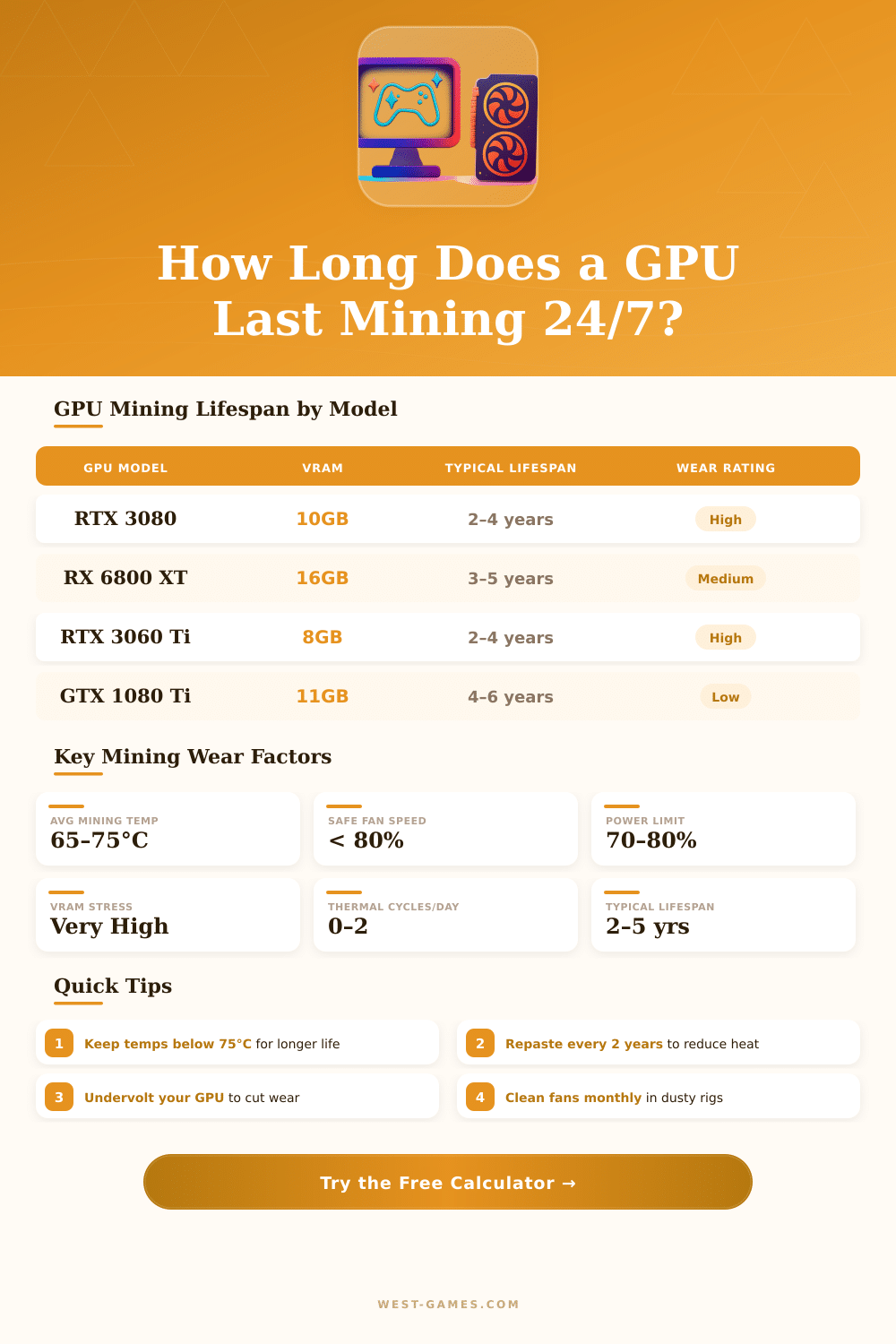
| GPU Model | VRAM Type | TDP (Watts) | Typical Hotspot | Estimated 24/7 Lifespan | Weak Point |
|---|---|---|---|---|---|
| RTX 3090 | GDDR6X | 350W | 105–110°C | 1.5–3 years | VRAM thermal pads |
| RTX 3080 | GDDR6X | 320W | 100–108°C | 2–4 years | VRAM / VRM |
| RTX 3070 | GDDR6 | 220W | 80–90°C | 3–5 years | Fans |
| RTX 3060 Ti | GDDR6 | 200W | 78–88°C | 3–5 years | Fans |
| RTX 2080 Ti | GDDR6 | 260W | 85–95°C | 2–4 years | VRM / solder |
| RX 6800 XT | GDDR6 | 300W | 80–95°C | 3–5 years | Fans / VRM |
| RX 5700 XT | GDDR6 | 225W | 85–100°C | 2–4 years | VRAM temps |
| RX 580 8GB | GDDR5 | 185W | 75–85°C | 4–6 years | Fans bearing |
| GTX 1080 Ti | GDDR5X | 250W | 80–90°C | 4–6 years | Fan bearing |
| GTX 1070 | GDDR5 | 150W | 72–82°C | 5–7 years | Thermal paste |
| Core Temp Range | VRAM Hotspot | Risk Level | Lifespan Impact | Recommendation |
|---|---|---|---|---|
| Below 60°C | Below 80°C | ✅ Very Low | Excellent — minimal degradation | Ideal — keep this up |
| 60–70°C | 80–95°C | 🟢 Low | Good — normal wear rate | Safe range for 24/7 |
| 70–80°C | 95–105°C | 🟡 Moderate | Accelerated wear on VRAM | Improve airflow or repaste |
| 80–90°C | 105–115°C | 🟠 High | Significant degradation risk | Thermal pad replacement needed |
| Above 90°C | Above 115°C | 🔴 Critical | Rapid failure likely | Stop mining — fix cooling now |
| Fan Speed | Noise Level | Cooling Efficiency | Fan Bearing Wear | Est. Fan Life (24/7) |
|---|---|---|---|---|
| 0–40% | Silent | Low | Minimal | 8–12 years |
| 40–60% | Quiet | Good | Low | 5–8 years |
| 60–75% | Moderate | Very Good | Moderate | 3–5 years |
| 75–85% | Loud | Excellent | High | 2–3 years |
| 85–100% | Very Loud | Maximum | Very High | 1–2 years |
| Factor | Impact on Lifespan | What to Do |
|---|---|---|
| Undervolting (–15% power) | +20–40% longer life | Use MSI Afterburner voltage curve |
| Thermal pad replacement | +15–30% longer life | Replace every 2 years on hot GPUs |
| Thermal paste replacement | +10–20% longer life | Repaste every 18–24 months |
| Regular dust cleaning | +10–15% longer life | Compressed air every 1–3 months |
| Aggressive overclocking | –20–50% shorter life | Avoid unless short-term only |
| Power limit above 100% | –15–30% shorter life | Keep at 70–80% for 24/7 |
| Fans running above 85% | –20–40% fan lifespan | Replace fans proactively at 2 yrs |
| VRAM hotspot above 110°C | Severe — memory failure risk | Replace thermal pads immediately |
Whether a GPU used for mining will last between 5 and 8 years on average. This amount changes a lot based on the way one uses the graphics card. Also some GPUs live much more than that.
For instance, cards from the year 2005 still work for playing video games today what makes them almost twenty years old. Truly GPUs bought around 2000 still work very well, what puts some of them at almost 25 years old.
How Long Do GPUs Last?
GPUs can technically live 10 to 20 years without problems. They have really long lifetimes, if one cares about them correctly. Even so each device has an end of life, regardless of its cost.
It is not truly possible to predict the lifetime of any particular part. It will work well until the day, when it will break.
The heat is the main enemy for many computer parts and the main thing that decides how long a GPU lasts. Every increase of 15 degrees Celsius can lower the lifetime. If one keeps temperature under 80 degrees Celsius, that helps to avoid too fast overheating.
The soft limit for safe temperature on GPUs is around 80 degrees Celsius. If it goes past that during long tiems, the silicon breaks down much more quickly. There is no truly “safe” limit, only continuous change between working temperature and expected lifespan.
Good power supply, keeping the computer a bit clean and cool always, all helps the GPU live longer. Use the card right and sometimes check the temperatures to catch preventable problems and it makes a big difference. Also stable power supply and steady wall power matters.
Removing the dust helps a lot. If a GPU works under full load for around 8 to 10 hours a day in good conditions, it can last at least 5 years, regardless of the brand.
Overclocking can shorten the lifetime. Undervolting the card is a way to reach the longest life then any other. The constant warming and cooling because of changing workloads can cause wear.
It is better to use it steadily than leave it warm during some minutes and later cool repeatedly, what is better for the chip.
The mining of crypto puts strong stress on GPUs, what commonly leads to early failures. Such mining can reduce the life of a GPU to around 2 to 3 years. In data centers, where one does work for artificial intelligence at 60 to 70 percent of usage, GPUs usually last between one and three years.
These parts use 200 to 500 watts, and it is surprising that they fail only after 2 to 3 years.
A GPU of middle range can last 3 to 4 years of use before needing an update. Warranties for GPUs rarely go past 5 or 6 years, even for the best models, what shows that makers expect bigger risk of failure around that time. The causes that kill GPUs are early failures, powersurges or overclocking.
Although sometimes new cards from the box do not work correctly right away.