🖥️ GPU Lifespan Calculator
Estimate how long your graphics card will last based on real usage, temps & workload
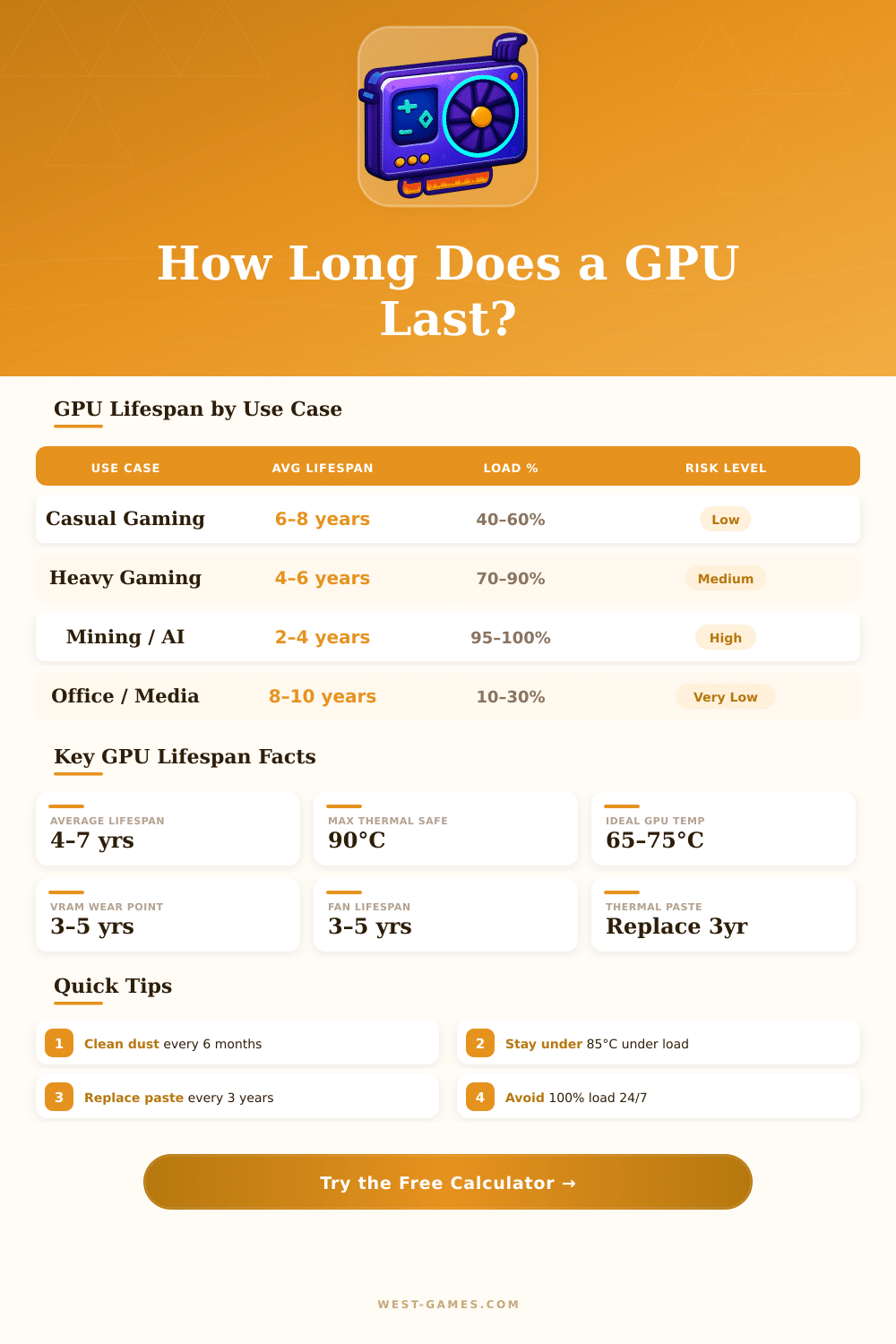
| Use Case | Avg Daily Load | Expected Lifespan | Risk Level | Key Wear Factor |
|---|---|---|---|---|
| Casual Gaming (1–2 hrs/day) | 30–50% | 7–10 years | 🟢 Low | Dust buildup |
| Regular Gaming (4–6 hrs/day) | 60–80% | 5–7 years | 🟡 Moderate | Thermal cycles |
| Heavy Gaming (8+ hrs/day) | 80–95% | 4–6 years | 🟠 Medium-High | VRAM & fan wear |
| Crypto Mining (24/7) | 95–100% | 2–4 years | 🔴 High | VRAM & VRM heat |
| AI / ML Training | 90–100% | 3–5 years | 🔴 High | Memory bandwidth |
| Content Creation | 40–70% | 5–8 years | 🟡 Moderate | Encoder block |
| Office / Media Only | 5–20% | 8–12 years | 🟢 Very Low | Driver staleness |
| Wear Factor | Low Risk | Medium Risk | High Risk |
|---|---|---|---|
| Operating Temperature | <70°C | 70–85°C | >85°C |
| Daily Load Duration | <4 hrs | 4–8 hrs | >8 hrs or 24/7 |
| Average GPU Utilization | <50% | 50–80% | >80% sustained |
| Cooling Quality | Water / AIO | 3+ case fans | No fans / cramped |
| Thermal Paste Age | <2 years | 2–4 years | >4 years |
| Dust Cleaning Frequency | Every 3–6 mo | Yearly | Never cleaned |
| Power Limit Setting | ≤100% | 100–110% | >110% (OC) |
| Maintenance Task | Frequency | Lifespan Impact | Difficulty |
|---|---|---|---|
| Dust cleaning (compressed air) | Every 3–6 months | +0.5–1 year | Easy |
| Thermal paste replacement | Every 2–4 years | +1–2 years | Medium |
| Fan bearing replacement | When noisy / 4–6 yrs | +1–2 years | Medium |
| Driver updates | Every 1–3 months | Stability only | Easy |
| Case airflow optimization | Once at build | +0.5–2 years | Easy–Medium |
| Power limit reduction (mining) | At setup | +0.5–1 year | Easy |
GPU do not have a fixed lifetime. These graphics cards can serve 10 to 20 years without any trouble. On the other hand, in real life the average lifespan for a GPU used in a home computer usually falls between 5 and 8 years.
This largely depends on the usage the heat that it reaches and the stability of the power source.
How long do GPUs last?
Heat stays the main threat for the lifetime of a GPU. It destroys the most computer parts. If you keep the temperatures under 80 degrees Celsius, that stops too fast wear because of thermal stress.
Many consider 80 degrees as a safe limit for graphics chips, even so if it goes past that for a long time, the silicon breaks down more quickly. Every extra 15 degrees in the temperature can shrink the life of the card. There is no truly absolute “safe” limit, only balance between working heat and wanted lifespan.
Good power supplies are also important. When the energy stays stable and the card keeps fairly clean and cool, it lives much longer. The main killers for GPU are overheating, sudden power spikes and too much overclocking.
Too much overclocking can shorten the possible 10-20 year life a lot. Instead, lowering the voltage helps extend the duration of teh card.
Crypto mining is especially harsh for graphics chips. The constant work puts strong stress on the chip, which commonly causes overheating. Industrial mining GPU lasts only around 2 to 3 years.
Cards in data centers for artificial intelligence tasks with 60 to 70 percent load usually last won to three years. Those units use 200 to 500 watts, and many of them fail in 2 to 3 years under such conditions.
Thermal expansion and shrinking also affects the cause. The constant switching between full load and rest stresses the chip. If you use the card only some hours each day, it will live more than if it works all day.
Many believe that GPU become outdated after 5 to 6 years, but that is wrong. The working life of a GPU can stretch across almost decades. Cards from 2005 still work today.
Those bought around 2000 are sometimes reported as perfectly working after 25 years. The lifetime of a GPU does not truly shrink if the card does not get used.
Regular players commonly upgrade every 3 to 5 years, but that does not show that the old card broke. Mid-range GPU can serve home use for 3 to 4 years, before one feels need for an update. Factory defects do happen, and some cards arrive with problems straight from the box.
However most GPU last long with good care, steady power and regular heat checks. Fans may wearout or capacitors dry up, but that takes years of usage.