🖱️ Gaming Mouse Lifespan Calculator
Estimate how long your gaming mouse will last based on usage habits, switch type, and care
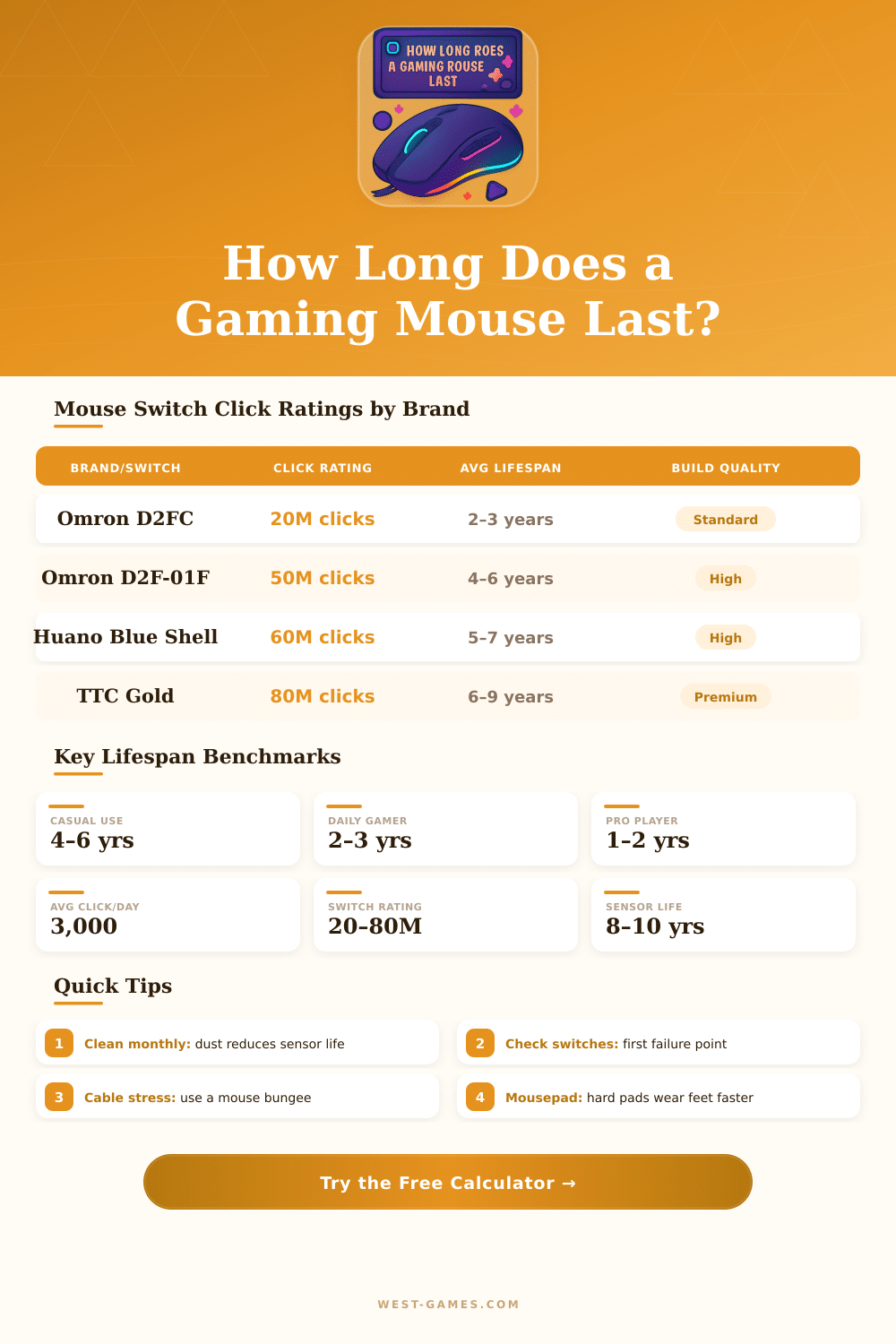
| Switch Model | Click Rating | Used In | Est. Lifespan (Heavy Use) | Type |
|---|---|---|---|---|
| Budget Generic | 5–10M | Budget mice under $20 | 6–18 months | Mechanical |
| Omron D2FC-F-7N | 20M | Logitech, older Razer | 1.5–3 years | Mechanical |
| Kailh GM 4.0 | 30M | Glorious, some Zowie | 2.5–4 years | Mechanical |
| Omron D2F-01F | 50M | Premium Logitech (G Pro) | 4–6 years | Mechanical |
| Huano Blue Shell | 60M | Various gaming brands | 5–7 years | Mechanical |
| TTC Gold / Silver | 80M | Razer (Gen-3), Endgame | 6–9 years | Mechanical |
| Razer Optical Gen-2 | 100M | Razer Viper / DeathAdder V3 | 8–12+ years | Optical |
| Logitech LIGHTFORCE | 100M+ | G Pro X Superlight 2 | 8–15+ years | Hybrid Optical |
| User Profile | Daily Hours | Clicks/Day | Expected Lifespan (20M Switch) | Expected Lifespan (80M Switch) |
|---|---|---|---|---|
| Casual / Weekend | 1–2 hrs | ~800 | 5–8 years | 20–35 years |
| Daily Office + Gaming | 3–5 hrs | ~2,000 | 3–5 years | 12–18 years |
| Dedicated Gamer | 5–8 hrs | ~4,000 | 2–3 years | 6–10 years |
| Competitive FPS | 6–10 hrs | ~8,000 | 1–2 years | 3–5 years |
| Pro / Streamer | 10–16 hrs | ~12,000 | <1 year | 2–3 years |
| Factor | Impact Level | Effect on Lifespan | Recommendation |
|---|---|---|---|
| Switch quality | Very High | Up to 10× difference | Choose 50M+ rated switches |
| Click frequency | Very High | Primary wear factor | Avoid unnecessary clicking |
| Cable stress | High | Connector/cable failure | Use a mouse bungee |
| Mousepad type | Medium | PTFE feet wear rate | Cloth pads extend feet life |
| Cleaning frequency | Medium | Debris clogs sensor/scroll | Clean monthly minimum |
| Storage / handling | Low–Medium | Physical drop damage | Avoid drops, use a mat |
| Sensor technology | Low | Rarely fails before switches | Any modern sensor is fine |
Cursor skipping: Sensor lens may be dirty or damaged. Try cleaning with isopropyl alcohol first.
Scroll wheel issues: Encoder wear causes missed steps or sticky scrolling. Usually fixable with cleaning.
Intermittent connection: Cable or USB connector stress fracture. Test with a different port/cable first.
A gaming mouse ranks among the most important accessories, that helps to reach the best possible experience during play. No matter what genre one chooses, whether MOBA, FPS or games from third person, it stays the main tool for control the action. A good gaming mouse does not limit to games; it is useful also for browsing the net and improve everyday work.
Special gaming mice offer fast response time and move across the screen more quickly than average tools. That shows clearly in genres like FPS. One can adjust them, so that the speed suits most to the player, and many include side buttons that one programs for various functions.
How to Choose the Right Gaming Mouse
Some models arrive with different weights, and choosing the ideal DPI does big difference. A mouse with little weight helps in precise tasks, for instance image editing.
For every style of game there are good options. There are wired and wireless models, as well as tools designed for FPS, MMO, MOBA or left-handed players. In MMO games you commonly need to use many skills quickly, and the Razer Naga V2 Pro makes it possible for players too shoot spells and special attacks without loss of time.
The Corsair Dark Core RGB Pro is a wireless optical gaming mouse with Slipstream Technology, that gives wireless charging support and reliable response in games at a fair cost.
The Logitech G502 reminds of a classic, that has been on the market during several years. It still belongs to the top choices for output and flexibility. The version G502 Hero includes extra buttons and features friendly to MMO.
The Logitech G305 LIGHTSPEED uses tough plastic shell, connects by means of USB receiver and operates on one AA battery. The Logitech G Pro Wireless 25K Sensor can reach until 25,600 DPI, what adds more flexibility.
The Logitech G Pro X2 SUPERLIGHT is a great gaming mouse, that inherits the great sensor output of the G Pro X SUPERLIGHT 2, while it brings fresh technology. An ultra-lightweight mouse even helps with comfort, helping against RSI in long gaming sessions.
The SteelSeries Rival 710 includes textured side grips, three buttons for thumbs, right form for smart palm support and adjustable LED display, that shows game stats or images. On the other hand, the parts of the scroll wheel can have problems after three months, and the battery output in some versions leaves to want. Asus offers gaming mice, like the ROG Keris II Origin Wireless, while Sony grows its Inzone series with a new gaming mouse.
Also budget options are plenty, a good cheap tool does notnecessarily mean weak performance.