🏎️ Forza Horizon 4 FOV Calculator
Calculate your ideal Field of View based on monitor size, seating distance & aspect ratio
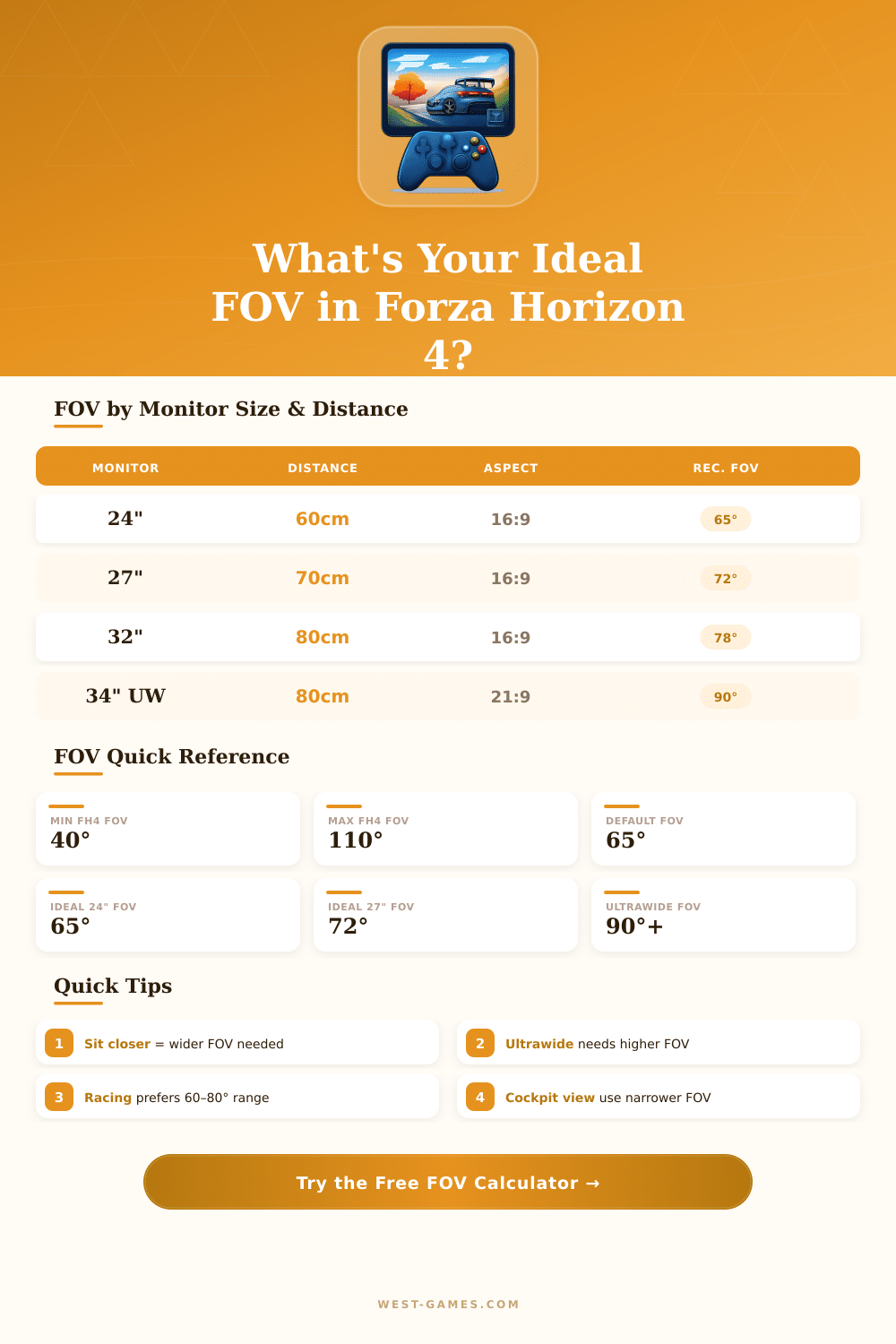
| Monitor Size | Aspect Ratio | Seat Distance | Recommended FOV | Feel |
|---|---|---|---|---|
| 21″ | 16:9 | 50–60 cm | 62°–68° | Focused |
| 24″ | 16:9 | 55–70 cm | 65°–72° | Balanced |
| 27″ | 16:9 | 60–80 cm | 68°–78° | Immersive |
| 32″ | 16:9 | 70–90 cm | 72°–82° | Wide |
| 34″ | 21:9 | 70–85 cm | 88°–95° | Cinematic |
| 38″ | 21:9 | 80–95 cm | 90°–98° | Ultra Cinematic |
| 49″ | 32:9 | 85–100 cm | 100°–110° | Sim-Race Wrap |
| 55″ TV | 16:9 | 100–150 cm | 65°–75° | Couch Gaming |
| Camera View | Typical FOV Range | Best For | Notes |
|---|---|---|---|
| Cockpit | 55°–80° | Simulation feel | Match real car windscreen angle |
| Bonnet / Hood | 65°–85° | Visibility & handling | Popular for road racing |
| Bumper | 70°–95° | Speed sensation | Widest feel, great for drifting |
| Chase Near | 60°–75° | Car showcase | Easier for beginners |
| Chase Far | 55°–70° | Track overview | Less immersive |
| Aspect Ratio | Horizontal Width | Base 16:9 FOV | Adjusted FOV | Multiplier |
|---|---|---|---|---|
| 4:3 | Narrower | 65° | 52°–55° | 0.82x |
| 16:10 | Slightly wider | 65° | 67°–69° | 1.03x |
| 16:9 | Standard | 65° | 65° | 1.00x |
| 21:9 | Wide | 65° | 88°–92° | 1.36x |
| 32:9 | Ultra-wide | 65° | 105°–110° | 1.67x |
Note: The content of this article is based on real knowledge and experiences shared by the community of gamers.
In Forza Horizon 4 there are settings for the field of sight (FOV), even though they have some limits that can annoy. In the computer version, one can expand the FOV until at least 55 degrees, what changes a lot the feeling of the game. But the slider for the viewpoint of the driver limits to 40 degrees below.
Make the driver view wider in Forza Horizon 4
Players that sit near their screens commonly need around 35 degrees for accuracy so that minimal value truly can create problems.
The options for setting the field of sight of the camera in the computer version were added mainly because of wishes of players on computer. That also is useful for helping some players with particular troubles in perception, what relates to wider movement of the game toward access and inclusion.
Players on consoles have it more hard. Not all consoles have sliders for FOV. Here is one of the main reasons that some players switch to computer version, although setups for computer cost much more.
One hoped that newer consoles with stronger gear would soon bring options for FOV in upcoming games of the Horizon-series.
One commonly complains about that, how closely the camera sits to the windshield in the viewpoint of the driver. The corner of the view seems too near, and even the whole windshield does not show. Even on ultra-broad screen, the impression of fisheye looks wierd and feels unnatural.
Even so, when one sets the FOV right, that fisheye sight disappears, especially during fast drives. Everything starts to seem more natural, and one can more easily time turns and recover after spins. That does not deal about physics, only about the angle of the camera itself.
Who wants to go past that, what the sliders in the game allow, can use a manual method on consoles. The process means to go to the directory AppData, later in the folders of users for Forza Horizon 4 and open UserConfigSelections by means of a text editor. Inside one finds entries for different viewpoints of the camera, like FollowLowFOV, FollowHighFOV, DriverFOV, DriverNoWheelFOV, HoodFOV and BumperHighFOV.
The values beside them can be set too anything wanted. There also exists a tool on GitHub that uses scanning of memory and should stay working even after updates of the game.
Calculators for FOV are used in simulations like Project Cars and iRacing. These tools take the size of the screen, distance to it and other details to make a realistic value for the field of sight. Some calculators give results higher than Forza Horizon 4 allows, what annoys.
Players from simulations like Project Cars 2 and Assetto Corsa already adjusted to the right FOV, so the 40-degree minimum in Forza can feel too broad.
Some players finally switch to third-person viewpoint after years in the cockpit or under the hood, partly because the limited FOV in first person simply tires. The fully set FOV for the dashboard on consoles gives much more broad sight in the cockpit andfeels much better than the default.