🎮 Fortnite Bottleneck Calculator
Detect CPU & GPU bottlenecks in your PC setup and optimize Fortnite performance
| CPU | Fortnite Score | Avg FPS (1080p Low) | Avg FPS (1080p High) | Tier |
|---|---|---|---|---|
| AMD Ryzen 7 7800X3D | 100 | 390+ | 270+ | S-Tier |
| Intel Core i9-14900K | 98 | 380+ | 260+ | S-Tier |
| AMD Ryzen 9 7900X | 94 | 360+ | 245+ | S-Tier |
| Intel Core i7-13700K | 92 | 350+ | 238+ | A-Tier |
| AMD Ryzen 5 7600X | 89 | 335+ | 225+ | A-Tier |
| Intel Core i5-13600K | 87 | 320+ | 218+ | A-Tier |
| AMD Ryzen 5 5600X | 80 | 285+ | 190+ | B-Tier |
| Intel Core i5-12600K | 79 | 280+ | 186+ | B-Tier |
| AMD Ryzen 5 5600 | 76 | 265+ | 175+ | B-Tier |
| AMD Ryzen 5 3600 | 68 | 230+ | 152+ | C-Tier |
| Intel Core i5-10600K | 66 | 220+ | 148+ | C-Tier |
| Intel Core i3-12100F | 62 | 200+ | 136+ | C-Tier |
| AMD Ryzen 5 2600 | 55 | 175+ | 115+ | D-Tier |
| Intel Core i3-10100F | 50 | 158+ | 104+ | D-Tier |
| GPU | GPU Score | 1080p Low FPS | 1440p High FPS | VRAM |
|---|---|---|---|---|
| NVIDIA RTX 4090 | 100 | 400+ | 280+ | 24 GB |
| NVIDIA RTX 4080 | 88 | 365+ | 245+ | 16 GB |
| AMD RX 7900 XTX | 86 | 355+ | 238+ | 24 GB |
| NVIDIA RTX 4070 Ti | 80 | 320+ | 210+ | 12 GB |
| NVIDIA RTX 3080 | 76 | 300+ | 195+ | 10 GB |
| AMD RX 6800 XT | 74 | 292+ | 190+ | 16 GB |
| NVIDIA RTX 4070 | 72 | 285+ | 186+ | 12 GB |
| NVIDIA RTX 3070 | 68 | 265+ | 172+ | 8 GB |
| AMD RX 7700 XT | 65 | 255+ | 165+ | 12 GB |
| NVIDIA RTX 3060 Ti | 63 | 248+ | 160+ | 8 GB |
| NVIDIA RTX 4060 | 58 | 228+ | 148+ | 8 GB |
| NVIDIA RTX 3060 | 55 | 215+ | 138+ | 12 GB |
| AMD RX 6600 XT | 53 | 208+ | 134+ | 8 GB |
| NVIDIA GTX 1660 Ti | 44 | 172+ | 105+ | 6 GB |
| NVIDIA GTX 1060 6GB | 34 | 130+ | 78+ | 6 GB |
| NVIDIA GTX 1050 Ti | 22 | 85+ | 48+ | 4 GB |
| Bottleneck % | Severity | Impact on FPS | Recommendation |
|---|---|---|---|
| 0 – 9% | Negligible | Minimal (<5 FPS loss) | Your build is well balanced |
| 10 – 19% | Mild | Moderate (5–15 FPS loss) | Acceptable, minor tuning helps |
| 20 – 29% | Moderate | Noticeable (15–30 FPS loss) | Consider upgrading weaker part |
| 30 – 49% | Severe | Major (30–60 FPS loss) | Upgrade strongly recommended |
| 50%+ | Critical | Crippling (60+ FPS loss) | Significant upgrade needed |
| Spec | Minimum | Recommended | Competitive / Pro |
|---|---|---|---|
| CPU | Core i5-7300U / Ryzen 3 3300U | Core i5-8600K / Ryzen 5 3600 | Ryzen 7 7800X3D / i9-13900K |
| GPU | GTX 960 / RX 470 | RTX 3070 / RX 6700 XT | RTX 4080 / RX 7900 XTX |
| RAM | 8 GB | 16 GB | 32 GB DDR5 |
| VRAM | 2 GB | 8 GB | 16 GB+ |
| Storage | HDD (15 GB+) | SSD (30 GB+) | NVMe SSD |
| DirectX | DirectX 11 | DirectX 12 | DirectX 12 Ultimate |
| OS | Windows 10 64-bit | Windows 10/11 64-bit | Windows 11 64-bit |
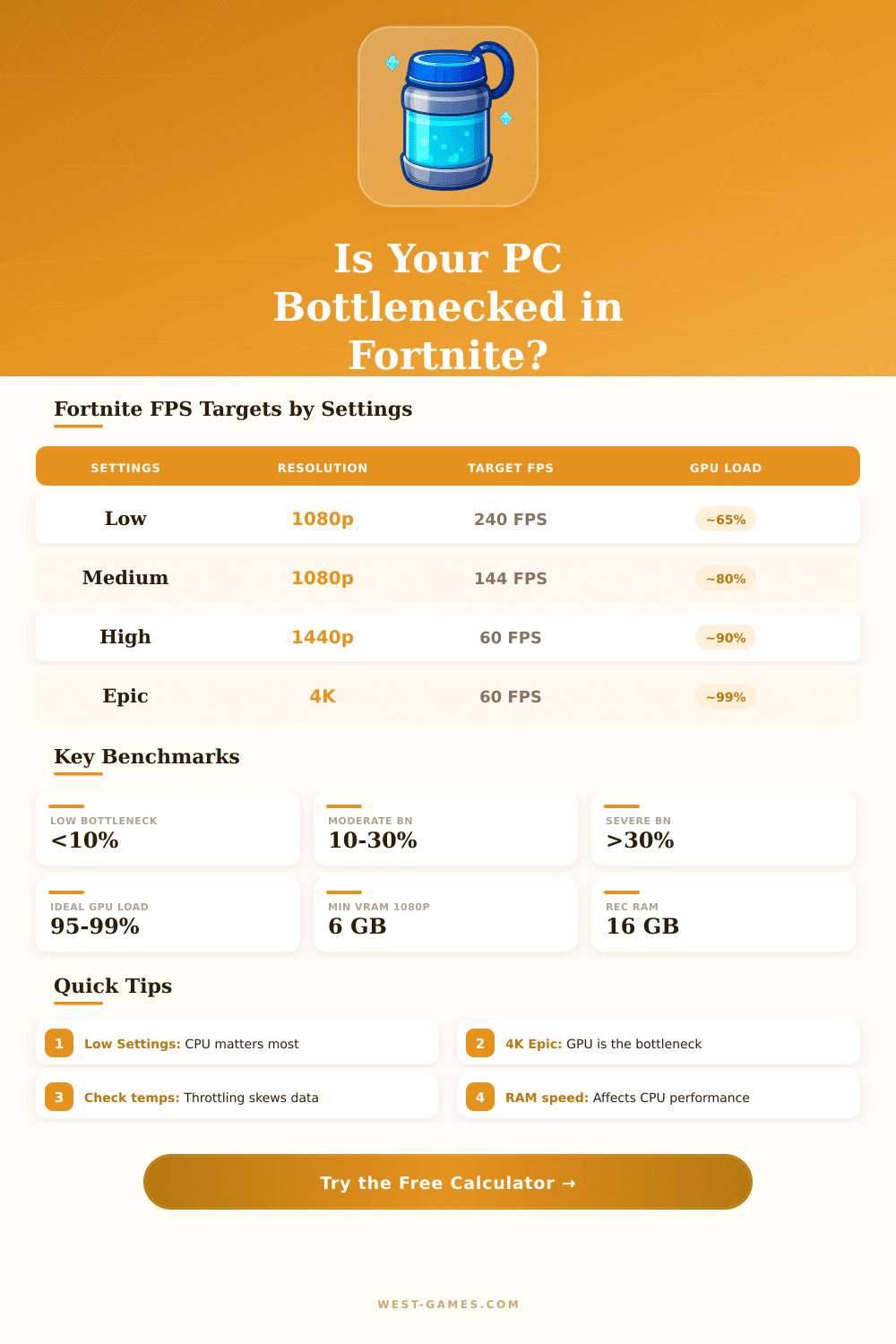
Fortnite Bottleneck happens when one of the computer parts limits the rest. The CPU cares about the game logic, physics and movement of players. The GPU handles the graphics and textures.
When the CPU reaches its max, while the GPU barely works, that shows CPU Bottleneck.
How to Find and Fix a Fortnite CPU Bottleneck
Fortnite is a game that strongly depends on the CPU, especially regarding performance. It really only uses two cores well. So the speed of a single core is very important.
If it is possible, raising the single-core speed helps a lot. The game settings also raise the load on the CPU, what makes everything harder for reaching good performance.
A typical sign of Bottleneck is that the CPU works at 100 percent, while the GPU stays around 40 percent. For instance, RTX 3060 with i5-11400F reaches only around 110 FPS in medium settings, although calculators project around 330 FPS. The GPU use stays at 40 percent, and the CPU reaches 100 percent.
Those differences between expected and actual performance clearly point, that something limtis the system.
Drops in FPS during fights are another typical sign. The frames can stay at 200 to 240, when nothing happens, but then drop too 90 or 100 in fights. The GPU use drops, while the CPU use goes up.
RX 570 with 8 GB runs other games well, but it stutters badly in Fortnite Battle Royale, because the game depends so much on the CPU.
A strong GPU with an older or lower CPU simply creates a recipe for Bottleneck. Changing from an i5 of the 9th generation to i7-13700K made a big difference for getting the most from a 3080. For this game, choosing a strong CPU instead of a GPU upgrade can pay off greatly.
Even so that does not mean that one should take a weak GPU with a big CPU. Fortnite uses the CPU and GPU quite a lot alike, and it really depends on the CPU only at 1080p or below.
You can reduce the problem without buying a new computer. Lowering the resolution and turning effects like shadows off removes stress from the CPU. Turning Nanite virtual geometry off really helped with frame rates.
The performance mode sets everything to low settings except view distance. In the Nvidia settings, set the power mode to max performance for Fortnite also helps. Raising the resolution in the game above the natural resolution of the monitor pushes more work to the GPU and reduces the stutter of CPU Bottleneck.
Download an FPS tool and track average FPS along with 1-percent lows as a good method. Check the use of GPU and CPU after matches helps to find which part you need to get. Having between 8 and 12 GB of RAM and at least 16 GB of free disk space also matters forsmooth performance.
Overclocking the graphics card can sometimes affect the Bottleneck and frame rate.