🎯 FOV Calculator
Calculate your ideal Field of View for any monitor, resolution & game setup
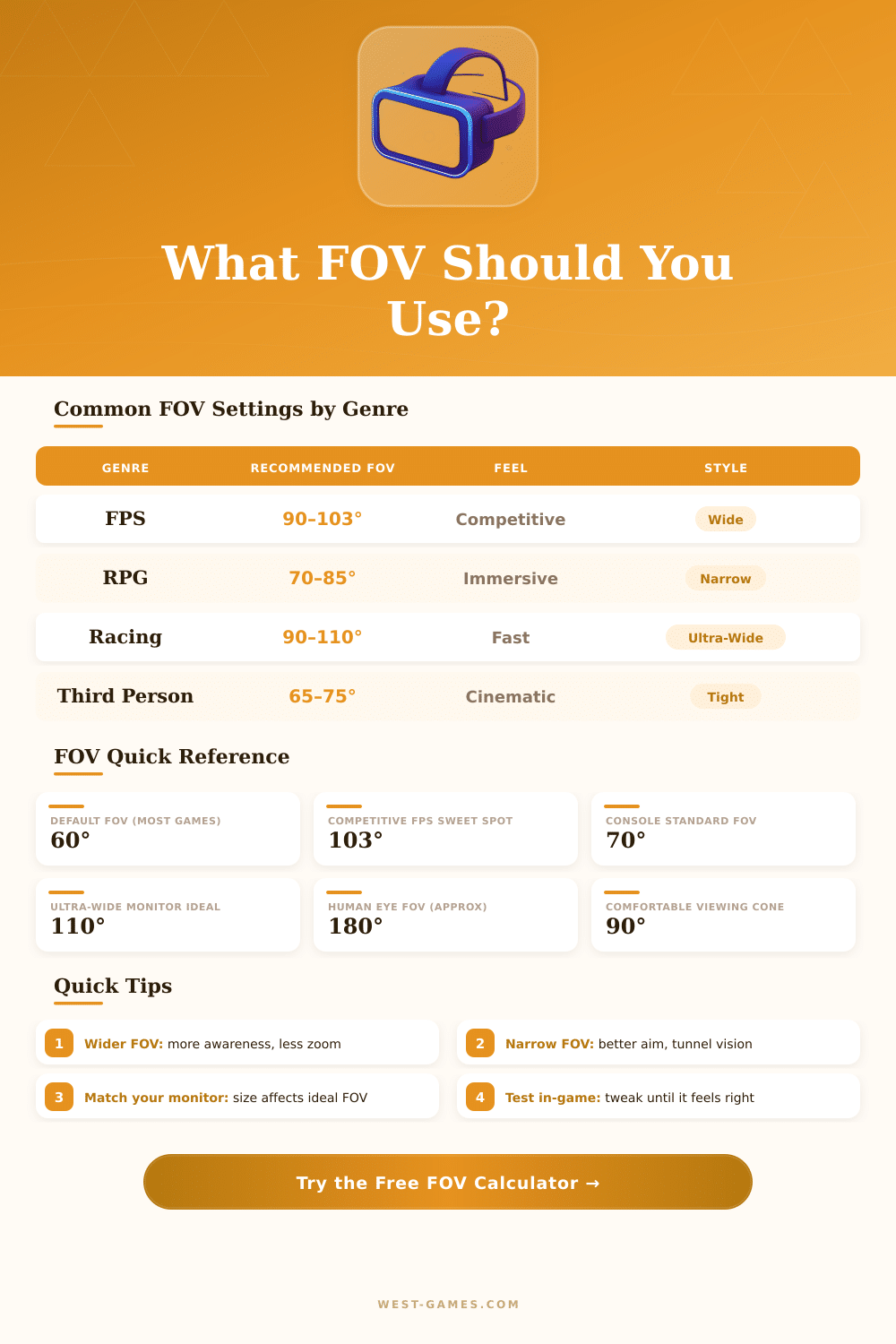
| Genre | Recommended FOV | Typical Aspect | Feel |
|---|---|---|---|
| First-Person Shooter (Competitive) | 90° – 103° | 16:9 | Wide, situational awareness |
| First-Person Shooter (Casual) | 80° – 90° | 16:9 | Balanced |
| RPG / Open World | 70° – 85° | 16:9 | Immersive, detailed |
| Racing Game | 90° – 110° | 21:9 | Fast, peripheral visibility |
| Third-Person Shooter | 65° – 80° | 16:9 | Cinematic, controlled |
| Flight / Simulation | 90° – 120° | 21:9 / 32:9 | Panoramic |
| Strategy / RTS | 60° – 75° | 16:9 | Overhead, clear UI |
| Sports | 70° – 90° | 16:9 | Broadcast style |
| VR Headset | 100° – 130° | N/A | Natural presence |
| Ultrawide Monitor | 100° – 115° | 21:9 | Expanded peripheral |
| Resolution | Aspect Ratio | Common Monitor Size | Suggested FOV (H) |
|---|---|---|---|
| 1920 x 1080 (1080p) | 16:9 | 24–27 in | 90° – 100° |
| 2560 x 1440 (1440p) | 16:9 | 27–32 in | 90° – 103° |
| 3840 x 2160 (4K) | 16:9 | 32–43 in | 85° – 100° |
| 2560 x 1080 (Ultrawide) | 21:9 | 29–34 in | 100° – 110° |
| 3440 x 1440 (Ultrawide) | 21:9 | 34–38 in | 103° – 113° |
| 5120 x 1440 (Super Ultrawide) | 32:9 | 49 in | 110° – 120° |
| 1280 x 1024 | 5:4 | 19–22 in | 80° – 90° |
| 1920 x 1200 | 16:10 | 24 in | 90° – 100° |
| Distance to Screen | Monitor Size | Ideal FOV Range | Notes |
|---|---|---|---|
| 16 in (41 cm) — very close | 24 in | 100° – 110° | Wide needed to reduce strain |
| 20 in (51 cm) — close | 24–27 in | 95° – 105° | Typical desk setup |
| 24 in (61 cm) — standard | 27 in | 90° – 100° | Most common PC setup |
| 30 in (76 cm) — far | 27–32 in | 80° – 95° | Relaxed viewing angle |
| 48 in (122 cm) — couch | 40–55 in | 70° – 85° | TV / console gaming |
| 96 in (244 cm) — living room | 55–75 in | 60° – 75° | Large TV, cinematic feel |
Field of sight, or FOV, describes the angular scope of the visible world at any moment. That concerns the human eyes, camera, sensors and tools for virtual reality. While shooting the FOV depends on the focal length of the lens regarding the size of the sensor.
In broader angle, more of the landscape is captured from one side to the other. Imagine it as slice of cake, that spreads from the lens.
What Is Field of View (FOV) and How It Affects Games, Cameras and VR
One finds at least three kinds of FOV: the horizontal, vertical and diagonal. They sometimes shorten themselves as hFOV, vFOV and dFOV. The details commonly point the working range, which shows, how far away objects are detected.
One measures FOV by means of angular or size value, and it shows, how much information the device receives.
While playing games, FOV shows the angle of the virtual world, that appears on the screen. One can compare the monitor to window. If you keep the edge of window beside your face, you can see wide space through it.
FOV in 90 degrees allows the player to glimpse 90 degress before his player, compared to FOV in 70, that confines to only 70 degrees. Console games usually use narrow FOV around 60 degrees, because the screen covers only little slice of the view of the player. For computer games, one commonly chooses bigger FOV between 90 and 100 degrees, because the screen covers more of the sight.
The real FOV of the eyes to the edges of the screen probably ranges between 30 and 45 degrees, according to the size of the viewer and the sitting distance. Setting in 90 degrees well works for the majority of the players. Too broad value can cause fisheye or watery effect, that seems bizarre.
FOV in 120 degrees in games can seem twisted compared too natural look, because of differences in the projection and the way, as the brain processes the side sight.
FOV ties to work on the frames each second. The result depends on that, as the engines of the games process wider angles. Some console games do not support sliders for FOV.
For instance, title of Call of Duty could not carry slider for FOV in the consoles. On the other hand, Borderlands 4 got resource about update, that introduced slider for FOV in consoles together with improvements of the performance.
In VR, FOV determines the area, that one sees while wearing the headset. The Steam Deck is unpublished standalone VR-headset with 110-degree FOV, resolution of 2160×2160 each eye and refresh rate in 144 Hz. At tools as the Oculus Quest 2, one way to add FOV is by means of change of the position of the eyes through the setting of IPD.
Use full-frame lens on camera withcut sensor like reduces the FOV, what matters also in shooting.