📡 Ethernet Cable Lifespan Calculator
Estimate how long your ethernet cable will last based on category, environment, and usage conditions
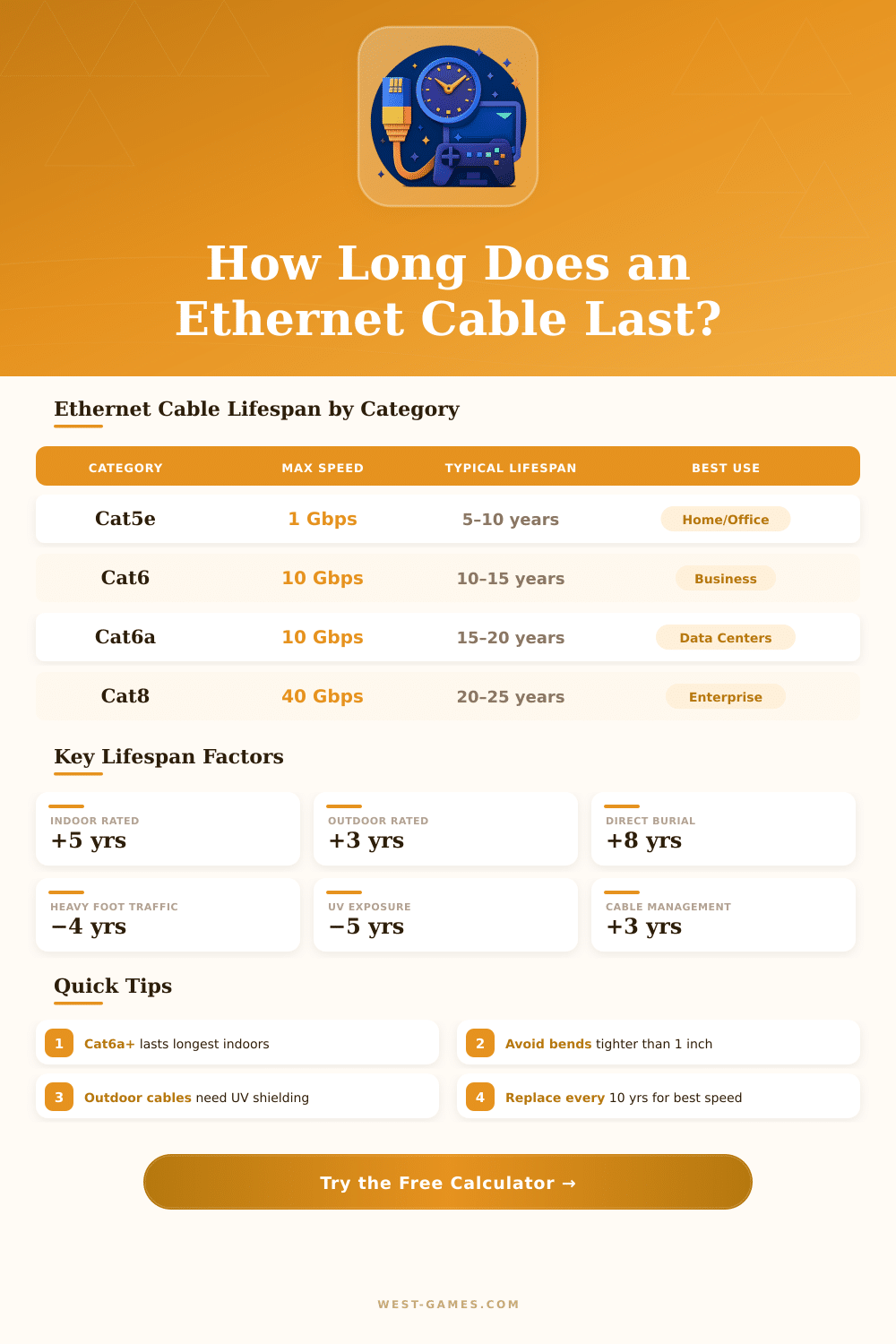
| Category | Max Speed | Max Bandwidth | Base Lifespan | Typical Use | Standard |
|---|---|---|---|---|---|
| Cat5 | 100 Mbps | 100 MHz | 5–8 years | Legacy Home | TIA-568-B |
| Cat5e | 1 Gbps | 100 MHz | 8–12 years | Home/Small Office | TIA-568-B |
| Cat6 | 10 Gbps (55m) | 250 MHz | 10–15 years | Business/Office | TIA-568-C |
| Cat6a | 10 Gbps (100m) | 500 MHz | 15–20 years | Enterprise/Data Center | TIA-568-C.2 |
| Cat7 | 10 Gbps | 600 MHz | 15–20 years | Shielded Environments | ISO/IEC 11801 |
| Cat8 | 40 Gbps (30m) | 2000 MHz | 20–25 years | Data Centers | TIA-568-C.2-1 |
| Environment | Lifespan Modifier | Key Risk Factor | Recommended Jacket | Inspection Interval |
|---|---|---|---|---|
| Indoor Climate Controlled | +4 years | Minimal | PVC or Plenum | Every 5 years |
| Indoor Attic/Crawlspace | +0 years | Heat & Humidity | Plenum/LSZH | Every 3 years |
| Outdoor Covered | −2 years | Moisture, Insects | Outdoor Rated | Every 2 years |
| Outdoor Direct Sun/Rain | −5 years | UV, Freeze/Thaw | UV-Resistant Outdoor | Annually |
| Direct Burial Underground | +2 years | Soil Chemicals, Moisture | Gel-Filled Burial | Every 5 years |
| Industrial/High Vibration | −4 years | EMI, Physical Stress | STP/Armored | Every 18 months |
| Symptom | Likely Cause | Urgency | Action |
|---|---|---|---|
| Intermittent disconnections | Damaged conductor or connector | High | Replace immediately |
| Speed below rated category | Internal oxidation or crosstalk | Medium | Test & plan replacement |
| Visible jacket cracking | UV damage or age | High | Replace soon |
| High packet loss | Signal attenuation | High | Run cable tester, replace |
| Slow but stable connection | Cable length or quality mismatch | Low | Upgrade category |
| Connector discoloration | Oxidation, moisture ingress | Medium | Re-terminate or replace |
Ethernet cables form the core of all modern networks. Devices like computers, routers and switches connect through them so that data flows without pause. Although one commonly uses wireless links, at least one Ethernet Cable almost always plays a part somewhere in the system.
Like this they became part of the starts of networking when they replaced the old, thick coaxial cables from bus networks.
All About Ethernet Cables
Wireless networks commonly fail right when one most needs them. For intense gaming sessions or important video calls, wired connection proves much more safe. When one attaches a laptop or computer through an Ethernet Cable, one gets a stable and fast link.
So, one can play video games without pauses, upload and download more quickly, and escape frustration during loading.
There are various kinds and categories for Ethernet cables. Both Cat 5e and Cat 6 work for the most common uses. Cat 6 fits for speeds up to 10/100/1000BASE-T over distances of up to 100 metres.
It also delivers 10G speeds for Ethernet. Cat 7 did not receive recognition from TIA and does not use the usual RJ45 connection, so best avoid it. Braided Cat 6 cable delivers frequency up to 250 MHz and data flow up to 1 000 Mbps, wrapped in strong nylon fabric that protects aganist wear and damage.
In most cases, the quality of cable beats the mark. If a cable properly ties all pins from one end to the other and meets the Cat 5e standard about pair distortion, it will do its job. Even so, cheap cables sometimes cause troubles.
The slim plastic tab, that closes the connection, easily catches on objects and breaks. Later, one can no longer plug the cable flatly.
Pure copper cables beat CCA types in quality and reliability, because CCA stands for copper-coated aluminum. It means that the conductors are aluminum with thin copper cover. Patch cables never should bee from CCA.
Lower AWG numbers usually point to thicker and better wires. Also, flat shaped Ethernet cables do not work, because Ethernet requires twisted pairs. It is hard to make flat cables with right twisted wires, and the twist helps against cross talk and interference, that would limit the speed.
For directly linking two devices without a router, one must use a crossover cable. A normal cable would link sending to sending and receiving to receiving, which does not work. Even so, with a usual Ethernet Cable, any end works, because the direction of the connections does not matter.
One finds both shielded and unshielded cables for use inside and outside. Ethernetcables come in many lengths, from little one foot patch strings up to 100 feet or even big rolls of 1 000 feet.