🎮 DualSense Edge Battery Life Calculator
Estimate exactly how long your DualSense Edge controller lasts based on your play style, features, and session length.
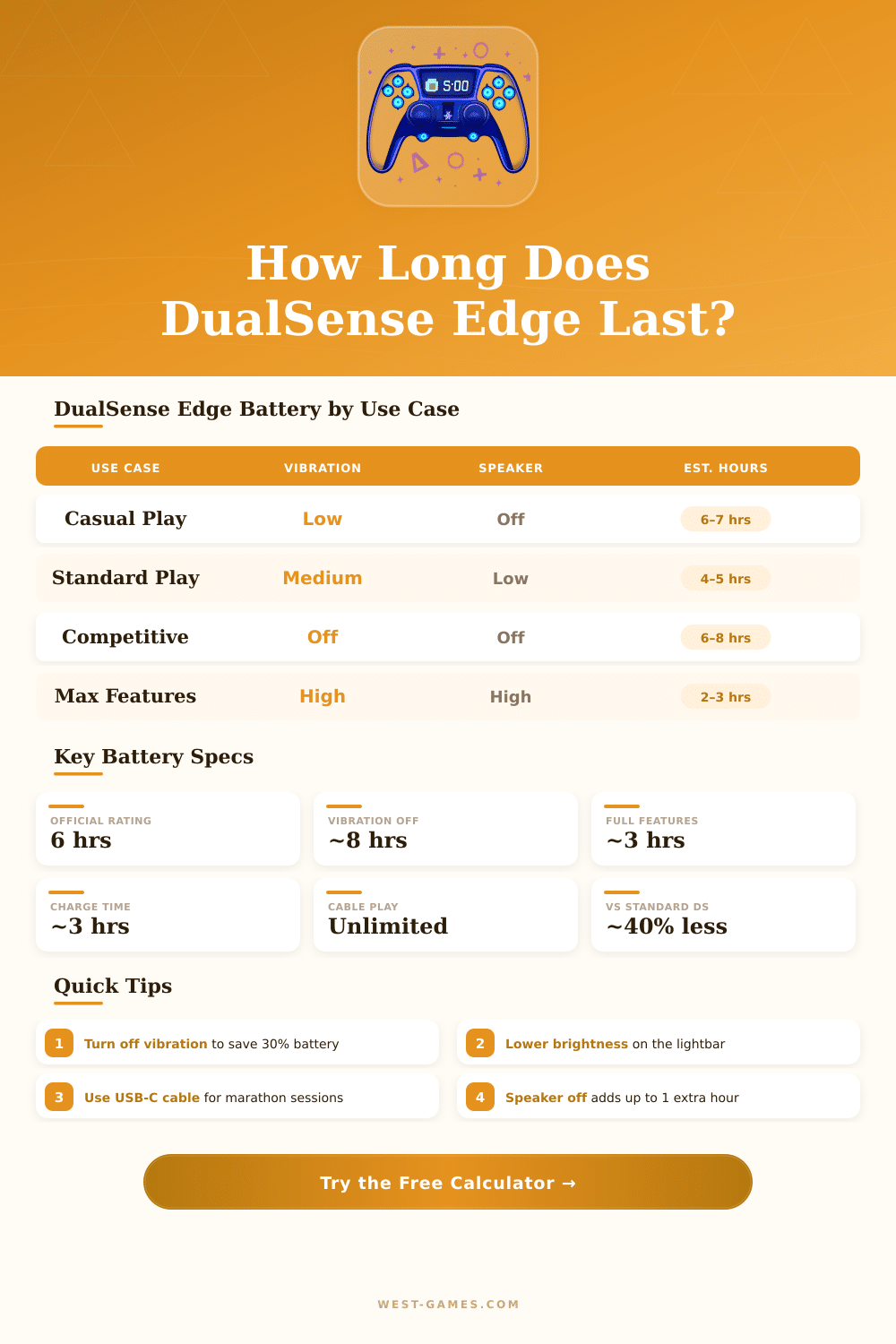
| Use Case | Haptics | Triggers | Speaker | Est. Battery Life |
|---|---|---|---|---|
| Battery Saver | Off | Off | Off | 7.5 – 8.5 hrs |
| Competitive / FPS | Off | Low | Off | 6.5 – 7.5 hrs |
| Casual / RPG | Medium | Medium | Off | 4.5 – 5.5 hrs |
| Standard Play | Medium | Medium | Low | 4.0 – 5.0 hrs |
| Sports / Racing | High | High | Off | 3.5 – 4.5 hrs |
| All Features On | High | High | High | 2.5 – 3.5 hrs |
| Media Streaming | Off | Off | High | 5.5 – 6.5 hrs |
| Controller | Battery (mAh) | Rated Life | Real-World Avg | Rechargeable |
|---|---|---|---|---|
| DualSense Edge (PS5) | 1,560 mAh | ~6 hrs | 4 – 6 hrs | Yes (USB-C) |
| DualSense Standard (PS5) | 1,560 mAh | ~12 hrs | 8 – 12 hrs | Yes (USB-C) |
| Xbox Elite Series 2 | 1,400 mAh | ~40 hrs | 28 – 40 hrs | Yes (USB-C) |
| Xbox Wireless Controller | AA Batteries | ~40 hrs | 30 – 40 hrs | AA only |
| Nintendo Switch Pro | 1,300 mAh | ~40 hrs | 30 – 40 hrs | Yes (USB-C) |
| Daily Play (hrs) | Avg Battery Life | Charges / Week | Charges / Month |
|---|---|---|---|
| 1 hr/day | 5 hrs avg | 1.4x / week | ~6x / month |
| 2 hrs/day | 5 hrs avg | 2.8x / week | ~12x / month |
| 3 hrs/day | 5 hrs avg | 4.2x / week | ~18x / month |
| 5 hrs/day | 5 hrs avg | 7x / week | ~30x / month |
| 8+ hrs/day | 5 hrs avg | 11x / week | ~46x / month |
The DualSense Edge uses the same 1,560 mAh battery but draws more power due to its additional hardware components: the extra trigger mechanism electronics, back paddle inputs, and the customizable module system all consume additional power — adding approximately 30–40% more drain than the standard controller under similar settings.
1. Disable haptics entirely — saves up to 25% battery. 2. Turn off adaptive triggers in game settings for an extra 10–18%. 3. Set lightbar to dim or off in PS5 Accessories settings. 4. Use USB-C cable for marathon sessions — the controller charges while you play. 5. Mute the microphone when using a headset.
The DualSense Edge Controller of Sony is a wireless controller, built specially for the PS5 and designed with thoughts about players that care about performance. The main idea behind it is to help you create settings that match perfectly to your play style. Whether you struggle in high level tournaments or spend hundreds of hours in solo story this controller cares about everything you need.
If you compare it with the usual DualSense, you would quickly see that the Edge brings some great improvements. It has adjustable back paddles, changeable trigger lengths and swappable stick caps. The surface feels much more shiny and premium than the plain plastic of the standard model.
DualSense Edge: Better Control and Changeable Parts
On the touchpad shows the logo of PlayStation, together with a group of new buttons (function buttons and back buttons). That are missing in the original version.
But here the main point: the Edge weighs clearly more. We talk about 46 grams of extra weight. Although it is heavier, the balance stays so good that you almost do not feel the difference, unless you keep both controllers at the same time in the hands.
It reminds me about teh feeling of the Xbox Elite 2, that heavy, safe weight.
The biggest strength here are without doubt those swappable modules for the stick caps. Drift in the stick caps hurts almost all controllers after time, and it genuinely upsets. With the Edge, when your stick caps wear out, you just need to simply swap them with new modules.
Replacements you buy directly from PlayStation Direct. Here the sad part (and it stings a bit); the price is genuinely high. The money for one Edge together with extra module for a stick cap costs almost as much as fore new average DualSense controllers.
The usual models cost around 69.99 dollars each.
The triggers L2 and R2 have stiff click mechanisms that feel genuinely nice, especially if you play through shooter games like Call of Duty with manual shots. You get to choose curved form for each stick separately and save different profiles to switch between them. Those back buttons let you assign actions like reload or crouch.
One little detail: the touchpad has stronger pressure feeling than that in standard DualSense.
On computer, things become a bit complex. Steam Input offers big flexibility, it allows you to remap almost everything, including the back buttons, function buttons and touchpad. The problem is that developers must actively turn on support for the Edge in their games.
Without that, Steam only can copy an Xbox controller. Turning on Steam Input in the settings of a game sometimes helps. There are also programs like DS4Windows, that copy the controller in games without natural wireless support.
You can update the firmware of the controller directly through Windows.
The battery life suffers because of wireless usage with the Edge. The size of the controller stayed same as in the standard model, so fitting a bigger battery simply was not possible. Even so, the Edge is genuinely expensive and placed as a luxury product.
If you get to buy it, the quality of performance and depth of settings makes it a genuinely goodinvestment for serious players.