📷 CCTV FOV Calculator
Calculate field of view, coverage width, and recommended lens for any surveillance scenario
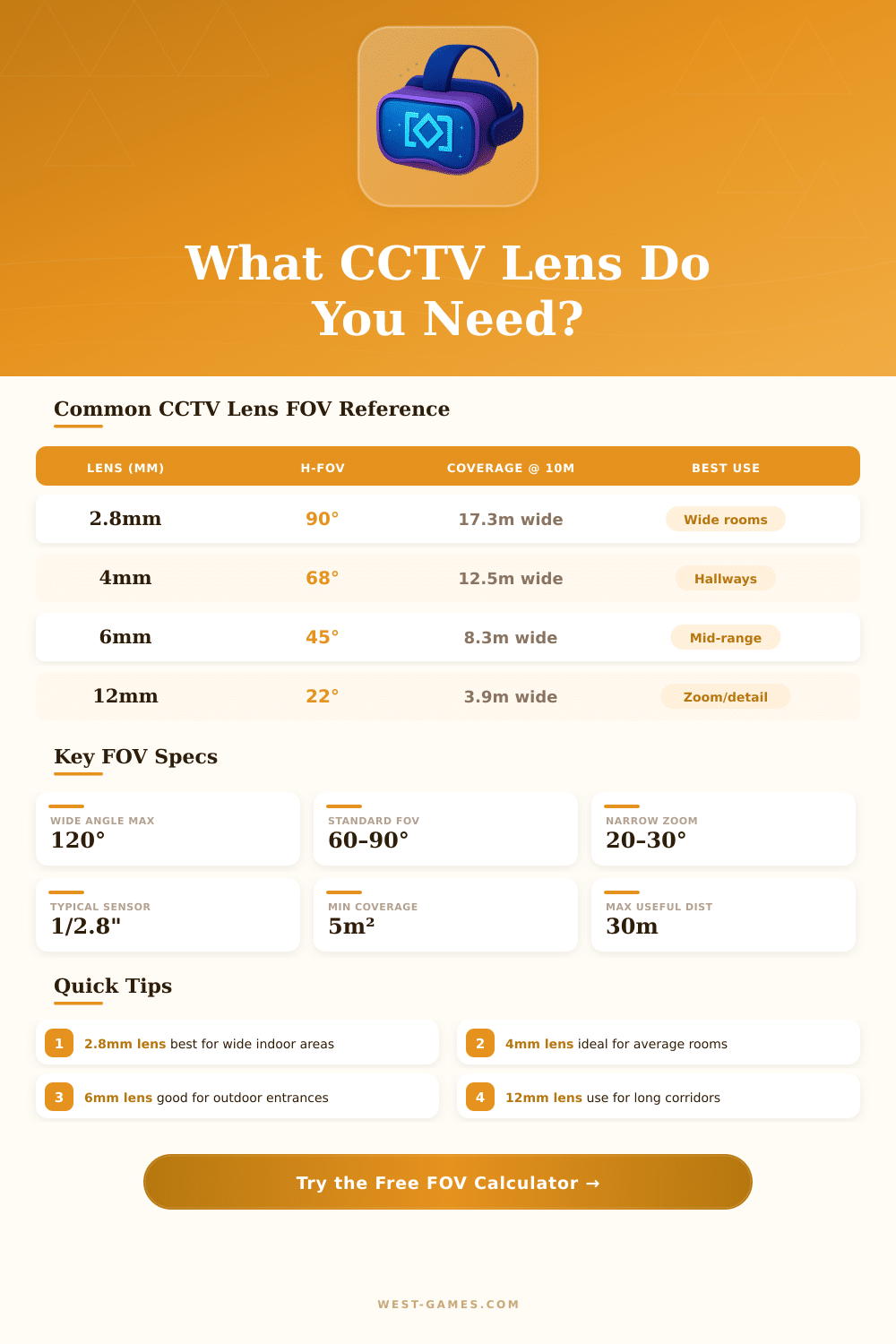
| Focal Length | H-FOV (1/2.8" sensor) | Coverage @ 5m | Coverage @ 10m | Coverage @ 20m | Best Use Case |
|---|---|---|---|---|---|
| 2.1mm | 110° | 12.8m | 25.6m | 51.2m | Very wide open spaces |
| 2.8mm | 90° | 10.0m | 20.0m | 40.0m | Indoor rooms, wide coverage |
| 3.6mm | 78° | 8.3m | 16.6m | 33.2m | Medium rooms, entrances |
| 4mm | 68° | 6.9m | 13.8m | 27.6m | Standard surveillance |
| 6mm | 45° | 4.2m | 8.3m | 16.6m | Outdoor corridors, gates |
| 8mm | 34° | 3.0m | 6.0m | 12.0m | Narrow focus, long distance |
| 12mm | 22° | 2.0m | 3.9m | 7.8m | Long corridors, license plates |
| 16mm | 17° | 1.5m | 3.0m | 6.0m | Detail capture, zoom |
| Sensor Size | Width (mm) | Height (mm) | Diagonal (mm) | Common Use |
|---|---|---|---|---|
| 1/4" | 3.20 | 2.40 | 4.00 | Budget cameras |
| 1/3.2" | 4.00 | 3.00 | 5.00 | Entry-level IP cams |
| 1/2.8" | 5.37 | 4.04 | 6.71 | Mid-range HD cameras |
| 1/2.5" | 5.76 | 4.29 | 7.18 | High-res surveillance |
| 1/2" | 6.40 | 4.80 | 8.00 | Professional cameras |
| 1/1.8" | 7.18 | 5.32 | 8.93 | High-end low light |
| Detection Level | Min Pixels/m (PPM) | Use Case | Suggested Lens |
|---|---|---|---|
| Monitor / Detect | 25 PPM | Person detected, not identified | 2.8mm – 4mm |
| Observe | 62 PPM | General activity, limited detail | 4mm – 6mm |
| Recognize | 125 PPM | Known person recognized | 6mm – 8mm |
| Identify | 250 PPM | Face clearly identified, forensic | 8mm – 12mm |
| Read Text | 500+ PPM | License plates, fine detail | 12mm+ |
FOV-calculator is a short, practical tiny tool that helps to find your best camera setup, whether you play games or do photography. The camera values determine how much of the scene really shows on your screen. It is like standing beside a window.
The more closely you get to the glass the more of the outside world you can see. A big window works the same, giving a more full overview. Here is the basic thought that stands behind the work of FOV-calculator.
Find Your Best View with the FOV Calculator
It accepts the size of your screen and the distance, how far you sit before it, then uses that info to build the right pattern.
In racing sims your fov is very important. Pros do not leave anything to luck, they play with well set camera values. A good FOV-calculator handles single-screen setups, sharp multi-screen setups and even three-monitor setups in popular racing programs.
It gives results for the horizontal fov, vertical fov and also the edge angles for three-monitor fans. Getting taht right creates the right view in the sim, which really changes a lot when dealing with speed and control on the track.
Most FOV-calculators for games need some basic data: the shape of your screen, the real size of the screen in inches and the sitting distance from it. Common shapes like 16:9, 21:9 and 32:9 are all supported. From that, the calculator makes your ideal vertical and horizontal fov based on that info.
Here is where it gets detailed… Some games work with horizontal fov, while others use vertical, and that difference really matters. A good calculator lets you switch between the two kinds, so that your settings match the needs of your game.
In games based on Source-engine, the screen shape adjusts the horizontal fov to keep the vertical fov fixed. That means that players with wider screens have a bit of advantage, if all use the same fov value. Staying at vertical fov stability has more sense, because it stays the same no matter the screen shape that you use.
Sometimes the result of the math does not feel totally right, when you really play. If the calculator points to 95 degrees, but it seems too warped, dropping it by one or too degrees can make it more natural. Go too low though, and you totally lose the feeling of speed.
When your numbers are good, the calculator gives the right sight. But in the end it is a matter of balance between the numbers and what really feels nice, especially on small screens, when you sit very far. If you go past the right fov, you start to lose the feeling of side movement.
Cameras have their own cctv calculators. Those count the fov using the focal length of the lens, the size of the sensor and possible distortions. They show you the real space of the seen object at a set distance, and the angle size.
For first-person shooters, 110-degree fov is widely seen as the best value. That view helps fast moves near your target, keepingthem sharp and focused. On smaller screens though, dropping to 100 or even 90 degrees can feel more easy.