🎯 BO7 Sensitivity Converter
Convert any game's sensitivity to Black Ops 7 — match your muscle memory instantly
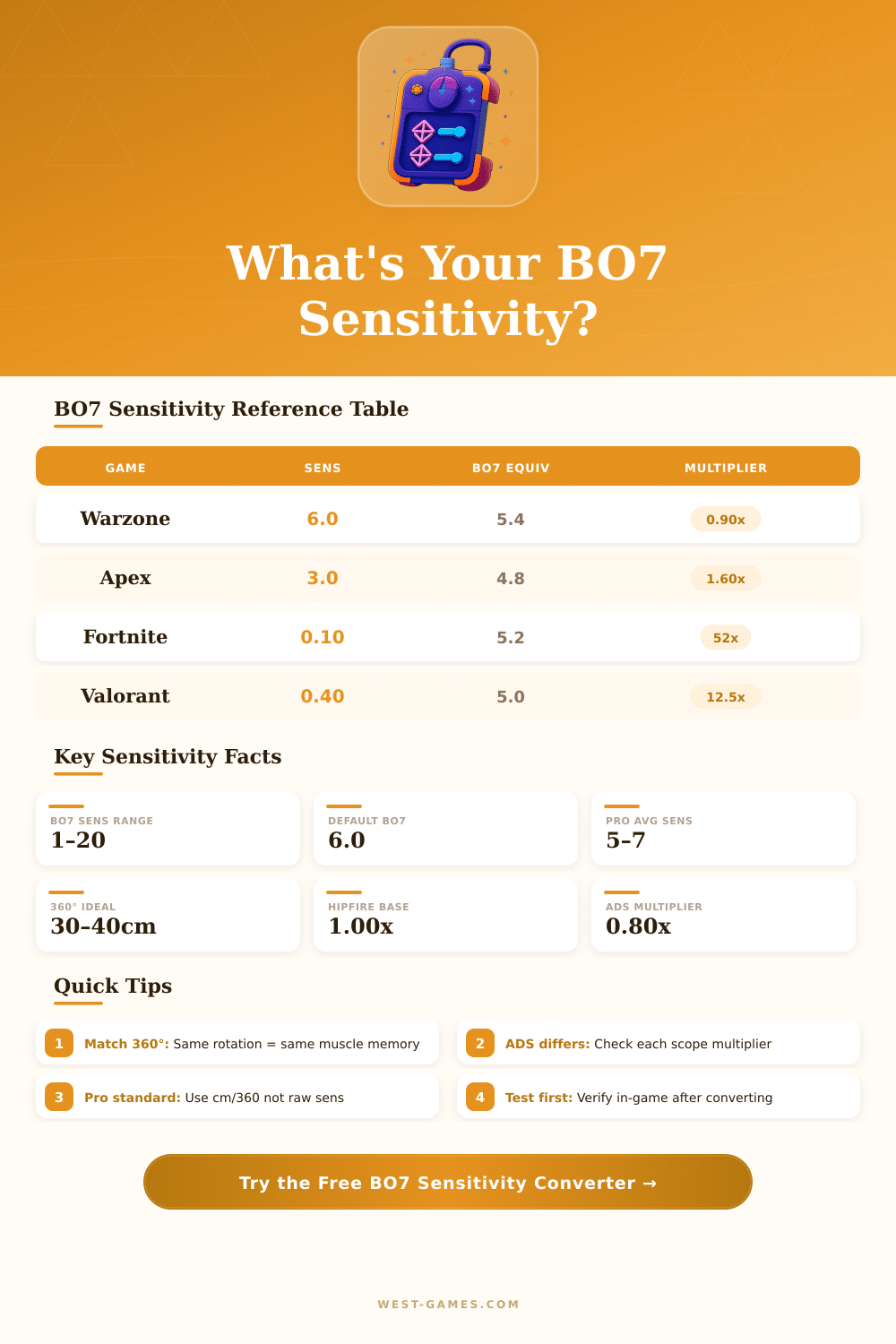
| Source Game | Multiplier to BO7 | Example Sens | BO7 Equivalent | Notes |
|---|---|---|---|---|
| Warzone / WZ2 | 0.90x | 6.0 | 5.4 | Very close match |
| Black Ops 6 | 1.00x | 6.0 | 6.0 | Same engine |
| MW2 / MW3 | 0.90x | 7.0 | 6.3 | IW engine diff |
| Apex Legends | 1.60x | 3.0 | 4.8 | Source engine |
| Fortnite | 52.0x | 0.10 | 5.2 | Unreal %, not raw |
| Valorant | 12.5x | 0.40 | 5.0 | Custom engine |
| CS2 / CSGO | 3.40x | 1.5 | 5.1 | Source engine |
| Overwatch 2 | 0.74x | 7.0 | 5.2 | OW proprietary |
| Halo Infinite | 1.67x | 3.0 | 5.0 | Slipspace engine |
| Rainbow Six | 0.167x | 30 | 5.0 | AnvilNext engine |
| Player Level | Sensitivity Range | DPI | cm/360° | ADS Style |
|---|---|---|---|---|
| Professional / CDL | 4 – 7 | 800 | 28–38cm | Relative 0.80x |
| High Ranked (Iridescent) | 5 – 8 | 800 | 25–35cm | Relative 0.80x |
| Competitive (Diamond+) | 5 – 9 | 800–1600 | 22–32cm | Relative 0.90x |
| Casual / Mid Ranked | 6 – 12 | 800–1600 | 15–28cm | Affected 1.0x |
| Controller (default) | N/A | N/A | N/A | Linear / Dynamic |
Note: This text bases on actual experience and conversations between players about Sensitivity settings in BO7.
Finding the right Sensitivity for BO7 can be a difficult task. In this game the recoil weighs a bit more than in prior titles of Call of Duty. Because of that, lower Sensitivity helps to control the recoil, while higher values are useful for escaping enemies at near distance.
How to Find the Right Sensitivity in BO7
The main task is to find balance between those two elements.
For monitors the ideal Sensitivity in BO7 is around 1.60. It provides great tracking without too much effort That level is quite fast for fights nearby, but stays calm and stable for shots from afar. Really, 1.60 marks the sweet spot for both horizontal and vertical settings, although it changes based on the player.
A great option is 1.65 for horizontal and vertical Sensitivity. Together with that, ADS Sensitivity around 1.25 works well. For zoom levels, low zoom wroks well at 1.40, 2x to 3x zoom at 1.40, 4x to 5x at 1.37 and 6x to 7x at 1.37.
Max dead zone for left-hand stick at 75 percent serves as a good starting point.
A common trouble is, that small changes to aiming at an enemy seem too fast, while tracking of near enemies feels too slow. That problem really upsets. The Sensitivity does not stay the same during the game, which makes aiming bad when settings change.
Vertical Sensitivity does not match the speed of the horizontal moves. Upward and down looking feels heavy and loaded. This is on purpose for slowing the game in vertical direction.
On mouse, however, this feeling commonly feels “floaty.”
Talking about mouse, ADS Sensitivity in BO7 does not match one-for-one with hip-fire. Hip-fire and ADS have separate Sensitivity levels, unlike sum other shooters. ADS works as a percent setting, so changes in DPI or basic Sensitivity do not need separate fixing of ADS.
Even so, mouse aiming widely does not work well in BO7 right now.
About response curves, dynamic at 90 percent only brings it to 10 percent closer to the standard curve, so staying at 100 percent is wiser. Both the standard and linear curves benefit from low scaling, because they grow in Sensitivity at low values. Dynamic does the reverse and drops in Sensitivity when the curve scale goes down.
From BO6 one can bring over important settings, but 1.6 Sensitivity in BO7 feels a bit more slow than the same value in BO6. It adds smoothness to the moves even so, and the aim assist seems different, which is a real improvement. Best settings include also FOV, type of aim assist and response curves for more precise and steady play.
Reverse flashbang is useful for those, that are sensitive to sudden lights. Dead zones and wall jump help, and one can change them based on own taste and kind of monitor. While adjusting Sensitivity, some players try fast weapon progress bymeans of camos for early unlocking more useful weapons.